From Newsgroup: alt.comp.os.windows-11
Maria Sophia wrote:
Normally I install extensions from a saved copy on my Windows archives.
But Epic doesn't have the normal Chromium-based browser "Developer mode" on/off switch anywhere (so you can't run the normal "Load unpacked").
Just FYI, I've been testing all the free no-registration VPN extensions.
<
https://i.postimg.cc/FzY9YkfX/vpn-extension.jpg>
There is deeply detailed information about browser extensions below, which
I get it most people's eyes will glaze over, but it's useful for power
users to know how to EFFICIENTLY test a score of VPN extensions at once.
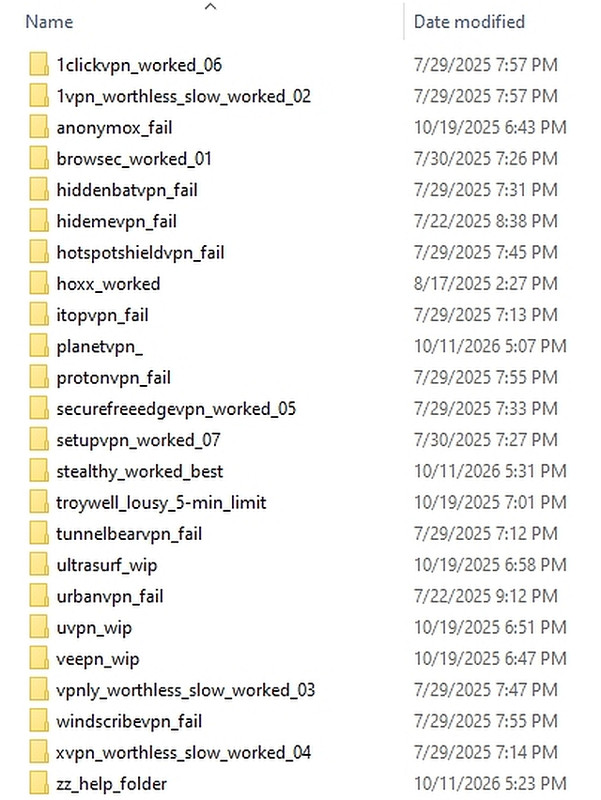
Specifically for Chromium-based browsers, I've tested 1clickvpn, 1vpn, anonymox, browsec, hiddenbatvpn, hidemevpn, hotspotshieldvpn, hoxx,
itopvpn, planetvpn, protonvpn, securefreeedgevpn, setupvpn, stealthy,
troywell, tunnelbearvpn, ultrasurf, urbanvpn, uvpn, veepn, vpnly, windscribevpn, xvpn, etc, and only about half of them were faithful to
their advertising that they're free and no-registration, and of those, only
a few were close to usable enough (e.g., w/o time limits or speed limits).
Since I tested them on a variety of browsers, I needed an extension archive that I could easily load and unload, which is why I use "Load unpacked".
which tells a Chromium-based web browser to run an extension directly from
a normal folder on the PC, rather than installing it from an extension
store. "Unpacked" means the extension files are already extracted, where
the browser reads the extension's manifest.json file in the archive folder.
Note loading an extension from the archive folder does not create an independent installed copy. All of the browsers continues using the one selected archive folder (as we always set up our PCs for efficiency).
1clickvpn_worked_06\pphgdbgldlmicfdkhondlafkiomnelnk
1vpn_worthless_slow_worked_02\akcocjjpkmlniicdeemdceeajlmoabhg
anonymox_fail\icpklikeghomkemdellmmkoifgfbakio
browsec_worked_01\omghfjlpggmjjaagoclmmobgdodcjboh
hiddenbatvpn_fail\bbmdbddokjkdlcicblahoeofpjkbeneo
hidemevpn_fail\ohjocgmpmlfahafbipehkhbaacoemojp
hoxx_worked\nbcojefnccbanplpoffopkoepjmhgdgh
itopvpn_fail\imikkmafgbjjghjeelijedabggogfdgo
planetvpn_\hipncndjamdcmphkgngojegjblibadbe
protonvpn_fail\jplgfhpmjnbigmhklmmbgecoobifkmpa
securefreeedgevpn_worked_05\mikenegoldghfdcmpchhobaabgkaikdj
setupvpn_worked_07\oofgbpoabipfcfjapgnbbjjaenockbdp
stealthy_worked_best\ieaebnkibonmpbhdaanjkmedikadnoje
troywell_lousy_5-min_limit\adlpodnneegcnbophopdmhedicjbcgco
tunnelbearvpn_fail\omdakjcmkglenbhjadbccaookpfjihpa
ultrasurf_wip\mjnbclmflcpookeapghfhapeffmpodij
urbanvpn_fail\eppiocemhmnlbhjplcgkofciiegomcon
uvpn_wip\jaoafpkngncfpfggjefnekilbkcpjdgp
veepn_wip\majdfhpaihoncoakbjgbdhglocklcgno
vpnly_worthless_slow_worked_03\lneaocagcijjdpkcabeanfpdbmapcjjg
windscribevpn_fail\hnmpcagpplmpfojmgmnngilcnanddlhb
xvpn_worthless_slow_worked_04\flaeifplnkmoagonpbjmedjcadegiigl
For those who don't know how the normal "Load unpacked" mechanism works,
for Chromium-based browsers (e.g., Chromium, Ungoogled Chromium, UR, Iron, Iridium, Dragon, DuckDuckGo, AvastSecureBrowser, Google Chrome, Microsoft
Edge, Brave, Opera, Aloha, Vivaldi, etc.), you go to the extensions URI
Chrome: chrome://extensions
Edge: edge://extensions
Brave: brave://extensions
Opera: opera://extensions
Vivaldi: vivaldi://extensions
etc.
And then you turn on "Developer mode" and then tap "Load unpacked".
You point the GUI to the numeric folder *below* the extension-ID folder.
For example,
C:\archive\extension\browsec\omghfjlpggmjjaagoclmmobgdodcjboh\3.92.2_0
C:\archive\extension\stealthy\ieaebnkibonmpbhdaanjkmedikadnoje\6.3.6_0
C:\archive\extension\setupvpn\oofgbpoabipfcfjapgnbbjjaenockbdp\4.0.9_0
etc.
Note: Technically, it's not the numeric folder that matters, but the
manifest.json file, which, in my experience, is always below it.
<
https://developer.chrome.com/docs/extensions/get-started/tutorial/hello-world>
The advantages of this philosophical strategic approach to extensions are
a. You only need to preserve one copy of each extension
b. It is shockingly easy to install and uninstall extensions at will
c. The extensions keep working even if they're no longer in the store
Some disadvantages of this well-honed method exist though, such as
a. You can't move your archive (as all browsers use the same code)
b. It doesn't update so you have to manage updates (which is fine by me)
c. You have to keep developer mode always on (which is fine by me)
And, of course, as in the case of Epic Privacy Browser, you have to
have the "developer mode" switch in the first place, but most have it.
As always, if you have a more efficient test jig, let all of us know.
--
On Usenet, we teach what we know and learn from others what we don't.
--- Synchronet 3.21d-Linux NewsLink 1.2