• Microsoft: October Windows update may break Smart App Control

    From CrudeSausage@crude@sausa.ge to comp.sys.mac.advocacy,alt.comp.os.windows-11 on Fri Oct 16 07:59:26 2026
    From Newsgroup: alt.comp.os.windows-11

    Microsoft's new update may break that thing you never wanted which
    barely works and often prevents the software you need from opening up.

    <https://www.bleepingcomputer.com/news/microsoft/kb5127648-windows-security-update-may-break-smart-app-control/>

    <https://shorturl.at/3Hgbe>

    Microsoft says some users may have trouble turning on Smart App Control
    after installing this month's KB5127648 Windows 11 security update.

    Smart App Control is a Windows 11 security feature that uses Microsoft's
    app intelligence services and code integrity features and works
    alongside Microsoft Defender and SmartScreen to block potentially
    harmful apps or binaries.

    According to the company, on affected devices running Windows 11,
    version 24H2 and later, the Smart App Control option is grayed out and
    cannot be toggled.

    "After installing this update, some devices might be unable to turn on
    Smart App Control in the Windows Security app if it has been turned off.
    On affected devices, the option to turn on Smart App Control might be
    grayed out," Microsoft said in an update to the KB5127648 advisory.

    "Devices where Smart App Control is already turned on are not affected
    and remain protected."

    While a fix isn't available yet, Microsoft shared temporary workarounds
    to help IT administrators mitigate the issue on enterprise-managed
    devices by modifying the registry or installing a group policy.

    To restore the ability to turn on Smart App Control on affected Windows
    11 devices by editing the registry, you have to follow these steps:

    Open a Command Prompt window by typing cmd in the Search box.

    Select Run as Administrator.

    At the command prompt, enter the following commands and then restart the device:

    reg add "HKLM\SYSTEM\CurrentControlSet\Policies\Microsoft\FeatureManagement\Overrides" /v 2883193997 /t REG_DWORD /d 1 /f

    reg add "HKLM\SYSTEM\CurrentControlSet\Policies\Microsoft\FeatureManagement\Overrides" /v 2850574478 /t REG_DWORD /d 1 /f
    IT admins can also work around the issue by installing and configuring
    the two Group Policies below to turn on Smart App Control and ensure
    that logging is enabled for troubleshooting:

    Windows 11, versions 24H2, 25H2, and 26H2 - KB5074105 261015_19222
    Feature Preview
    Windows 11, versions 24H2, 25H2, and 26H2 - KB5074105 261015_19221
    Feature Preview
    The two Group Policies can be found under Computer Configuration > Administrative Templates > {Group Policy name} > Windows 11, version
    24H2, 25H2.

    After installing them, admins must set both settings to Enabled and
    restart the affected device(s) to apply the Group Policy settings.

    This week, Microsoft also confirmed that recent Windows updates cause
    Remote Desktop failures for non-admin users if the "Administrator
    protection" security feature is enabled, and resolved another known
    issue that triggered Always On VPN connection problems after installing
    the September 2026 security updates.

    On Tuesday, it also addressed a bug that was causing black screens,
    desktop loading issues, and Explorer crashes after installing Windows 11 updates released since August.
    --
    CrudeSausage
    MacBook Air M4
    iPhone 13
    Friendly Apple zealot

    --- Synchronet 3.21d-Linux NewsLink 1.2
  • From Paul@nospam@needed.invalid to comp.sys.mac.advocacy,alt.comp.os.windows-11 on Fri Oct 16 09:30:03 2026
    From Newsgroup: alt.comp.os.windows-11

    On Fri, 10/16/2026 7:59 AM, CrudeSausage wrote:
    Microsoft's new update may break that thing you never wanted which barely works and often prevents the software you need from opening up.

    <https://www.bleepingcomputer.com/news/microsoft/kb5127648-windows-security-update-may-break-smart-app-control/>

    <https://shorturl.at/3Hgbe>

    Microsoft says some users may have trouble turning on Smart App Control after installing this month's KB5127648 Windows 11 security update.

    Smart App Control is a Windows 11 security feature that uses Microsoft's app intelligence services and code integrity features and works alongside Microsoft Defender and SmartScreen to block potentially harmful apps or binaries.

    According to the company, on affected devices running Windows 11, version 24H2 and later, the Smart App Control option is grayed out and cannot be toggled.


    https://support.microsoft.com/en-us/windows/security/threat-malware-protection/smart-app-control-frequently-asked-questions

    "Can I turn Smart App Control on manually?

    Yes, if it's available for your device, you are able to turn on Smart App Control
    in the Windows Security App settings. Recent Windows updates allow
    Smart App Control to be enabled without requiring a clean installation. <=== Note:
    "

    "Why is Smart App Control turned off?

    There are multiple reasons why Smart App Control could be turned off, for example:

    - Your device is enterprise-managed or developer-mode has been configured.
    - It was turned off manually by you or another user signed into your machine.
    - Your device is running Windows in S mode. You'll need to turn S mode off, then reset your PC.
    - You have optional diagnostic data in Windows turned off. If you want to turn
    Smart App Control on, you'll need to reset this PC, or reinstall Windows,
    and select Send optional diagnostic data during the setup process. <=== Note:

    Recent Windows updates allow Smart App Control to be enabled
    within the Windows Security App without requiring a clean installation.
    "

    That is a "hint" that previously (like a couple months ago), this feature could *only*
    be turned on, right after an installation of the OS. It was not allowed to be switched on some time later. You had to do it "right away".

    A regression to the old behavior, is not such a surprise,
    when you know what the previous constraint was.

    Previously, most of the time, the control was greyed out.

    Does it need an MSA ? Dunno.

    Paul


    --- Synchronet 3.21d-Linux NewsLink 1.2
  • From CrudeSausage@crude@sausa.ge to comp.sys.mac.advocacy,alt.comp.os.windows-11 on Fri Oct 16 11:17:52 2026
    From Newsgroup: alt.comp.os.windows-11

    On 2026-10-16 9:30 a.m., Paul wrote:
    On Fri, 10/16/2026 7:59 AM, CrudeSausage wrote:
    Microsoft's new update may break that thing you never wanted which barely works and often prevents the software you need from opening up.

    <https://www.bleepingcomputer.com/news/microsoft/kb5127648-windows-security-update-may-break-smart-app-control/>

    <https://shorturl.at/3Hgbe>

    Microsoft says some users may have trouble turning on Smart App Control after installing this month's KB5127648 Windows 11 security update.

    Smart App Control is a Windows 11 security feature that uses Microsoft's app intelligence services and code integrity features and works alongside Microsoft Defender and SmartScreen to block potentially harmful apps or binaries.

    According to the company, on affected devices running Windows 11, version 24H2 and later, the Smart App Control option is grayed out and cannot be toggled.


    https://support.microsoft.com/en-us/windows/security/threat-malware-protection/smart-app-control-frequently-asked-questions

    "Can I turn Smart App Control on manually?

    Yes, if it's available for your device, you are able to turn on Smart App Control
    in the Windows Security App settings. Recent Windows updates allow
    Smart App Control to be enabled without requiring a clean installation. <=== Note:
    "

    "Why is Smart App Control turned off?

    There are multiple reasons why Smart App Control could be turned off, for example:

    - Your device is enterprise-managed or developer-mode has been configured.
    - It was turned off manually by you or another user signed into your machine.
    - Your device is running Windows in S mode. You'll need to turn S mode off, then reset your PC.
    - You have optional diagnostic data in Windows turned off. If you want to turn
    Smart App Control on, you'll need to reset this PC, or reinstall Windows,
    and select Send optional diagnostic data during the setup process. <=== Note:

    Recent Windows updates allow Smart App Control to be enabled
    within the Windows Security App without requiring a clean installation.
    "

    That is a "hint" that previously (like a couple months ago), this feature could *only*
    be turned on, right after an installation of the OS. It was not allowed to be switched on some time later. You had to do it "right away".

    A regression to the old behavior, is not such a surprise,
    when you know what the previous constraint was.

    Previously, most of the time, the control was greyed out.

    Does it need an MSA ? Dunno.

    On clean installs, the feature is enabled but in Evaluation Mode. Once
    it is fully turned on, applications routinely get blocked from running properly. It's not entirely different on the Mac nowadays. By default,
    Apple blocks anything that isn't signed, but you can remove applications
    from a blacklist manually.
    --
    CrudeSausage
    MacBook Air M4 Sky Blue
    iPhone 13
    Friendly Apple zealot
    --- Synchronet 3.21d-Linux NewsLink 1.2
  • From ....winston@winstonmvp@gmail.com to comp.sys.mac.advocacy,alt.comp.os.windows-11 on Fri Oct 16 11:23:53 2026
    From Newsgroup: alt.comp.os.windows-11

    On 10/16/2026 9:30 AM, Paul wrote:
    On Fri, 10/16/2026 7:59 AM, CrudeSausage wrote:
    Microsoft's new update may break that thing you never wanted which barely works and often prevents the software you need from opening up.

    <https://www.bleepingcomputer.com/news/microsoft/kb5127648-windows-security-update-may-break-smart-app-control/>

    <https://shorturl.at/3Hgbe>

    Microsoft says some users may have trouble turning on Smart App Control after installing this month's KB5127648 Windows 11 security update.

    Smart App Control is a Windows 11 security feature that uses Microsoft's app intelligence services and code integrity features and works alongside Microsoft Defender and SmartScreen to block potentially harmful apps or binaries.

    According to the company, on affected devices running Windows 11, version 24H2 and later, the Smart App Control option is grayed out and cannot be toggled.


    https://support.microsoft.com/en-us/windows/security/threat-malware-protection/smart-app-control-frequently-asked-questions

    "Can I turn Smart App Control on manually?

    Yes, if it's available for your device, you are able to turn on Smart App Control
    in the Windows Security App settings. Recent Windows updates allow
    Smart App Control to be enabled without requiring a clean installation. <=== Note:
    "

    "Why is Smart App Control turned off?

    There are multiple reasons why Smart App Control could be turned off, for example:

    - Your device is enterprise-managed or developer-mode has been configured.
    - It was turned off manually by you or another user signed into your machine.
    - Your device is running Windows in S mode. You'll need to turn S mode off, then reset your PC.
    - You have optional diagnostic data in Windows turned off. If you want to turn
    Smart App Control on, you'll need to reset this PC, or reinstall Windows,
    and select Send optional diagnostic data during the setup process. <=== Note:

    Recent Windows updates allow Smart App Control to be enabled
    within the Windows Security App without requiring a clean installation.
    "

    That is a "hint" that previously (like a couple months ago), this feature could *only*
    be turned on, right after an installation of the OS. It was not allowed to be switched on some time later. You had to do it "right away".

    A regression to the old behavior, is not such a surprise,
    when you know what the previous constraint was.

    Previously, most of the time, the control was greyed out.

    Does it need an MSA ? Dunno.

    Paul


    Known issue. A Microsoft WI was issued.
    "You might be unable to turn on Smart App Control after a Windows update"

    Workarounds available - Registry key import and also Microsoft GPO downloads

    :) MSA is not required
    --
    ...w¡ñ§±¤ñ
    --- Synchronet 3.21d-Linux NewsLink 1.2
  • From Sausage Rolls@rolls@invalid.invalid to alt.comp.os.windows-11 on Sat Oct 17 21:26:19 2026
    From Newsgroup: alt.comp.os.windows-11

    On 16/10/2026 12:59, CrudeSausage wrote:
    Microsoft's new update may break that thing you never wanted which
    barely works and often prevents the software you need from opening up.

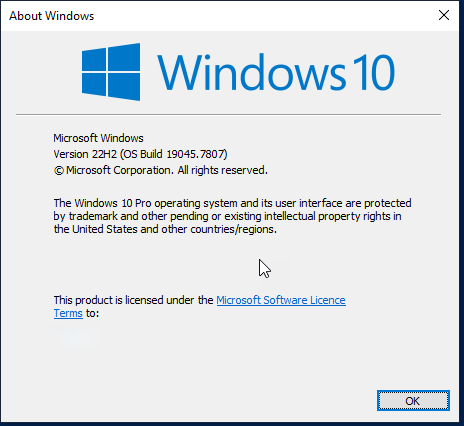
    Some of us are still using this:

    https://postimg.cc/7fWVt8FB https://i.postimg.cc/bwzBJq3j/2026-10-17-20-49-26-b.png

    so it is impossible to prove or disprove your assertions.


    --- Synchronet 3.21d-Linux NewsLink 1.2