From Newsgroup: alt.comp.os.windows-11
The basic symptom is:
Running system gives "black screen"
HID devices are disabled. Plugging in a new HID device, it is ignored on purpose.
With no keyboard, you cannot ctrl-alt-delete or any other input value.
NIC is disabled, LEDs go off on it.
USB ports *do* have power, but some detection constraint prevents usage.
In the past, no EventVwr.msc log entry, was available. But some
things can be logged, like Watchdogs can be logged.
At one point, while working on it, it became SO BAD, I couldn't even type in the PIN before the computer black screened. It was not inclined in that case, to wait 60 seconds before dropping. Previously it would only do these about once a week. There could be periods where it stopped happening entirely,
but it's been a dumpster fire recently. If I log in with my second profile,
it is all "sweetness and light" and the frequency of the event and the predictability are a lot lower.
Memtest passes. I ran it earlier today. Linux operates on this computer, without a problem. Hmmm.
*******
That's not the same as this. The video card has a watchdog, and the video card driver is supposed to have a recovery procedure. It takes a second or so
for a card to recover, normally. Microsoft has improved the behavior on some
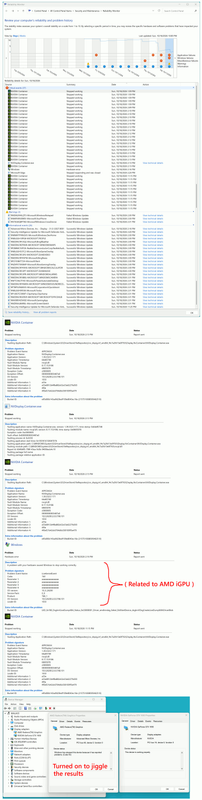
of these, such that you can only see them happening via using the Reliability Monitor.
The suspicion is, these are not necessarily turning off the monitor.
C:\ProgramData\NVIDIA\NVDisplayContainerWatchdog.log
#0(I)[2026-10-19 03:15:47,473]{00000FC8}<NvpChildProcess> Container 00000000000009BC for C:\WINDOWS\System32\DriverStore\FileRepository\nv_dispig.inf_amd64_f4c7a2fd13e0f763\Display.NvContainer\plugins\Session exited with C0000005
#1(D)[2026-10-19 03:15:47,473]{00000FC8}<DirectoryEnumera> Process file C:\WINDOWS\System32\DriverStore\FileRepository\nv_dispig.inf_amd64_f4c7a2fd13e0f763\Display.NvContainer\plugins\Session/nvprofileupdaterplugin.dll
#2(D)[2026-10-19 03:15:47,473]{00000FC8}<DirectoryEnumera> OnItem returned FALSE for file C:\WINDOWS\System32\DriverStore\FileRepository\nv_dispig.inf_amd64_f4c7a2fd13e0f763\Display.NvContainer\plugins\Session/nvprofileupdaterplugin.dll
#3(I)[2026-10-19 03:15:47,473]{00000FC8}<NvpChildProcess> Container in session 2 new crash count 5
#4(E)[2026-10-19 03:15:47,473]{00000FC8}<NvpChildProcess> Container in session 2 crash rate 0.000479 exceeded maximum 0.000033. Count 5. Disable it
#5(E)[2026-10-19 03:15:47,473]{00000FC8}<NvpChildProcess> Container for C:\WINDOWS\System32\DriverStore\FileRepository\nv_dispig.inf_amd64_f4c7a2fd13e0f763\Display.NvContainer\plugins\Session will not be restarted due to policy 10/300
#6(D)[2026-10-19 03:15:47,473]{00000FC8}<DirectoryEnumera> Process file C:\WINDOWS\System32\DriverStore\FileRepository\nv_dispig.inf_amd64_f4c7a2fd13e0f763\Display.NvContainer\plugins\Session/nvprofileupdaterplugin.dll
#7(D)[2026-10-19 03:15:47,473]{00000FC8}<DirectoryEnumera> OnItem returned FALSE for file C:\WINDOWS\System32\DriverStore\FileRepository\nv_dispig.inf_amd64_f4c7a2fd13e0f763\Display.NvContainer\plugins\Session/nvprofileupdaterplugin.dll
#8(D)[2026-10-19 03:15:47,473]{00000FC8}<NvpChildGroup> Group => #9(D)[2026-10-19 03:15:47,473]{00000FC8}<NvpChildGroup> Folder: C:\WINDOWS\System32\DriverStore\FileRepository\nv_dispig.inf_amd64_f4c7a2fd13e0f763\Display.NvContainer\plugins\Session
#0(D)[2026-10-19 03:15:47,473]{00000FC8}<NvpChildGroup> Container: elevated - C:\WINDOWS\System32\DriverStore\FileRepository\nv_dispig.inf_amd64_f4c7a2fd13e0f763\Display.NvContainer\NVDisplay.Container.exe
#1(D)[2026-10-19 03:15:47,473]{00000FC8}<NvpChildGroup> Parameters: -f %ProgramData%\NVIDIA\DisplaySessionContainer%d.log -d C:\WINDOWS\System32\DriverStore\FileRepository\nv_dispig.inf_amd64_f4c7a2fd13e0f763\Display.NvContainer\plugins\Session -r -l 3 -p 30000 -cfg NVDisplay.ContainerLocalSystem\Session /ert
#2(D)[2026-10-19 03:15:47,473]{00000FC8}<NvpChildGroup> Processes => #3(D)[2026-10-19 03:15:47,473]{00000FC8}<NvpChildProcess> Session 1, process 0000000000000000
#4(D)[2026-10-19 03:15:47,473]{00000FC8}<NvpChildProcess> Session 2, process 0000000000000000
#5(D)[2026-10-19 03:15:47,473]{00000FC8}<NvpWatchdog> Wait for 3 handles. Timeout = 4294967295
Apparently, the kernel also has some detections. This might not be
making the screen go black, as this iGPU is not driving the screen,
and I only turned it on to "fuzz the problem" and try to make it
so the stupid PC would continue to run.
Problem
Hardware error
Description
A problem with your hardware caused Windows to stop working correctly.
Problem signature
Problem Event Name: LiveKernelEvent
Code: 1b0
Parameter 1: aaaaaaaaaaaaaaaa
Parameter 2: aaaaaaaaaaaaaaaa
Parameter 3: aaaaaaaaaaaaaaaa
Parameter 4: aaaaaaaaaaaaaaaa
OS version: 10_0_26200
Service Pack: 0_0
Product: 768_1
OS Version: 10.0.26200.2.0.0.768.101
Locale ID: 1033
Extra information about the problem
Bucket ID: LKD_0x1B0_DxgkrlLiveDump:804_Status_0xC0000001_Driver_amdkmdag_failed_DdiStartDevice_dxgkrnl!DxgCreateLiveDumpWithDriverBlob
Date Sun, 10/18/2026 2:16 PM
*******
One of the problems with Windows 11, is not all the "installed software"
has convenient entries related to "uninstall". There is NVidia software
on the machine, there is NVidia telemetry (telemetry is an OPTIONAL behavior, and is not essential to the driver staying upright). The telemetry module
seems to be implicated. NVDisplayContainer seems to be part of that
telemetry thing. There were also four entries in Task Schedule, which
cause the NVidia "package" to go after telemetry. Those were discovered
years ago in Scheduled Tasks. They are unlikely to be disabled on this machine, but I disabled them one time on Win10 or so.
If I wanted to remove the Telemetry package NVDisplayContainer. that's
going to be a challenge (Revo Uninstaller?). The actual driver is a hard-working Ring0 kind of thing. The NVDisplayContainer and its "nvcpl.dll" seem separate from it. Because it's generating a logfile, it could be in Ring3,
or if virtualized, maybe in Ring2.
*******
I turned on the iGPU originally, just to see if it alone would work.
It appears the NVDisplay.Container.exe might still be running.
I put the GTX 1650 back in, and the box is now staying up while my
regular account (MSA) is the one being used. This should return me
to the "random" rate of droppage, rather than dying in 60 seconds or less.
A tool like DDU ("Driver Cleaner") might not be enough for this, as NVDisplay.Container is a separate item. People claim to have run it,
without symptoms improvement, suggesting it is not a "general system carwash". That's one reason I haven't used it, so far. No modern claims of it
performing a miracle. That program may have been referred to as
"Detonator Destroyer" in an earlier time (I had used it and it worked then).
If the NVDisplay.Container does not have an App entry, nor a Programs and Features
entry, then maybe it will have to be located via the .msi cache. Maybe I
need to get Revo Uninstaller involved ??? Of course, the next time the oh-so-fine Windows Update gets in there, it's going to put that garbage
right back there.
[Picture] Black-screen-breadcrumbs.png
https://imgur.com/a/ooJPBtt
https://postimg.cc/21zz64P9
https://i.postimg.cc/W1Zt58SV/Black-screen-breadcrumbs.png
Paul
--- Synchronet 3.21d-Linux NewsLink 1.2