Oopsy daisy...(No description of what the link points to, so made unclickable by
https:// imgur. com/ a/ N1b66u6
Dennis <nobody@nowhere.invalid> wrote:
Oopsy daisy...(No description of what the link points to, so made unclickable by
https://imgur.com/a/N1b66u6
adding spaces.)
Not visiting a non-described image link. You took the time to post, but
not to provide context.
*From:* VanguardLH <V@nguard.LH>
*Date:* Sat, 16 May 2026 12:46:26 -0500
Dennis <nobody@nowhere.invalid> wrote:
Oopsy daisy...
https:// imgur. com/ a/ N1b66u6(No description of what the link points to, so made unclickable by
adding spaces.)
Not visiting a non-described image link. You took the time to
post, but not to provide context.
On 2026-05-16 19:46, VanguardLH wrote:
Dennis <nobody@nowhere.invalid> wrote:
Oopsy daisy...(No description of what the link points to, so made unclickable by
https://imgur.com/a/N1b66u6
adding spaces.)
Not visiting a non-described image link. You took the time to post, but not to provide context.
The link is safe and is funny. Explaining the contents (it is just a
photo) would spoil the fun.
It is also a bug somewhere.
Carlos E.R. <robin_listas@es.invalid> wrote:
On 2026-05-16 19:46, VanguardLH wrote:
Dennis <nobody@nowhere.invalid> wrote:
Oopsy daisy...(No description of what the link points to, so made unclickable by
https://imgur.com/a/N1b66u6
adding spaces.)
Not visiting a non-described image link. You took the time to post, but >>> not to provide context.
The link is safe and is funny. Explaining the contents (it is just a
photo) would spoil the fun.
It is also a bug somewhere.
It would be more funny/interesting if the screenshot made clear
*which* screen/utility/<whatever> contains this tidbit.
On 2026-05-16 20:48, Frank Slootweg wrote:
Carlos E.R. <robin_listas@es.invalid> wrote:
On 2026-05-16 19:46, VanguardLH wrote:
Dennis <nobody@nowhere.invalid> wrote:
Oopsy daisy...(No description of what the link points to, so made unclickable by
https://imgur.com/a/N1b66u6
adding spaces.)
Not visiting a non-described image link. You took the time to post, but >>>> not to provide context.
The link is safe and is funny. Explaining the contents (it is just a
photo) would spoil the fun.
It is also a bug somewhere.
It would be more funny/interesting if the screenshot made clear
*which* screen/utility/<whatever> contains this tidbit.
Sure. We can ask that after the initial post.
In article <1g2hors7fw6kl.dlg@v.nguard.lh>, V@nguard.LH (VanguardLH) wrote:
*From:* VanguardLH <V@nguard.LH>imgur.com isn't available in the UK anyway so it doesn't matter to us! :^)
*Date:* Sat, 16 May 2026 12:46:26 -0500
Dennis <nobody@nowhere.invalid> wrote:
Oopsy daisy...(No description of what the link points to, so made unclickable by
https:// imgur. com/ a/ N1b66u6
adding spaces.)
Not visiting a non-described image link. You took the time to
post, but not to provide context.
On 17/05/2026 4:02 am, John K.Eason wrote:
In article <1g2hors7fw6kl.dlg@v.nguard.lh>, V@nguard.LH (VanguardLH) wrote: >>> *From:* VanguardLH <V@nguard.LH>Clicking that link got me a blank, black, screen .... so, maybe, not available in Aust, either. .... or do I need another add-on-thingee.
*Date:* Sat, 16 May 2026 12:46:26 -0500imgur.com isn't available in the UK anyway so it doesn't matter to us! :^) >>
Dennis <nobody@nowhere.invalid> wrote:
Oopsy daisy...(No description of what the link points to, so made unclickable by
https:// imgur. com/ a/ N1b66u6
adding spaces.)
Not visiting a non-described image link. You took the time to
post, but not to provide context.
Clicking that link got me a blank,
On Sun, 5/17/2026 6:11 AM, Daniel70 wrote:
On 17/05/2026 4:02 am, John K.Eason wrote:
In article <1g2hors7fw6kl.dlg@v.nguard.lh>, V@nguard.LH (VanguardLH) wrote: >>>> *From:* VanguardLH <V@nguard.LH>Clicking that link got me a blank, black, screen .... so, maybe, not available in Aust, either. .... or do I need another add-on-thingee.
*Date:* Sat, 16 May 2026 12:46:26 -0500imgur.com isn't available in the UK anyway so it doesn't matter to us! :^) >>>
Dennis <nobody@nowhere.invalid> wrote:
Oopsy daisy...(No description of what the link points to, so made unclickable by
https:// imgur. com/ a/ N1b66u6
adding spaces.)
Not visiting a non-described image link. You took the time to
post, but not to provide context.
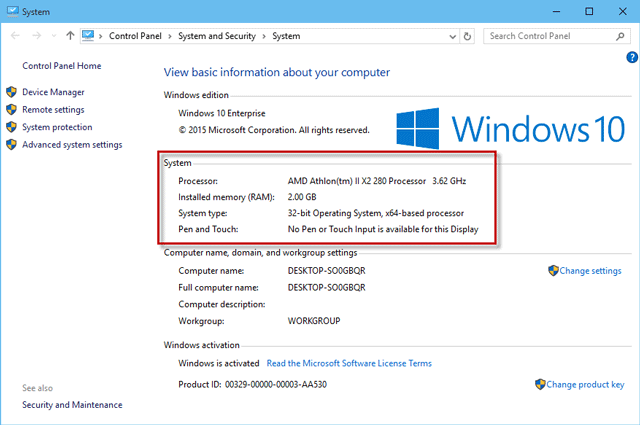
You have to put on your sunglasses.
<https://imgur.com/a/N1b66u6>
That interface is how it was roughly in the year 2016.
It would take an early release of Win10 to do that.
This is an example (for reference), of what the imgur link
should have looked like (in the year 2016, as Windows 10
in the year 2026 does not look like this).
<https://www.isumsoft.com/it/wp-content/uploads/2016/09/system-properties-window.png>
It depends on how that software is determining the revision.
It is unlikely to just consult a single file or a single registry entry.
On Linux, as a (failed) example of trying to keep it the same
everywhere, they would use
cat /etc/lsb-release
and four lines of text in there attempted to tell you what
OS it was.
But nobody like standards, or easy things, so that's why
this topic is always complicated and silly things happen
(or could happen) to the output.
Paul
<https://imgur.com/a/N1b66u6>
<https://www.isumsoft.com/it/wp-content/uploads/2016/09/system-properties-window.png>
Just on Spec, I Copied both links and Pasted them into FireFox and what do you know .... they both worked!!
The second worked in SeaMonkey .... but not the first!!
On Mon, 5/18/2026 5:31 AM, Daniel70 wrote:
<https://imgur.com/a/N1b66u6>
<https://www.isumsoft.com/it/wp-content/uploads/2016/09/system-properties-window.png>
Just on Spec, I Copied both links and Pasted them into FireFox and what do you know .... they both worked!!
The second worked in SeaMonkey .... but not the first!!
OK, so what that means, is it is a https:// issue.
The connection (secure to in-flight sniffing) is secured by SSL/TLS.
We are up to TLS 1.3 or so. Within TLS, there is also
a negotiation of a crypto method, such as a CHACHA20 or so.
# stream cypher
https://en.wikipedia.org/wiki/Salsa20#ChaCha_variant
On high security sites, they "crank everything to the max".
This leaves older browsers in the dust, as they might only
have TLS 1.2 support and not TLS 1.3 . We as users, cannot
really be sure what the web site admin is thinking when the
selection of things to negotiate is so small, that only
half the users can establish a connection. But that's why
things like this happen.
There is a web site scanner, that used to report all the
gory details, of what the web site supported. And whether
it only had a couple of the highest (known) security choices
for the crypto. I think it was ssllabs.
# Testing a web browser for capabilities. They have
# reduced the thoroughness of tests like this.
https://www.ssllabs.com/ssltest/viewMyClient.html
You can test a domain, and see what it supports.
Here, I'm checking Walmart, to see if it uses TLS 1.3 and CHACHA20 :-)
https://www.ssllabs.com/ssltest/analyze.html?d=walmart.com
Your web browser can have an about:config setting for
SSL/TLS. It should not be using SSL at all. TLS 1.2 is
kinda OK, and TLS 1.3 is what we're aiming for. TLS 1.1 is
no good any more. When Q-Day arrives (quantum computing
with Q-bits, which does not solve every problem given to it),
then something stronger than CHACHA20 will be needed at
that point. Cryptographers are working on quantum-resistant
materials as we sleep.
Paul
On 05/18/2026 2:48 PM, Paul wrote:
On Mon, 5/18/2026 5:31 AM, Daniel70 wrote:
<https://imgur.com/a/N1b66u6>
<https://www.isumsoft.com/it/wp-content/uploads/2016/09/system-properties-window.png>
Just on Spec, I Copied both links and Pasted them into FireFox and
what do you know .... they both worked!!
The second worked in SeaMonkey .... but not the first!!
OK, so what that means, is it is a https:// issue.
The connection (secure to in-flight sniffing) is secured by SSL/TLS.
We are up to TLS 1.3 or so. Within TLS, there is also
a negotiation of a crypto method, such as a CHACHA20 or so.
# stream cypher
https://en.wikipedia.org/wiki/Salsa20#ChaCha_variant
On high security sites, they "crank everything to the max".
This leaves older browsers in the dust, as they might only
have TLS 1.2 support and not TLS 1.3 . We as users, cannot
really be sure what the web site admin is thinking when the
selection of things to negotiate is so small, that only
half the users can establish a connection. But that's why
things like this happen.
There is a web site scanner, that used to report all the
gory details, of what the web site supported. And whether
it only had a couple of the highest (known) security choices
for the crypto. I think it was ssllabs.
# Testing a web browser for capabilities. They have
# reduced the thoroughness of tests like this.
https://www.ssllabs.com/ssltest/viewMyClient.html
You can test a domain, and see what it supports.
Here, I'm checking Walmart, to see if it uses TLS 1.3 and CHACHA20 >> :-)
https://www.ssllabs.com/ssltest/analyze.html?d=walmart.com
Your web browser can have an about:config setting for
SSL/TLS. It should not be using SSL at all. TLS 1.2 is
kinda OK, and TLS 1.3 is what we're aiming for. TLS 1.1 is
no good any more. When Q-Day arrives (quantum computing
with Q-bits, which does not solve every problem given to it),
then something stronger than CHACHA20 will be needed at
that point. Cryptographers are working on quantum-resistant
materials as we sleep.
Paul
Fyi:
For SeaMonkey 2.53.23 (the latest release) and at least the prior five 2.53.x releases(22, 21, 20, 19, 18)
; TLS 1.3 is the default version
SSLLabs.com results for 2.53.23
- Your user agent supports TLS 1.2 and TLS 1.3, which are recommended protocol version at the moment
- no user agent vulnerabilities(Curveball, Logjam, FREAK, POODLE)
- etc.
On 19/05/2026 3:53 pm, ....winston wrote:
On 05/18/2026 2:48 PM, Paul wrote:Looking at about:config and typing 'tls' in the Search: field, 14 prefs
On Mon, 5/18/2026 5:31 AM, Daniel70 wrote:
<https://imgur.com/a/N1b66u6>
<https://www.isumsoft.com/it/wp-content/uploads/2016/09/system-
properties-window.png>
Just on Spec, I Copied both links and Pasted them into FireFox and
what do you know .... they both worked!!
The second worked in SeaMonkey .... but not the first!!
OK, so what that means, is it is a https:// issue.
The connection (secure to in-flight sniffing) is secured by SSL/TLS.
We are up to TLS 1.3 or so. Within TLS, there is also
a negotiation of a crypto method, such as a CHACHA20 or so.
# stream cypher
https://en.wikipedia.org/wiki/Salsa20#ChaCha_variant
On high security sites, they "crank everything to the max".
This leaves older browsers in the dust, as they might only
have TLS 1.2 support and not TLS 1.3 . We as users, cannot
really be sure what the web site admin is thinking when the
selection of things to negotiate is so small, that only
half the users can establish a connection. But that's why
things like this happen.
There is a web site scanner, that used to report all the
gory details, of what the web site supported. And whether
it only had a couple of the highest (known) security choices
for the crypto. I think it was ssllabs.
# Testing a web browser for capabilities. They have
# reduced the thoroughness of tests like this.
https://www.ssllabs.com/ssltest/viewMyClient.html
You can test a domain, and see what it supports.
Here, I'm checking Walmart, to see if it uses TLS 1.3 and
CHACHA20 :-)
https://www.ssllabs.com/ssltest/analyze.html?d=walmart.com
Your web browser can have an about:config setting for
SSL/TLS. It should not be using SSL at all. TLS 1.2 is
kinda OK, and TLS 1.3 is what we're aiming for. TLS 1.1 is
no good any more. When Q-Day arrives (quantum computing
with Q-bits, which does not solve every problem given to it),
then something stronger than CHACHA20 will be needed at
that point. Cryptographers are working on quantum-resistant
materials as we sleep.
Paul
Fyi:
For SeaMonkey 2.53.23 (the latest release) and at least the prior
five 2.53.x releases(22, 21, 20, 19, 18)
=> TLS 1.3 is the default version
SSLLabs.com results for 2.53.23
- Your user agent supports TLS 1.2 and TLS 1.3, which are recommended
protocol version at the moment
- no user agent vulnerabilities(Curveball, Logjam, FREAK, POODLE)
- etc.
show up .... and ALL are set a 'default' status and none show the
protocol version.
On 05/19/2026 6:31 AM, Daniel70 wrote:
On 19/05/2026 3:53 pm, ....winston wrote:
Looking at about:config and typing 'tls' in the Search: field, 14
prefs show up .... and ALL are set a 'default' status and none show
the protocol version.
Look closer at the values(the numbers) i.e. the respective protocol
range configure for use:
security.tls.version.min
security.tls.version.max
Then compare to SeaMonkey's Edit\Preferences\Privacy & Security\ for
SSL/TLS configured/enabled protocol
TLS 1.0 TLS 1.1 TLS 1.2 TLS 1.3
1 2 3 4
For a clean install of SeaMonkey(since at least 2.53.18[2.53.23 is the latest] TLS 1.3 is the default enabled protocol.
Fyi...
- An upgrade install retains any prior enabled TLS protocols
- the user can toggled (on/off) any of the four available protcols
On 20/05/2026 12:47 am, ....winston wrote:
On 05/19/2026 6:31 AM, Daniel70 wrote:
On 19/05/2026 3:53 pm, ....winston wrote:
<Snip>
Looking at about:config and typing 'tls' in the Search: field, 14
prefs show up .... and ALL are set a 'default' status and none show
the protocol version.
Look closer at the values(the numbers) i.e. the respective protocol
range configure for use:
security.tls.version.min
security.tls.version.max
Then compare to SeaMonkey's Edit\Preferences\Privacy & Security\ for
SSL/TLS configured/enabled protocol
TLS 1.0 TLS 1.1 TLS 1.2 TLS 1.3
1 2 3 4
For a clean install of SeaMonkey(since at least 2.53.18[2.53.23 is the
latest] TLS 1.3 is the default enabled protocol.
Fyi...
- An upgrade install retains any prior enabled TLS protocols
- the user can toggled (on/off) any of the four available protcols
Are you reading my Set-up or something, winston.
Because I've upgraded somewhere along the lines, my SeaMonkey Prefs has
TLS 1.2 & 1.3 enabled. ;-)
What may be significant is SeaMonkey's legacy JavaScript engine and
ciphers which are known to struggle with image hosting platforms. -
in some cases, opening the link in a different browser and clicking
on the image to obtain the image actual link(shown in the Address
bar) and then using that in SeaMonkey will load the image
...but that is often met with limited success (and especially,
previously known with imgur hosted images)....on other image hosting platforms.
On 22/05/2026 2:13 am, ....winston wrote:
<Snip>
What may be significant is SeaMonkey's legacy JavaScript engine and
ciphers which are known to struggle with image hosting platforms. -
in some cases, opening the link in a different browser and clicking on
the image to obtain the image actual link(shown in the Address
bar) and then using that in SeaMonkey will load the image
... and, if you've already got the image displayed in a different
browser, why would you need to display it in SeaMonkey's browser??
...but that is often met with limited success (and especially,
previously known with imgur hosted images)....on other image hosting
platforms.
--
Daniel70
On 22/05/2026 2:13 am, ....winston wrote:
<Snip>
What may be significant is SeaMonkey's legacy JavaScript engine and
ciphers which are known to struggle with image hosting platforms. -
in some cases, opening the link in a different browser and clicking on
the image to obtain the image actual link(shown in the Address
bar) and then using that in SeaMonkey will load the image
... and, if you've already got the image displayed in a different
browser, why would you need to display it in SeaMonkey's browser??
...but that is often met with limited success (and especially,
previously known with imgur hosted images)....on other image hosting
platforms.
--
Daniel70
On 22/05/2026 2:13 am, ....winston wrote:
<Snip>
What may be significant is SeaMonkey's legacy JavaScript engine and
ciphers which are known to struggle with image hosting platforms. -
in some cases, opening the link in a different browser and clicking on
the image to obtain the image actual link(shown in the Address
bar) and then using that in SeaMonkey will load the image
... and, if you've already got the image displayed in a different
browser, why would you need to display it in SeaMonkey's browser??
...but that is often met with limited success (and especially,
previously known with imgur hosted images)....on other image hosting
platforms.
--
Daniel70
On 05/22/2026 5:55 AM, Daniel70 wrote:
On 22/05/2026 2:13 am, ....winston wrote:
<Snip>
What may be significant is SeaMonkey's legacy JavaScript engine and
ciphers which are known to struggle with image hosting platforms. -
in some cases, opening the link in a different browser and clicking
on the image to obtain the image actual link(shown in the Address
bar) and then using that in SeaMonkey will load the image
... and, if you've already got the image displayed in a different
browser, why would you need to display it in SeaMonkey's browser??
...but that is often met with limited success (and especially,
previously known with imgur hosted images)....on other image hosting
platforms.
It was not that one 'would' but only that one 'could'
| Sysop: | Scott Duensing |
|---|---|
| Location: | Freeburg, IL, USA, Earth |
| Users: | 5 |
| Nodes: | 16 (0 / 16) |
| Uptime: | 494354:34:51 |
| Calls: | 5 |
| Messages: | 20,594 |