From Newsgroup: alt.comp.os.windows-11
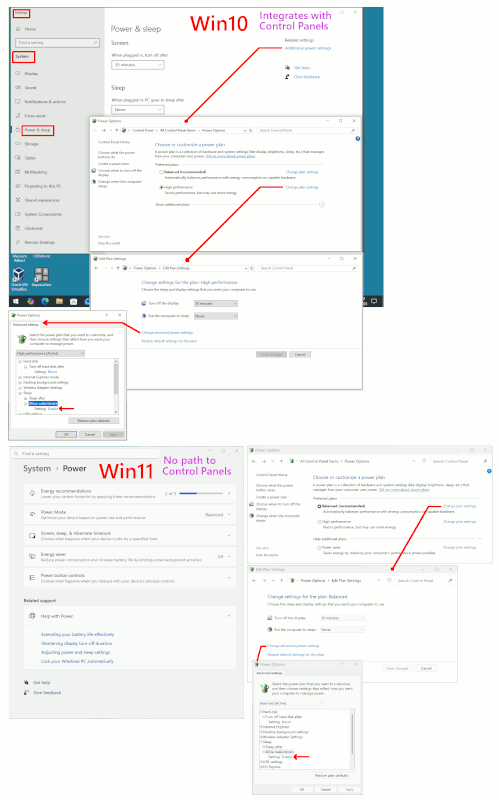
A lot of settings that I used to use or at least look at seem to have disappeared in win11. Am I right aobut that?
Especially ones in win10 that one accessed by clicking on the blue text
on the left or right side of the page. I never see text on the right
side of a Settings page in win11, so are all those settings inaccessible
now?
Have you noticed this? Are the things that were on the right somewhere
else now.
This might not be the best example
https://www.quora.com/Is-it-possible-to-remotely-power-on-a-PC-from-another-PC-even-if-one-of-them-is-in-sleep-mode
includes:
To keep your computer from waking up in sleep mode, go to Power & Sleep Settings. Then click Additional power settings > Change plan settings >
Change advanced power settings and disable Allow wake timers under
Sleep.
Click the magnifying glass icon in the bottom-left corner of your
screen.
Then type Power & sleep into the search bar and click Open.
Then scroll down and click Additional power settings. You will see
thins under Related settings. This will open a new window with your
Control Panel settings.
Next, select Balanced and click Change plan settings.
Then click Change advanced power settings. The Power Options window
will pop up.
--- Synchronet 3.21a-Linux NewsLink 1.2