From Newsgroup: alt.comp.os.windows-11
All my tutorials use freeware so that EVERYONE can use them, but I
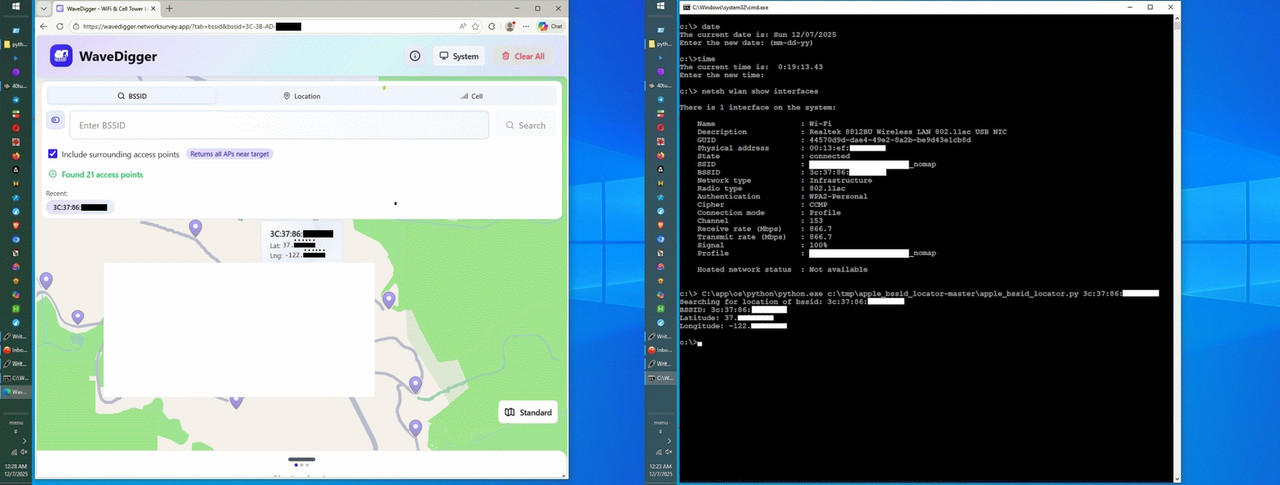
wrote this tutorial before I found out about this Apple WPS query:
<
https://wavedigger.networksurvey.app/?tab=bssid>
Hence, this tutorial is only useful if you want to control the query
of Apple's highly insecure WPS database, which has no privacy controls.
For example, you can query thousands of BSSID's in a single command.
I'm not promoting that action, but I'm making the point it can be done.
See also:
From: Marian <
marianjones@helpfulpeople.com>
Newsgroups: alt.comp.os.windows-10,comp.mobile.android,misc.phone.mobile.iphone,alt.internet.wireless
Subject: How to test if your access point BSSID is in the highly insecure Apple WPS database
Date: Fri, 5 Dec 2025 05:08:08 -0700
Message-ID: <10guhv8$ig7$
1@nnrp.usenet.blueworldhosting.com>
Tutorial: *Query the Apple database for your access point BSSID*
<
https://github.com/darkosancanin/apple_bssid_locator>
0. Download & install 7zip if you don't already have it on Windows.
<
https://www.7-zip.org/>
1. Download & install Python 3.14.1 on Windows & create site-packages
<
https://www.python.org/downloads/windows/>
<
https://www.python.org/ftp/python/3.14.1/python-3.14.1-amd64.exe>
Name: python-3.14.1-amd64.exe
Size: 29883656 bytes (28 MiB)
SHA256: 74E1516408744190FCC12307C150DE30902898444F77F85F4C2AC18F36788A80
I installed into C:\app\os\python\python.exe
REM Create site-packages if missing
mkdir C:\app\os\python\Lib\site-packages
2. Download the requests package & copy into your Python environment
<
https://pypi.org/project/requests/#files>
<
https://files.pythonhosted.org/packages/source/r/requests/requests-2.32.5.tar.gz>
Name: requests-2.32.5.tar.gz
Size: 134517 bytes (131 KiB)
SHA256: DBBA0BAC56E100853DB0EA71B82B4DFD5FE2BF6D3754A8893C3AF500CEC7D7CF
When 7-Zip asks Would you like to replace the existing file
@PaxHeader, Press A (Always) to overwrite all such header files.
C:\app\archiver\7zip\7z.exe x requests-2.32.5.tar.gz
C:\app\archiver\7zip\7z.exe x requests-2.32.5.tar
xcopy /E /I requests-2.32.5\src\requests C:\app\os\python\Lib\site-packages\requests
3. Do the same for urllib3 -> handles HTTP connections
<
https://files.pythonhosted.org/packages/source/u/urllib3/urllib3-2.5.0.tar.gz>
Name: urllib3-2.5.0.tar.gz
Size: 393185 bytes (383 KiB)
SHA256: 3FC47733C7E419D4BC3F6B3DC2B4F890BB743906A30D56BA4A5BFA4BBFF92760
C:\app\archiver\7zip\7z.exe x urllib3-2.5.0.tar.gz
C:\app\archiver\7zip\7z.exe x urllib3-2.5.0.tar
xcopy /E /I urllib3-2.5.0\src\urllib3 C:\app\os\python\Lib\site-packages\urllib3
4. Do the same for certifi -> provides SSL certificates
<
https://files.pythonhosted.org/packages/source/c/certifi/certifi-2025.11.12.tar.gz>
Name: certifi-2025.11.12.tar.gz
Size: 160538 bytes (156 KiB)
SHA256: D8AB5478F2ECD78AF242878415AFFCE761CA6BC54A22A27E026D7C25357C3316
C:\app\archiver\7zip\7z.exe x certifi-2025.11.12.tar.gz
C:\app\archiver\7zip\7z.exe x certifi-2025.11.12.tar
xcopy /E /I certifi-2025.11.12\certifi C:\app\os\python\Lib\site-packages\certifi
5. Do the same for idna -> supports international domain names
<
https://files.pythonhosted.org/packages/source/i/idna/idna-3.11.tar.gz
Name: idna-3.11.tar.gz
Size: 194582 bytes (190 KiB)
SHA256: 795DAFCC9C04ED0C1FB032C2AA73654D8E8C5023A7DF64A53F39190ADA629902
xcopy /E /I idna-3.11\idna C:\app\os\python\Lib\site-packages\idna
C:\app\archiver\7zip\7z.exe x idna-3.11.tar.gz
C:\app\archiver\7zip\7z.exe x idna-3.11.tar
xcopy /E /I idna-3.11\idna C:\app\os\python\Lib\site-packages\idna
6. Do the same for charset'normalizer -> handles text encoding
<
https://files.pythonhosted.org/packages/source/c/charset-normalizer/charset_normalizer-3.4.4.tar.gz>
Name: charset_normalizer-3.4.4.tar.gz
Size: 129418 bytes (126 KiB)
SHA256: 94537985111C35F28720E43603B8E7B43A6ECFB2CE1D3058BBE955B73404E21A
C:\app\archiver\7zip\7z.exe x charset_normalizer-3.4.4.tar.gz
C:\app\archiver\7zip\7z.exe x charset_normalizer-3.4.4.tar
xcopy /E /I charset_normalizer-3.4.4\src\charset_normalizer C:\app\os\python\Lib\site-packages\charset_normalizer
7. Test for the expected outcome of "2.32.5"
C:\app\os\python\python.exe -c "import requests; print(requests.__version__)"
8. Now we have to add the protobuf 5.29.4 archive
https://files.pythonhosted.org/packages/source/p/protobuf/protobuf-5.29.4.tar.gz
Name: protobuf-5.29.4.tar.gz
Size: 424902 bytes (414 KiB)
SHA256: 4F1DFCD7997B31EF8F53EC82781FF434A28BF71D9102DDDE14D076ADCFC78C99
C:\app\archiver\7zip\7z.exe x protobuf-5.29.4.tar.gz
C:\app\archiver\7zip\7z.exe x protobuf-5.29.4.tar
xcopy /E /I protobuf-5.29.4\google C:\app\os\python\Lib\site-packages\google
Note that protobuf has a version compatibility rule which only
shows up once you actually try to load a generated .proto file.
When you run the apple_bssid_locator.py, it will complain if the
version of protoc you installed is different than what had been
used to generate AppleWLoc_pb2.py.
9. Test for expected outcome of "5.29.4"
C:\app\os\python\python.exe -c "from google import protobuf; print(protobuf.__version__)"
10. Download & extract the Apple_bssid_locator project
<
https://github.com/darkosancanin/apple_bssid_locator/archive/refs/heads/master.zip>
Name: apple_bssid_locator-master.zip
Size: 509563 bytes (497 KiB)
SHA256: 59A89D3AF89E70012493668BD71DD640C8EF39F15A88955E25B7AE242FCFC7BF
I extracted to C:\tmp\apple_bssid_locator-master\apple_bssid_locator.py
11. Obtain your own BSSID of your hidden SSID access point
<
http://192.168.0.1/start.htm>
AA:BB:CC:11:22:33
Or scan your local network for BSSIDs:
netsh wlan show networks mode=bssid
12. Run the script
cd C:\tmp\apple_bssid_locator-master
C:\app\os\python\python.exe apple_bssid_locator.py AA:BB:CC:11:22:33
If the BSSID is in the Apple database, you'll get something like this:
{
"bssid": "AA:BB:CC:11:22:33",
"latitude": 40.12345678,
"longitude": -120.12345678
"ssid": null
}
Convert that to a location using the Google Maps URI:
<
https://maps.google.com/?q=40.12345678,-120.12345678
If the BSSID is NOT in the Apple database, you'll get this:
C:\app\os\python\python.exe apple_bssid_locator.py AA:BB:CC:11:22:33
Searching for location of bssid: AA:BB:CC:11:22:33
The bssid was not found.
See also:
<
https://github.com/acheong08/apple-corelocation-experiments>
--
<
https://www.cs.umd.edu/~dml/papers/wifi-surveillance-sp24.pdf>
"In this work, we show that Apples WPS implementation
can easily be abused to create a serious privacy threat
on a global scale."
<
https://arxiv.org/abs/2405.14975>
"In this work, we show that Apple's flawed WPS can too easily be abused"
<
https://www.govinfosecurity.com/surveillance-risk-apples-wifi-based-positioning-system-a-25330>
"The attack risk stems from Apple's WiFi-based Positioning System, or WPS"
<
https://securityboulevard.com/2024/05/apple-wi-fi-location-privacy-richixbw/>
"An unrestricted Apple API endpoint allows for easy tracking."
<
https://cybernews.com/privacy/apple-beams-wifi-location-data-privacy-risk/>
"Anyone can exploit Apple's flawed WiFi-based positioning system (WPS)*
<
https://www.macworld.com/article/2343297/apple-wi-fi-network-wps-vulnerability-location-services-leak.html>
"Researchers have discovered a crucial vulnerability
in the way only Apple's location services work"
<
https://www.theregister.com/2024/05/23/apple_wifi_positioning_system/>
"The threat applies even to users that do not own devices
for which the WPSes are designed - individuals who own no Apple
products, for instance, can have their AP in Apple's WPS merely
by having Apple devices come within Wi-Fi transmission range."
<
https://9to5mac.com/2024/05/24/apple-location-services-vulnerability/>
"There is one crucial difference between the way in which
Apple and Google devices carry out this task
and that's exactly where the privacy issue arises."
"We need to understand Apple devices figure out locations differently"
<
https://www.bizcommunity.com/article/apple-may-have-turned-wi-fi-routers-into-a-privacy-threat-239637a>
"Researchers from the University of Maryland have uncovered a
significant privacy vulnerability in Apple's Wi-Fi-based
Positioning System (WPS). This vulnerability enables attackers
to track devices globally by exploiting the way Apple's WPS
operates, raising serious privacy concerns."
<
https://cyberinsider.com/apples-wi-fi-based-positioning-system-is-a-privacy-nightmare/>
*Apple's Wi-Fi-Based Positioning System is a Privacy Nightmare*
"Researchers from the University of Maryland have uncovered a
significant privacy vulnerability in Apple's Wi-Fi-based Positioning
System (WPS). This vulnerability enables attackers to track devices
globally by exploiting the way Apple's WPS operates, raising
serious privacy concerns."
--- Synchronet 3.21a-Linux NewsLink 1.2