• GitHub - zoicware/RemoveWindowsAI: Force Remove Copilot, Recall andMore in Windows 11

    From Mr. Man-wai Chang@toylet.toylet@gmail.com to alt.comp.os.windows-11 on Wed Dec 10 22:44:09 2025
    From Newsgroup: alt.comp.os.windows-11

    GitHub - zoicware/RemoveWindowsAI: Force Remove Copilot, Recall and More
    in Windows 11
    <https://github.com/zoicware/RemoveWindowsAI/>

    Source:

    RemoveWindowsAI 工具登場 可移除 Windows 11 內建 AI 功能 - 電腦領域 HKEPC Hardware
    - 全港 No.1 PC網站
    <https://www.hkepc.com/24654/>
    --
    @~@ Simplicity is Beauty! Remain silent! Drink, Blink, Stretch!
    / v \ May the Force and farces be with you! Live long and prosper!!
    /( _ )\ https://sites.google.com/site/changmw/
    ^ ^ https://github.com/changmw/changmw

    --- Synchronet 3.21a-Linux NewsLink 1.2
  • From Daniel70@daniel47@nomail.afraid.org to alt.comp.os.windows-11 on Thu Dec 11 20:30:36 2025
    From Newsgroup: alt.comp.os.windows-11

    On 11/12/2025 1:44 am, Mr. Man-wai Chang wrote:
    GitHub - zoicware/RemoveWindowsAI: Force Remove Copilot, Recall and More
    in Windows 11
    <https://github.com/zoicware/RemoveWindowsAI/>

    Source:

    RemoveWindowsAI 工具登場 可移除 Windows 11 內建 AI 功能 - 電腦領域 HKEPC
    Hardware - 全港 No.1 PC網站
    <https://www.hkepc.com/24654/>

    Doing a Win11 Search for 'Copilot' draws a blank and sends me off to
    MicroSoft to get Copilot.

    Does this mean I have previously successfully removed 'Copilot'??
    --
    Daniel70
    --- Synchronet 3.21a-Linux NewsLink 1.2
  • From Paul@nospam@needed.invalid to alt.comp.os.windows-11 on Thu Dec 11 15:22:10 2025
    From Newsgroup: alt.comp.os.windows-11

    On Thu, 12/11/2025 4:30 AM, Daniel70 wrote:
    On 11/12/2025 1:44 am, Mr. Man-wai Chang wrote:
    GitHub - zoicware/RemoveWindowsAI: Force Remove Copilot, Recall and More in Windows 11
    <https://github.com/zoicware/RemoveWindowsAI/>

    Source:

    RemoveWindowsAI 工具登場 可移除 Windows 11 內建 AI 功能 - 電腦領域 HKEPC Hardware - 全港 No.1 PC網站
    <https://www.hkepc.com/24654/>

    Doing a Win11 Search for 'Copilot' draws a blank and sends me off to MicroSoft to get Copilot.

    Does this mean I have previously successfully removed 'Copilot'??

    Use the Settings wheel. You can see two items there.

    Settings : Apps : Installed Apps
    CoPilot
    Microsoft 365 Copilot

    MSEdge (CoPilot icon in upper right corner)

    *******

    The Microsoft idea of search, is purposely completely off the mark.

    This is why there are occasional discussions here, about what
    tools are the right "substitutes" for what you've been given.

    1) You were supposed to go to File Explorer, upper right hand corner
    and search there for evidence CoPilot is on your C: drive.
    Make sure the C: drive is selected, while you are searching.
    Search will occur for whatever domain you select. If you select
    something like "My PC", then all the partitions are searched.

    2) To prepare the machine for searching from File Explorer

    Start : Run : control.exe
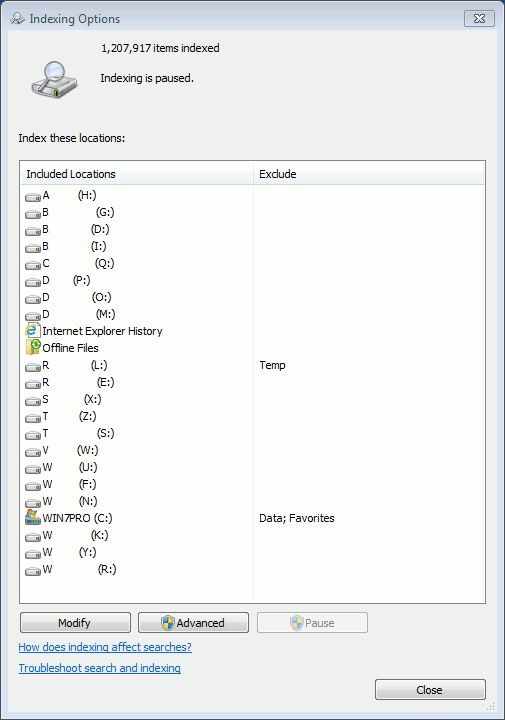
    Then, look for the Indexing Options control panel.

    [Picture] Click "Download Original" to avoid the advertising

    https://i.postimg.cc/jjM5F6Sp/Indexing-Options-Control-Panel.gif

    That picture shows that 1.2 million files have been indexed,
    so that each time a File Explorer search is done, it is done
    against a list of 1.2 million files.

    My Win11 machine on the other hand, has indexed 76 files (less than
    a hundred files) and the search is then, worthless. And I can leave
    it that way, as I have MythicSoftware Agent Ransack loaded.

    Paul
    --- Synchronet 3.21a-Linux NewsLink 1.2
  • From Daniel70@daniel47@nomail.afraid.org to alt.comp.os.windows-11 on Fri Dec 12 20:46:04 2025
    From Newsgroup: alt.comp.os.windows-11

    On 12/12/2025 7:22 am, Paul wrote:
    On Thu, 12/11/2025 4:30 AM, Daniel70 wrote:
    On 11/12/2025 1:44 am, Mr. Man-wai Chang wrote:
    GitHub - zoicware/RemoveWindowsAI: Force Remove Copilot, Recall and More in Windows 11
    <https://github.com/zoicware/RemoveWindowsAI/>

    Source:

    RemoveWindowsAI 工具登場 可移除 Windows 11 內建 AI 功能 - 電腦領域 HKEPC Hardware - 全港 No.1 PC網站
    <https://www.hkepc.com/24654/>

    Doing a Win11 Search for 'Copilot' draws a blank and sends me off to MicroSoft to get Copilot.

    Does this mean I have previously successfully removed 'Copilot'??

    Use the Settings wheel. You can see two items there.

    Settings : Apps : Installed Apps
    CoPilot
    Microsoft 365 Copilot

    MSEdge (CoPilot icon in upper right corner)

    In the 39 listed "Installed Apps" I see no mention of 'Copilot',
    MicroSoft 365 Copilot' or 'MSEdge'. YEAH!!
    --
    Daniel70
    --- Synchronet 3.21a-Linux NewsLink 1.2