Trying to export chats from Whatsapp to windows 11.
Twice it worked, then immediateadly stopped.
17 more tries, one worked!
Phone is only 2 feet from laptop, but once I held it 6 inches away, no >change.
Sometimes it says "whatsapp share file file not sent" and once in a
while there's a different error message.
Yesterday it wouldn't work at all.
Also can't export to Google drive, yesterday not at all, today once, but
not the second time!
what's up--- Synchronet 3.21a-Linux NewsLink 1.2
In comp.mobile.android, on Mon, 26 Jan 2026 13:49:27 -0500, micky <NONONOmisc07@fmguy.com> wrote:
Trying to export chats from Whatsapp to windows 11.
Twice it worked, then immediateadly stopped.
17 more tries, one worked!
Phone is only 2 feet from laptop, but once I held it 6 inches away, no >change.
Sometimes it says "whatsapp share file file not sent" and once in a
while there's a different error message.
Yesterday it wouldn't work at all.
Also can't export to Google drive, yesterday not at all, today once, but >not the second time!
And the one I just exported to Drive, I can't find in Drive?
what's up
micky <NONONOmisc07@fmguy.com> wrote:
In comp.mobile.android, on Mon, 26 Jan 2026 13:49:27 -0500, micky
<NONONOmisc07@fmguy.com> wrote:
Trying to export chats from Whatsapp to windows 11.
Twice it worked, then immediateadly stopped.
17 more tries, one worked!
Phone is only 2 feet from laptop, but once I held it 6 inches away, no
change.
Sometimes it says "whatsapp share file file not sent" and once in a
while there's a different error message.
Yesterday it wouldn't work at all.
Also can't export to Google drive, yesterday not at all, today once, but >>> not the second time!
And the one I just exported to Drive, I can't find in Drive?
what's up
Please describe *exactly* what you're doing on which device (phone or laptop). Our crystal balls are in the shop this week.
*And* explain *what* you try to accomplish.
AFAIK, there's no 'export' of chatS (plural) in WhatsApp. Only of *a*
chat (singular), i.e. the communication with *one* person (or group).
An export of a chat *can* be shared to Google Drive, but can be shared
to any Share-able destination, for example e-mail.
Other than the above export of a single chat. there are:
- You can *backup* chats (Settings -> Chats -> Chat backup), which is
backed up to Google Drive, but is 'invisible' in Google Drive and only
visible to a virgin WhatApp app on a new phone, i.e. this is a way to
get chats from an old phone to a new one.
- There is also a way to *transfer* chats from an old phone to a new one
*without* going through Google Drive (Settings -> Chats -> Tranfer
chats).
- And there is *archive* chats (Settings -> Chats -> Chat history ->
Archive all chats).
In all of this, the computer does not really get into the picture,
unless you do a Share-type operation where the destination 'happens' to
be the computer.
On 2026-01-26 20:38, Frank Slootweg wrote:
to any Share-able destination, for example e-mail.
If you do with files, it crashes if there are many files or too big. And
the resulting email does not have the files in context, like a properly formatted html text.
On 1/26/2026 9:44 PM, Carlos E.R. wrote:
On 2026-01-26 20:38, Frank Slootweg wrote:
to any Share-able destination, for example e-mail.
If you do with files, it crashes if there are many files or too big. And
the resulting email does not have the files in context, like a properly
formatted html text.
A few days ago I exported a >500 MByte chat. I saved it locally on the
phone and then transferred the zip file to the PC with ftp (using
"primitive ftpd" on the phone and "Windows Explorer" on the PC) . I
think this is the fasted method because the transfer is only within
the local WLAN.
There is also software to convert the exported data to html, but
I didn't try it:
https://github.com/mtln/chat-export
On 2026-01-26 22:07, Herbert Kleebauer wrote:
A few days ago I exported a >500 MByte chat. I saved it locally on the
phone and then transferred the zip file to the PC with ftp (using
"primitive ftpd" on the phone and "Windows Explorer" on the PC) . I
What format has the chat?
On 1/26/2026 9:44 PM, Carlos E.R. wrote:
On 2026-01-26 20:38, Frank Slootweg wrote:
to any Share-able destination, for example e-mail.
If you do with files, it crashes if there are many files or too big. And
the resulting email does not have the files in context, like a properly
formatted html text.
A few days ago I exported a >500 MByte chat. I saved it locally on the
phone
and then transferred the zip file to the PC with ftp (using
"primitive ftpd" on the phone and "Windows Explorer" on the PC) . I
think this is the fasted method because the transfer is only within
the local WLAN.
There is also software to convert the exported data to html, but
I didn't try it:
https://github.com/mtln/chat-export
On 2026-01-26 20:38, Frank Slootweg wrote:
micky <NONONOmisc07@fmguy.com> wrote:
In comp.mobile.android, on Mon, 26 Jan 2026 13:49:27 -0500, micky
<NONONOmisc07@fmguy.com> wrote:
Trying to export chats from Whatsapp to windows 11.
Twice it worked, then immediateadly stopped.
17 more tries, one worked!
Phone is only 2 feet from laptop, but once I held it 6 inches away, no >>>> change.
Sometimes it says "whatsapp share file file not sent" and once in a
while there's a different error message.
Yesterday it wouldn't work at all.
Also can't export to Google drive, yesterday not at all, today once, but >>>> not the second time!
And the one I just exported to Drive, I can't find in Drive?
what's up
Please describe *exactly* what you're doing on which device (phone or
laptop). Our crystal balls are in the shop this week.
*And* explain *what* you try to accomplish.
AFAIK, there's no 'export' of chatS (plural) in WhatsApp. Only of *a*
chat (singular), i.e. the communication with *one* person (or group).
An export of a chat *can* be shared to Google Drive, but can be shared
to any Share-able destination, for example e-mail.
If you do with files, it crashes if there are many files or too big. And
the resulting email does not have the files in context, like a properly >formatted html text.
Print to PDF possible?
A few days ago I exported a >500 MByte chat. I saved it locally on the >>phone
I don't even see a way to save it locally?
A few days ago I exported a >500 MByte chat. I saved it locally on the
phone and then transferred the zip file to the PC with ftp (using
"primitive ftpd" on the phone and "Windows Explorer" on the PC) . I
What format has the chat?
The chat is exported as a zip file. It contains the chat as .txt
file (utf-8 including smileys.) and all pictures, videos, pdfs etc.
in the original format.
On 1/26/2026 11:17 PM, micky wrote:
A few days ago I exported a >500 MByte chat. I saved it locally on the >>>phone
I don't even see a way to save it locally?
Beside Bluetooth, Google Drive, Gmail there is also an entry
"Save As" which is provided by the app "primitive ftpd" which
I then also use to transfer the file to the pc.
https://f-droid.org/packages/org.primftpd/
https://github.com/wolpi/prim-ftpd
Herbert Kleebauer wrote:
A few days ago I exported a >500 MByte chat. I saved it locally on the >>>> phone and then transferred the zip file to the PC with ftp (using
"primitive ftpd" on the phone and "Windows Explorer" on the PC) . I
What format has the chat?
The chat is exported as a zip file. It contains the chat as .txt
file (utf-8 including smileys.) and all pictures, videos, pdfs etc.
in the original format.
To add value to what Herbert kindly offered, I ran research for the team.
While I shun highly marketed Android apps such as WhatsApp is, I use it for >my grandkids as it helps to get videos of the grandkids and to talk to >relatives in Germany so even I use this highly marketing VOIP tool.
I don't back up anything but the media, and since Android is just a drive >letter on Windows, it's trivial to easily backup Android files to the PC.'
But the messages inside of WhatsApp are apparently different from the media >in terms of how they're stored (encrypted, apparently). So you need a key.
So, to help the team, as always, I looked up just now how to back up the
text messages from unrooted Android WhatsApp to the Windows PC filesystem.
In my humble opinion, WhatsApp tries too hard to get us to use Google
Drive, when something like our personal chats belong on our network.
But I found these two Windows programs which purport to decrypt
and save the Android WhatsApp messages to your Windows PC.
This is, what I think Herbert was suggesting worked for a single chat:
1. Open the WhatsApp chat you want to save.
2. Tap the three dots -> More -> Export chat.
3. Choose "Include media".
4. WhatsApp will generate a ZIP file.
ChatName.txt
Media/
IMG-20240101-WA0001.jpg
IMG-20240101-WA0002.jpg
...
5. Choose
a. "Save to Files",
b. "Share via Bluetooth",
c. "Send to your PC via LAN app", or
d. "Send via USB MTP".
Always eschewing cloud-services marketing gimmicks, we can
A. Save to device storage
Then copy via USB or by mounting the phone as a drive letter on Windows
B. Share to a LAN file-sharing app
(e.g., KDE Connect or LocalSend, both of which are FOSS)
C. Send via Bluetooth
(slow but works)
Apparently there are FOSS whatsapp viewers/backups for Windows
which will decrypt and save every chat, two of which I installed.
Windows WhatsApp Viewer
<https://xdaforums.com/t/tool-whatsapp-key-db-extractor-crypt6-12-non-root-updated-october-2016.2770982/>
<https://github.com/andreas-mausch/whatsapp-viewer> <https://andreas-mausch.de/whatsapp-viewer/> <https://github.com/andreas-mausch/whatsapp-viewer/releases/tag/v1.15> <https://github.com/andreas-mausch/whatsapp-viewer/releases/download/v1.15/WhatsApp.Viewer.zip>
D:\software\telecom\whatsapp\whatsappviewer\WhatsApp.Viewer.zip
Name: WhatsApp.Viewer.zip
Size: 1425323 bytes (1391 KiB)
SHA256: DC83B74719C82AB9AB2FEC9E62768ABB530791EB49BF69F444DFFB8BDD543D07
Unzip to a single file:
C:\app\telecom\whatsapp\WhatsApp.Viewer\WhatsApp Viewer.exe
Name: WhatsApp Viewer.exe
Size: 2445312 bytes (2388 KiB)
SHA256: 31E6C5CDA73CA16439E12F5A8AD642796DCA00DCEF4871EB74DB5C6171C4408F
Create a shortcut in your taskbar pullout cascade menu folder: >C:\menu\telecom\whatsapp\WhatsApp.Viewer\WhatsAppViewer.lnk
Target: C:\app\telecom\whatsapp\WhatsApp.Viewer\WhatsApp Viewer.exe
How to use
a. Get your key and database file from the phone (see XDA thread above).
b. Open WhatsApp Viewer
c. File -> Open -> Select file
d. Select msgstore.db in the folder "extracted"
e. Leave account name empty
f. Optional: Import contact names from the wa.db file
g. Click on a chat to show the messages.
WhatsApp Key/DB Extractor
Allows WhatsApp users to extract their cipher key and databases on
non-rooted Android devices. Requires Java on Windows. And adb. ><https://github.com/EliteAndroidApps/WhatsApp-Key-DB-Extractor> ><https://github.com/EliteAndroidApps/WhatsApp-Key-DB-Extractor/archive/refs/heads/master.zip>
Name: WhatsApp-Key-DB-Extractor-master.zip
Size: 7462622 bytes (7287 KiB)
SHA256: BEB32B7494D9BE95AF90219E1CA73209808C55AD4FA6AAEFF539B8FB1C4F4FE2 >Extract to:
a. Batch script: WhatsAppKeyDBExtract.bat
b. PowerShell script: WhatsAppKeyDBExtract.ps1
c. Shell script: WhatsAppKeyDBExtract.sh
Interestingly, a "grep.exe" came with this package, which, in and of
itself, is a useful tool to put in the path for us old Unix folks.
C:\app\telecom\whatsapp\dbextract\
AdbWinApi.dll
AdbWinUsbApi.dll
abe.jar
adb.exe
curl.exe
grep.exe
libiconv2.dll
libintl3.dll
pcre3.dll
regex2.dll
tar.exe
I haven't tested it, but if anyone tests these out, it will be useful to
all for you to write it up so that we can all benefit from your effort.
micky <NONONOmisc07@fmguy.com> wrote:
In comp.mobile.android, on Mon, 26 Jan 2026 13:49:27 -0500, micky
<NONONOmisc07@fmguy.com> wrote:
Trying to export chats from Whatsapp to windows 11.
Twice it worked, then immediateadly stopped.
17 more tries, one worked!
Phone is only 2 feet from laptop, but once I held it 6 inches away, no
change.
Sometimes it says "whatsapp share file file not sent" and once in a
while there's a different error message.
Yesterday it wouldn't work at all.
Also can't export to Google drive, yesterday not at all, today once, but
not the second time!
And the one I just exported to Drive, I can't find in Drive?
what's up
Please describe *exactly* what you're doing on which device (phone or
laptop). Our crystal balls are in the shop this week.
*And* explain *what* you try to accomplish.
AFAIK, there's no 'export' of chatS (plural) in WhatsApp. Only of *a*
chat (singular), i.e. the communication with *one* person (or group).
An export of a chat *can* be shared to Google Drive, but can be shared
to any Share-able destination, for example e-mail.
Other than the above export of a single chat. there are:
- You can *backup* chats (Settings -> Chats -> Chat backup), which is
backed up to Google Drive, but is 'invisible' in Google Drive and only
visible to a virgin WhatApp app on a new phone, i.e. this is a way to
get chats from an old phone to a new one.
- There is also a way to *transfer* chats from an old phone to a new one
*without* going through Google Drive (Settings -> Chats -> Tranfer
chats).
- And there is *archive* chats (Settings -> Chats -> Chat history ->
Archive all chats).
In all of this, the computer does not really get into the picture,
unless you do a Share-type operation where the destination 'happens' to
be the computer.
In comp.mobile.android, on Mon, 26 Jan 2026 13:49:27 -0500, micky ><NONONOmisc07@fmguy.com> wrote:--- Synchronet 3.21a-Linux NewsLink 1.2
Trying to export chats from Whatsapp to windows 11.
Twice it worked, then immediateadly stopped.
17 more tries, one worked!
Phone is only 2 feet from laptop, but once I held it 6 inches away, no >>change.
Sometimes it says "whatsapp share file file not sent" and once in a
while there's a different error message.
Yesterday it wouldn't work at all.
Also can't export to Google drive, yesterday not at all, today once, but >>not the second time!
And the one I just exported to Drive, I can't find in Drive?
what's up
mOSTLY SOLVED:
It turns out, for all but one chat so far, the problem was in Windows.
For each transfer, I have to click on the arrow in the systray to open
up all the miscellaneous overflow icons, click on the Bluetooth icon,
then chnose Receive a file. Each time. I didn't expect that.
One important one continues to balk. There is a strange blue large
capital T in the name of the other party to the chat. Could that be the >problem? That's the only anomaly I see.
Anyhow, thanks for all the help. Nothing on the web mentioned this
either. It's a Dell Latitude 5510 but it's hard to believe the make or >model makes a difference. Windows 11 Pro fully updated.
In alt.comp.os.windows-11, on Mon, 26 Jan 2026 21:26:46 -0500, micky <NONONOmisc07@fmguy.com> wrote:
mOSTLY SOLVED:
It turns out, for all but one chat so far, the problem was in Windows.
For each transfer, I have to click on the arrow in the systray to open
up all the miscellaneous overflow icons, click on the Bluetooth icon,
then chnose Receive a file. Each time. I didn't expect that.
I guess since it said "Receive *A* file" I should have thought of this.
LOL
One important one continues to balk. There is a strange blue large
capital T in the name of the other party to the chat. Could that be the
problem? That's the only anomaly I see.
Anyhow, thanks for all the help. Nothing on the web mentioned this
either. It's a Dell Latitude 5510 but it's hard to believe the make or
model makes a difference. Windows 11 Pro fully updated.
Beside Bluetooth, Google Drive, Gmail there is also an entry
"Save As" which is provided by the app "primitive ftpd" which
I don't have that entry.
But if I install F-droid, that line will appear?
https://f-droid.org/packages/org.primftpd/ >>https://github.com/wolpi/prim-ftpd
On 1/26/2026 10:27 PM, Carlos E.R. wrote:
On 2026-01-26 22:07, Herbert Kleebauer wrote:
A few days ago I exported a >500 MByte chat. I saved it locally on the
phone and then transferred the zip file to the PC with ftp (using
"primitive ftpd" on the phone and "Windows Explorer" on the PC) . I
What format has the chat?
The chat is exported as a zip file. It contains the chat as .txt
file (utf-8 including smileys.) and all pictures, videos, pdfs etc.
in the original format.
On 2026-01-26 22:50, Herbert Kleebauer wrote:
On 1/26/2026 10:27 PM, Carlos E.R. wrote:
On 2026-01-26 22:07, Herbert Kleebauer wrote:
A few days ago I exported a >500 MByte chat. I saved it locally on the >>>> phone and then transferred the zip file to the PC with ftp (using
"primitive ftpd" on the phone and "Windows Explorer" on the PC) . I
What format has the chat?
The chat is exported as a zip file. It contains the chat as .txt
file (utf-8 including smileys.) and all pictures, videos, pdfs etc.
in the original format.
That is useless crap. Now I remember, I tried that one years ago.
The message part are the plain text messages, without the emoticons, and without the files inserted in the text in their context. Like a PDF file would be.
On 1/27/2026 1:28 AM, micky wrote:
Beside Bluetooth, Google Drive, Gmail there is also an entry
"Save As" which is provided by the app "primitive ftpd" which
I don't have that entry.
But if I install F-droid, that line will appear?
F-Droid is an alternative app store for Google Playstore.
You don't have to install F-Droid to be able to install
apps hosted on F-Droid, but then there are no automatic
updates for the installed apps (but for me it is an advantage
when working apps are not automatically replaced by newer ones).
https://f-droid.org/packages/org.primftpd/
https://github.com/wolpi/prim-ftpd
The direct link to Primitive ftpd is:
https://f-droid.org/repo/org.primftpd_67.apk
Just download and install it on the phone.
Primitive ftpd is very easy to use because the
Windows explorer has a built-in ftp client and
therefore no extra software is needed on the PC.
Just start Primitive ftpd on the phone and enter
the displayed ftp address in the address bar of
the Windows explorer (or if you have a QR-code scanner
attached to your PC, just scan the displayed QR-code).
Then the file system on your phone is displayed in
explorer like a local folder and you can use drag&drop
to copy files from or to your phone. Copying files
by WLAN is much faster than using bluetooth.
And Primitive ftpd also provides the "Save As" button
when exporting chats from Whatsapp.
On 1/27/2026 1:28 AM, micky wrote:
Beside Bluetooth, Google Drive, Gmail there is also an entry
"Save As" which is provided by the app "primitive ftpd" which
I don't have that entry.
But if I install F-droid, that line will appear?
F-Droid is an alternative app store for Google Playstore.
You don't have to install F-Droid to be able to install
apps hosted on F-Droid, but then there are no automatic
updates for the installed apps (but for me it is an advantage
when working apps are not automatically replaced by newer ones).
https://f-droid.org/packages/org.primftpd/
https://github.com/wolpi/prim-ftpd
The direct link to Primitive ftpd is:
https://f-droid.org/repo/org.primftpd_67.apk
Just download and install it on the phone.
Primitive ftpd is very easy to use because the
Windows explorer has a built-in ftp client and
therefore no extra software is needed on the PC.
Just start Primitive ftpd on the phone and enter
the displayed ftp address in the address bar of
the Windows explorer (or if you have a QR-code scanner
attached to your PC, just scan the displayed QR-code).
Then the file system on your phone is displayed in
explorer like a local folder and you can use drag&drop
to copy files from or to your phone. Copying files
by WLAN is much faster than using bluetooth.
And Primitive ftpd also provides the "Save As" button
when exporting chats from Whatsapp.
On 2026-01-26 22:50, Herbert Kleebauer wrote:
The chat is exported as a zip file. It contains the chat as .txt
file (utf-8 including smileys.) and all pictures, videos, pdfs etc.
in the original format.
That is useless crap. Now I remember, I tried that one years ago.
The message part are the plain text messages, without the emoticons, and without the files inserted in the text in their context. Like a PDF file would be.
And Primitive ftpd also provides the "Save As" button
when exporting chats from Whatsapp.
That's a curious one. I get that one.
I also get Cx File explorer and can then save as a local file.
But the advantage of FSquirt, is it works over Bluetooth,
On 1/27/2026 9:43 AM, Carlos E.R. wrote:
On 2026-01-26 22:50, Herbert Kleebauer wrote:
The chat is exported as a zip file. It contains the chat as .txt
file (utf-8 including smileys.) and all pictures, videos, pdfs etc.
in the original format.
That is useless crap. Now I remember, I tried that one years ago.
The message part are the plain text messages, without the emoticons, and
without the files inserted in the text in their context. Like a PDF file
would be.
It is for backup purpose. You most likely will never look at it. But
if, a few year later, you really need it, it all is there: the text
chat and all the pictures, videos and other files.
And as I already said:
|| There is also software to convert the exported data to html, but
|| I didn't try it:
||
|| https://github.com/mtln/chat-export
On 1/27/2026 10:03 AM, Carlos E.R. wrote:
And Primitive ftpd also provides the "Save As" button
when exporting chats from Whatsapp.
That's a curious one. I get that one.
I also get Cx File explorer and can then save as a local file.
Android by default doesn't offer the "Save As" so you will need an
additional app which provides this service. Doesn't matter whether
this is "Primitive FTPD" or "Cx File explorer" or any other app.
But I was glad that Primitive FTPD provided that feature because
it was installed already for file transfer and I didn't need a
further app.
But I don't understand why Whatsapp itself doesn't offer a "Save As".
On 1/27/2026 11:03 AM, Paul wrote:
But the advantage of FSquirt, is it works over Bluetooth,
I don't think this is an advantage. Try to transfer a 500 MByte
file by bluetooth.
|| There is also software to convert the exported data to html, but
|| I didn't try it:
||
|| https://github.com/mtln/chat-export
Ah, I see. I imagined it would be a tool to run in Android and would
extract the chat somehow. No, it works using the already exported zip archive in a computer. I have to try this. Looks promising.
Beside Bluetooth, Google Drive, Gmail there is also an entry
"Save As" which is provided by the app "primitive ftpd" which
I then also use to transfer the file to the pc.
https://f-droid.org/packages/org.primftpd/
https://github.com/wolpi/prim-ftpd
F-Droid is an alternative app store for Google Playstore.
You don't have to install F-Droid to be able to install
apps hosted on F-Droid, but then there are no automatic
updates for the installed apps (but for me it is an advantage
when working apps are not automatically replaced by newer ones).
Primitive ftpd is very easy to use because the
Windows explorer has a built-in ftp client and
therefore no extra software is needed on the PC.
net use Z: \\102.168.1.2@8000\DavWWWRoot /USER:jim * /PERSISTENT:YES--
Primitive ftpd is very easy to use because the
Windows explorer has a built-in ftp client and
therefore no extra software is needed on the PC.
I used to use FTP to mount Android onto Windows, so Herbert is correct:
<https://www.ferrobackup.com/map-ftp-as-disk.html>
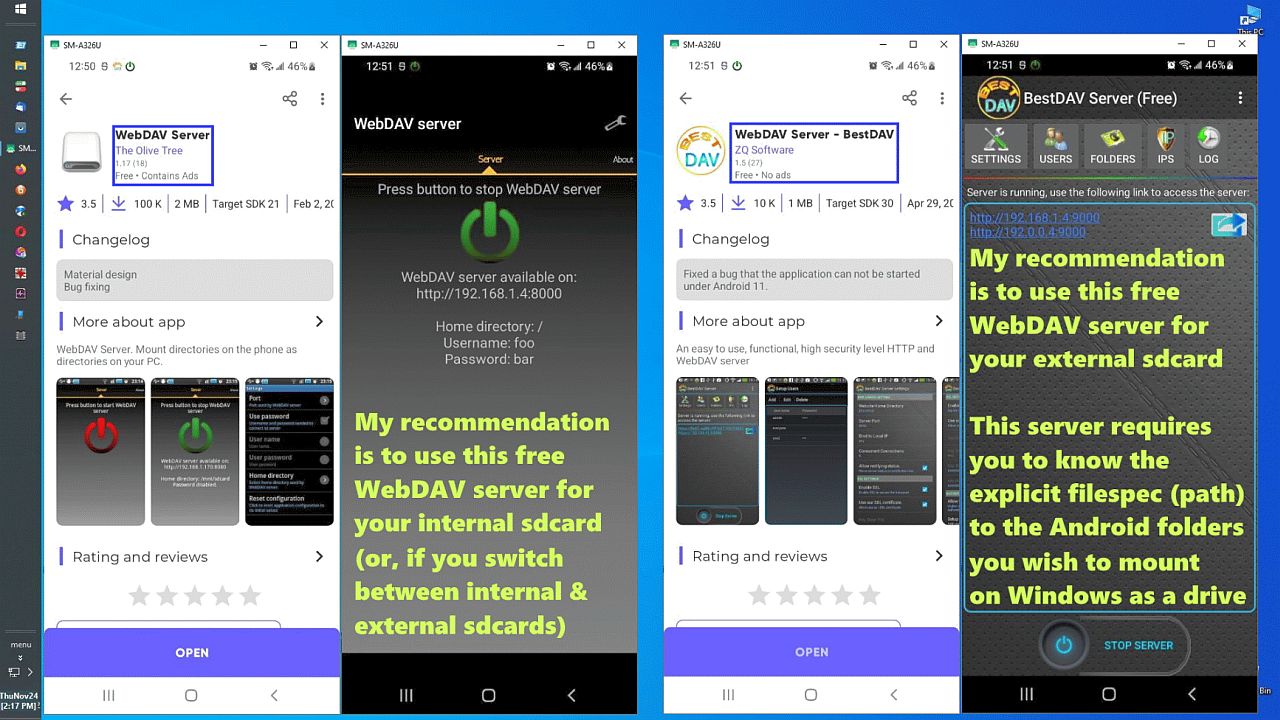
But I prefer WebDav over FTP because it's just like sliced bread is.
<https://i.postimg.cc/4yKdxWS4/chart-ftpshare-vs-webdavdrive.jpg>
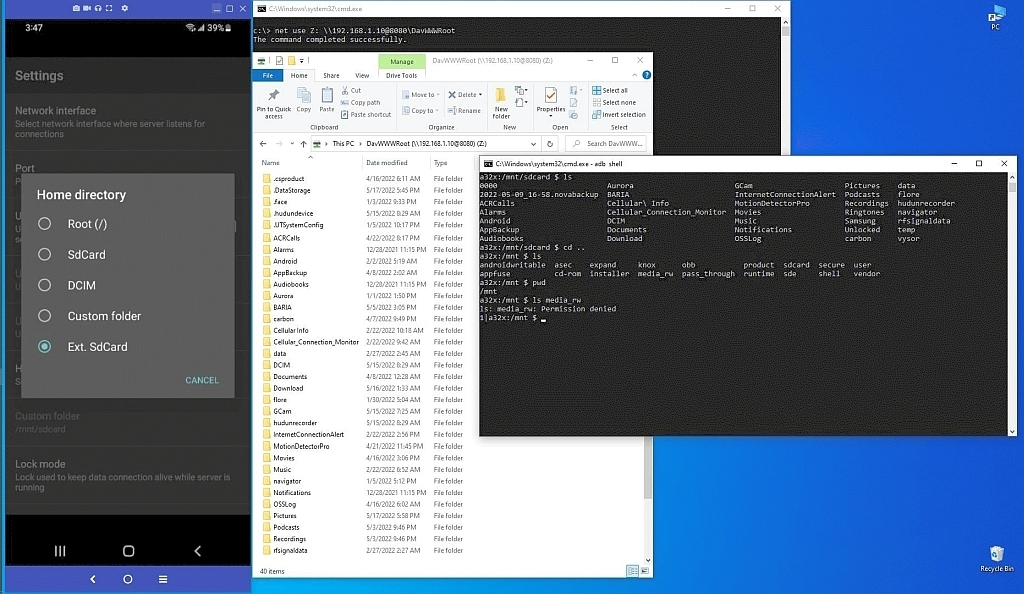
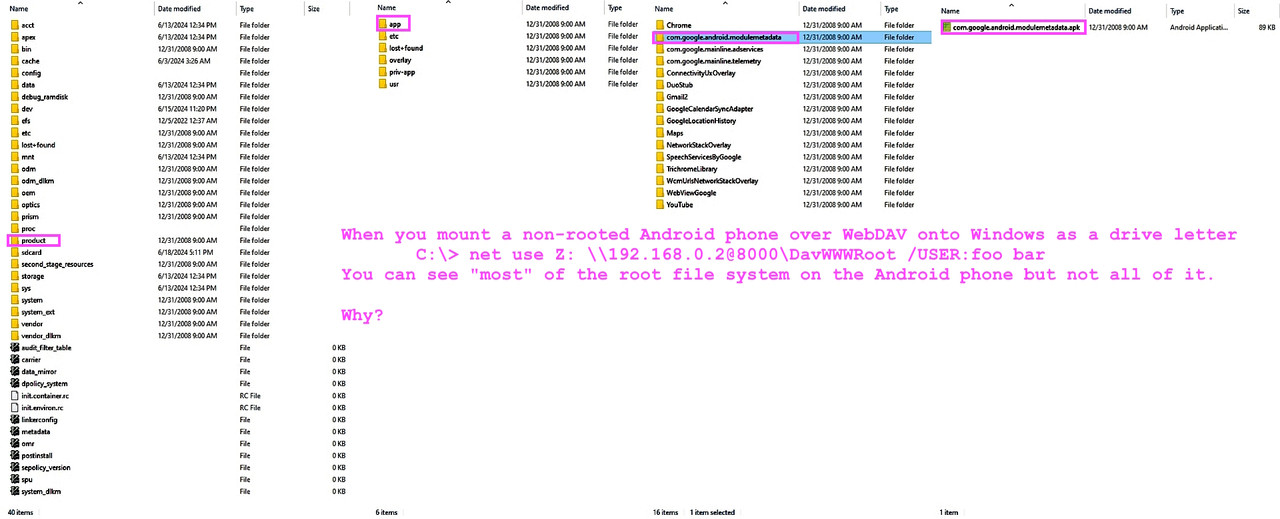
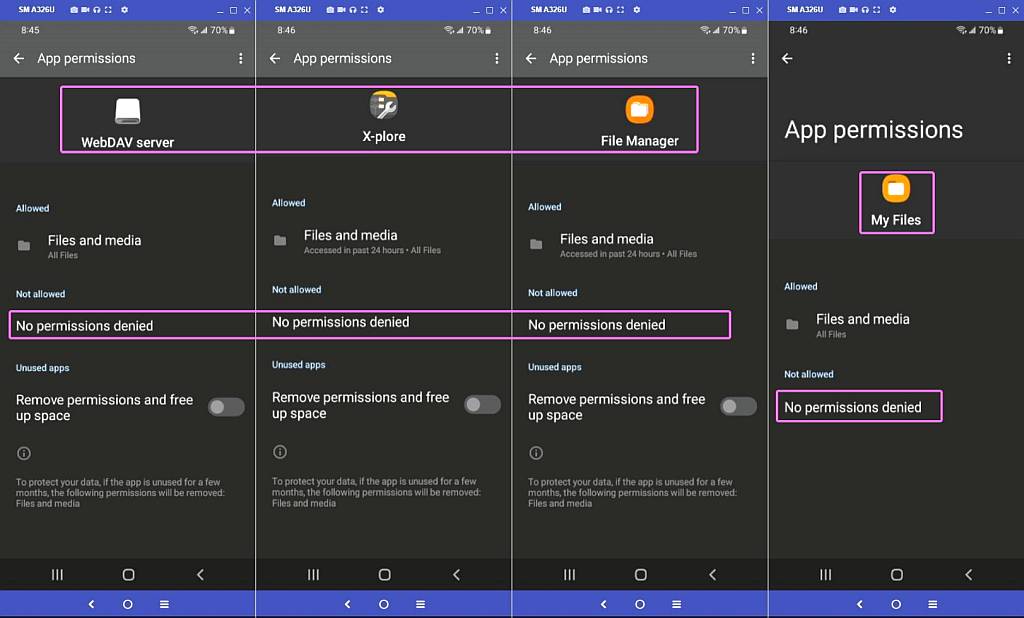
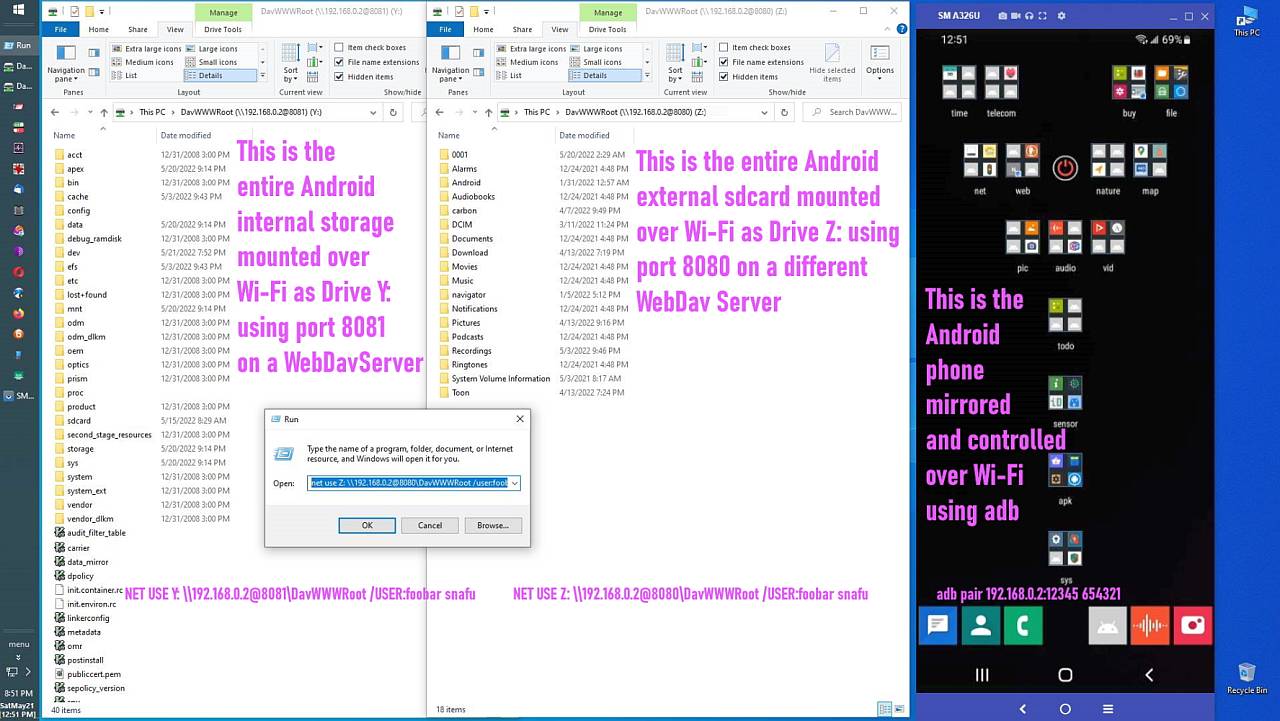
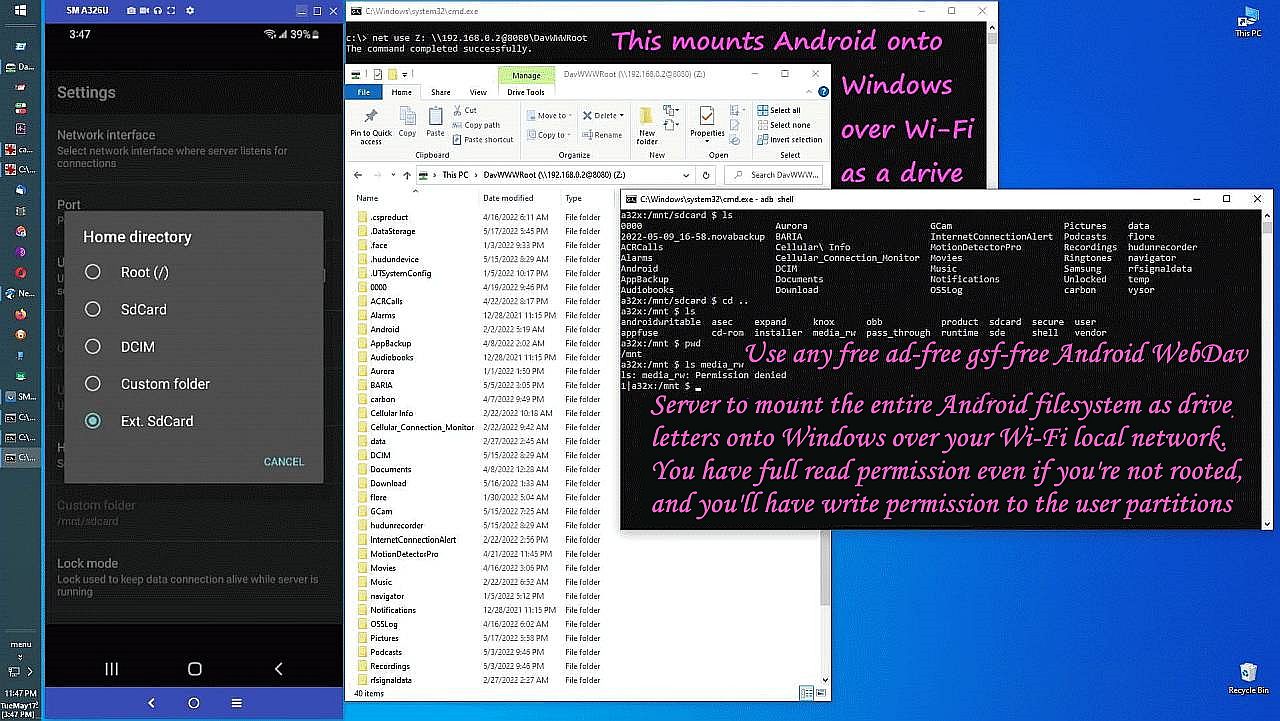
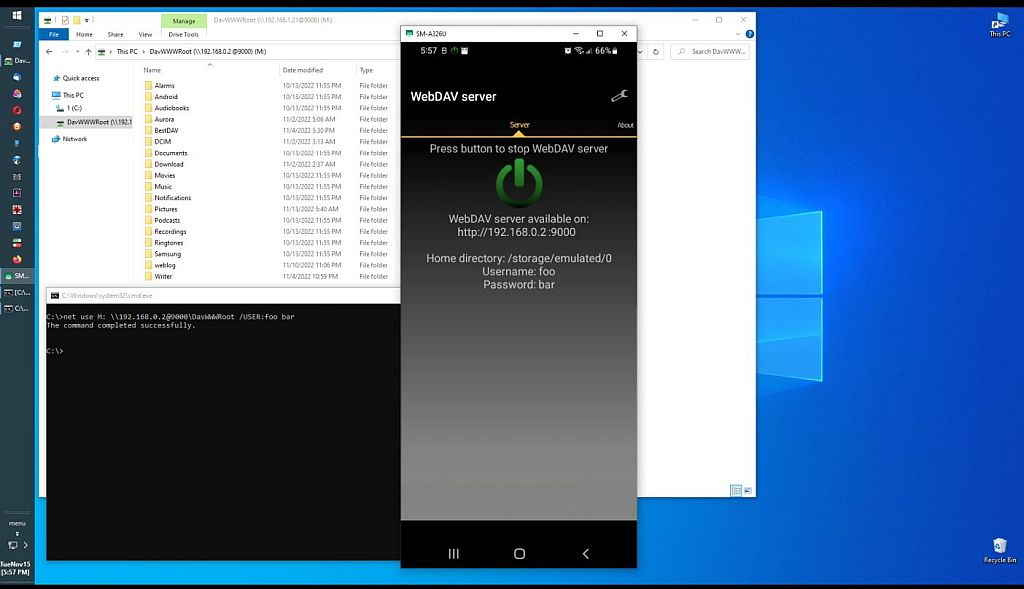
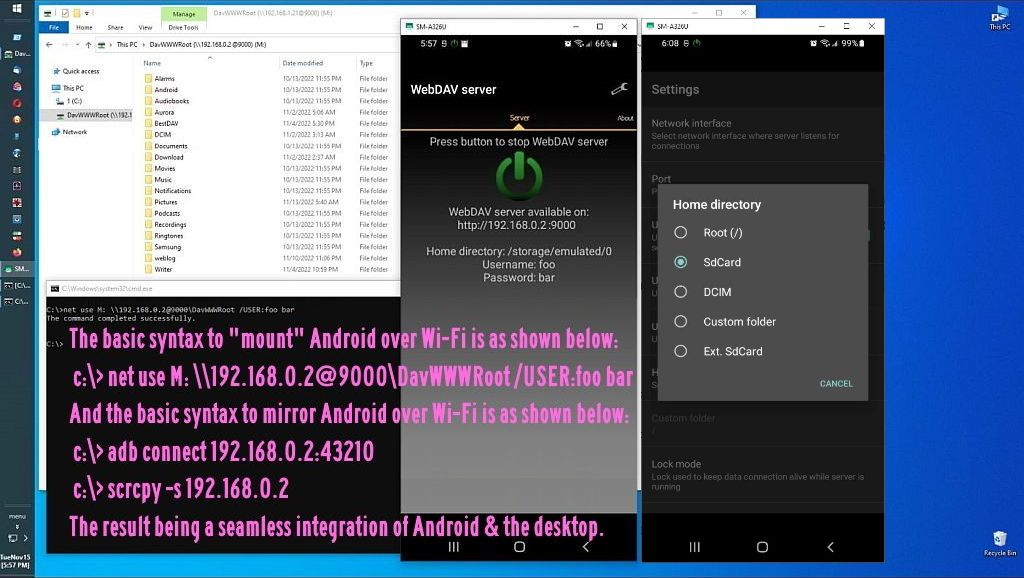
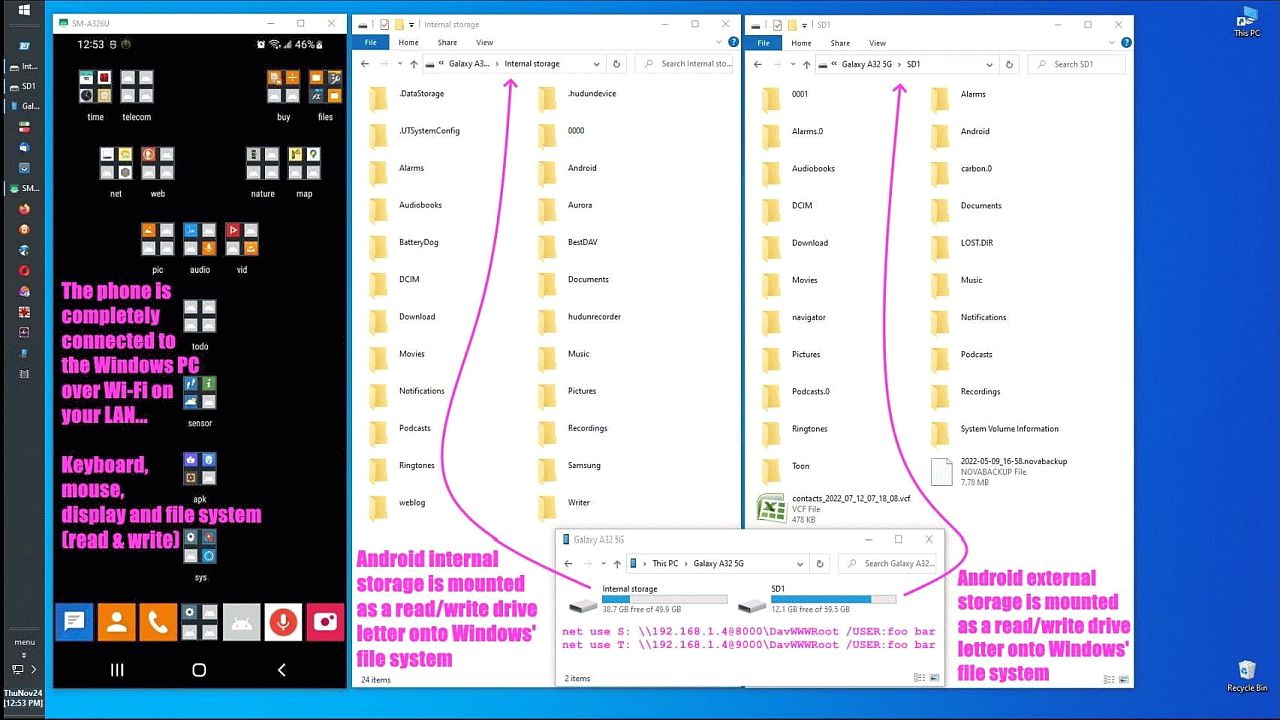
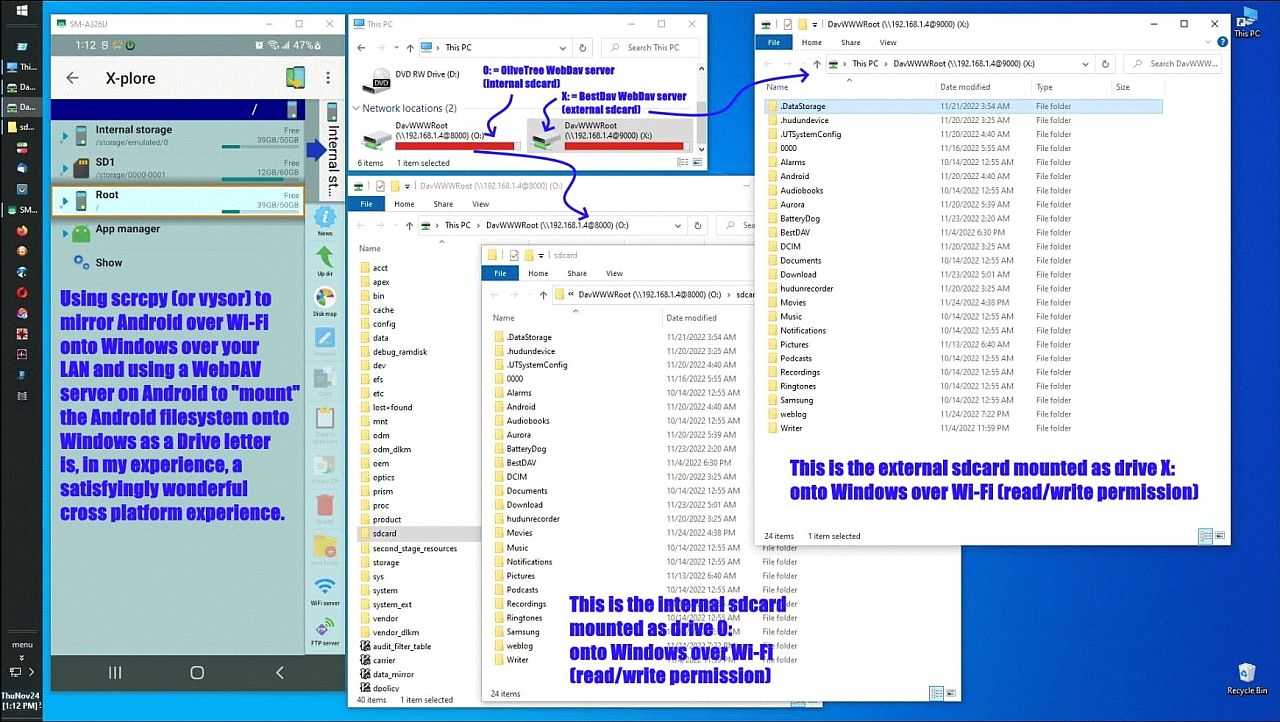
As with FTP, nothing needs to be installed on Windows for WebDav to mount your entire Android file system (yes, root too!) as a Windows drive letter.
<https://i.postimg.cc/1zrmSmQc/davroot.jpg> Windows can see Android root!
All you need on Windows is to use the "net use" command to mount Android:
C:\> net use Z: \\102.168.1.2@8000\DavWWWRoot /USER:jim * /PERSISTENT:YES
In comp.mobile.android, on Tue, 27 Jan 2026 00:06:15 +0100, Herbert
Kleebauer <klee@unibwm.de> wrote:
On 1/26/2026 11:17 PM, micky wrote:
A few days ago I exported a >500 MByte chat. I saved it locally on the >>>phone
I don't even see a way to save it locally?
Beside Bluetooth, Google Drive, Gmail there is also an entry
"Save As" which is provided by the app "primitive ftpd" which
I don't have that entry.
But I prefer WebDav over FTP because it's just like sliced bread is.
<https://i.postimg.cc/4yKdxWS4/chart-ftpshare-vs-webdavdrive.jpg>
You don't need an external program (ftpuse) to access the
Android file system. It's all built into Windows explorer.
net use Z: \\102.168.1.2@8000\DavWWWRoot /USER:joe * /PERSISTENT:YES
As with FTP, nothing needs to be installed on Windows for WebDav to mount
your entire Android file system (yes, root too!) as a Windows drive letter. >> <https://i.postimg.cc/1zrmSmQc/davroot.jpg> Windows can see Android root!
Already the first line is a lie.
net use Z: \\192.168.1.2@8000\DavWWWRoot /USER:jim * /PERSISTENT:YES
|| Native Windows Integration
|| FTP Server on Android/iOS: Requires a separate FTP client application
|| Windows Drive over WebDAV on Android/iOS: Integrated for drive mapping via Explorer
No separate FTP client is necessary!
All you need on Windows is to use the "net use" command to mount Android:
C:\> net use Z: \\102.168.1.2@8000\DavWWWRoot /USER:jim * /PERSISTENT:YES
The simpler solution is always the better solution.
I start
Primitive ftpd on the phone (just a finger tip) and open
an explorer window on the pc. I put the cursor into the
address bar of explorer and use the QR-code scanner to
scan the QR-code on the phone. That's all. Now in the
explorer window I can access the Android file system (including
SD card) and use drag&drop like in a local explorer window.
After the file transfer I stop Primitive ftpd and then nothing
is running on the phone which could be used as entry point
for illegal accessing the phone from outside.
Occam's Razor has TWO tenets:
a. Simple
b. Solves all needs
The simplest solution that solves all the needs is likely the better.
So what matters is what are our respective needs.
But you haven't seemed to discuss shares and mounts when we discuss them. There are fundamental differences when it comes to Windows mounts & shares!
One is mere mapping; the other is mounting as a drive letter.
They're not the same thing.
I don't do anything and my entire Android phone is permanently mounted on Windows the moment I boot up my Android phone and I boot up Windows.
On 1/26/2026 10:27 PM, Carlos E.R. wrote:
On 2026-01-26 22:07, Herbert Kleebauer wrote:
A few days ago I exported a >500 MByte chat. I saved it locally on the
phone and then transferred the zip file to the PC with ftp (using
"primitive ftpd" on the phone and "Windows Explorer" on the PC) . I
What format has the chat?
The chat is exported as a zip file. It contains the chat as .txt
file (utf-8 including smileys.) and all pictures, videos, pdfs etc.
in the original format.
One is mere mapping; the other is mounting as a drive letter.
They're not the same thing.
Who cares.
The only thing I want do do is, to copy pictures taken
with the phone (or in this case a zip file generated by exporting a
chat from Whatsapp) to the pc and sometimes copy videos or apk files
to the phone. And that happens only every few month.
I don't do anything and my entire Android phone is permanently mounted on
Windows the moment I boot up my Android phone and I boot up Windows.
That makes your solution unusable for me.
If you have a pc which
downloads every few month some files from the internet, do you then
want that this pc is connected to the internet all the time?
The communication software on pc and phone must be active only
if I transfer data. I don't want an open port to the phone all
the time.
net use Z: \\102.168.1.2@8000\DavWWWRoot
net use Z: /delete--
Herbert Kleebauer <klee@unibwm.de> wrote:
On 1/26/2026 10:27 PM, Carlos E.R. wrote:
On 2026-01-26 22:07, Herbert Kleebauer wrote:
A few days ago I exported a >500 MByte chat. I saved it locally on the >> phone and then transferred the zip file to the PC with ftp (using
"primitive ftpd" on the phone and "Windows Explorer" on the PC) . I
What format has the chat?
The chat is exported as a zip file. It contains the chat as .txt
file (utf-8 including smileys.) and all pictures, videos, pdfs etc.
in the original format.
I did a test for one Chat/person. I got the .txt file with the text of
the messages (with the smileys, etc.), pictures (.jpg), audio (.opus),
videos (.mp4), but did *not* get PDFs (there should be two).
For a PDF, the ,txt file says
8/27/25, 20:30 - Frank Slootweg: DOC-20250827-WA0004. (file attached)
but the file is not included in the .zip file. N.B. in the above line it looks like the file does not have an extension (which would be a
problem), but the file in the original chat *is* a PDF and is opened by
for example the (Google) 'Drive PDF Viewer. But also in that viewer, the
name is shown without an extension: "DOC-20250827-WA0004." (note the dot
at the end). So something is fishy.
Also that PDF was attached to a small message and that message
("Huisregels Dutch GP") is not in the .txt file. Very strange!
Other than these two missing PDFs, the .zip file seems to contain everything.--- Synchronet 3.21a-Linux NewsLink 1.2
BUT, as I think Carlos hinted at, if a message contains a quote of an earlier message (as we do on Usenet), the quote is not in the .txt file,
only the response is. So something like
"Yes"
and then you have to guess to what the "Yes" applies. This particular
chat had two of these missing quotes.
Bottom line: Somewhat useful, but not very much.
Herbert Kleebauer wrote:
Since your needs are so simple, almost any solution I've tested in the past works for you (& that's fine). Nobody said you had to use a better tool.
The communication software on pc and phone must be active only
if I transfer data. I don't want an open port to the phone all
the time.
Bbbbbuuuuttttt it's just this one command you run when you need it.
C:\> net use Z: \\102.168.1.2@8000\DavWWWRoot
Since your needs are so simple, almost any solution I've tested in the past >> works for you (& that's fine). Nobody said you had to use a better tool.
But I can't imagine a simpler way to do it: one finger tip on the
phone and one QR-code scan on the PC and all is up and running.
And you don't have to learn anything new because all you are using
is the Windows explorer (in the same way as you do it on the local disk).
It does all I want and in the simplest way possible. So I call
it the "better tool".
The communication software on pc and phone must be active only
if I transfer data. I don't want an open port to the phone all
the time.
Bbbbbuuuuttttt it's just this one command you run when you need it.
C:\> net use Z: \\102.168.1.2@8000\DavWWWRoot
The problem is not the client (pc) but the server (phone). If
the port is open all the time, there is a much higher risk to be
misused than when the server is only running while it is actually
used.
Frank Slootweg <this@ddress.is.invalid> wrote:
Herbert Kleebauer <klee@unibwm.de> wrote:
On 1/26/2026 10:27 PM, Carlos E.R. wrote:
On 2026-01-26 22:07, Herbert Kleebauer wrote:
A few days ago I exported a >500 MByte chat. I saved it locally on the >>>>> phone and then transferred the zip file to the PC with ftp (using
"primitive ftpd" on the phone and "Windows Explorer" on the PC) . I
What format has the chat?
The chat is exported as a zip file. It contains the chat as .txt
file (utf-8 including smileys.) and all pictures, videos, pdfs etc.
in the original format.
I did a test for one Chat/person. I got the .txt file with the text of
the messages (with the smileys, etc.), pictures (.jpg), audio (.opus),
videos (.mp4), but did *not* get PDFs (there should be two).
For a PDF, the ,txt file says
8/27/25, 20:30 - Frank Slootweg: DOC-20250827-WA0004. (file attached)
but the file is not included in the .zip file. N.B. in the above line it
looks like the file does not have an extension (which would be a
problem), but the file in the original chat *is* a PDF and is opened by
for example the (Google) 'Drive PDF Viewer. But also in that viewer, the
name is shown without an extension: "DOC-20250827-WA0004." (note the dot
at the end). So something is fishy.
The missing PDF mystery is solved!
I was again thinking about the missing extension and especially about
the dot at the end of the filename.
It turns out that (Windows) File Explorer does not show such files. I opened the .zip file with the 7-Zip program and lo and behold there
were the 'missing' files! I just clicked on them and (Google) Chrome was quite happy to open them, never mind the missing extension.
Also that PDF was attached to a small message and that message
("Huisregels Dutch GP") is not in the .txt file. Very strange!
This *is* still a mystery, because that text should be in the .txt
file, but isn't (and it's also not in the PDF).
Other than these two missing PDFs, the .zip file seems to contain
everything.
BUT, as I think Carlos hinted at, if a message contains a quote of an
earlier message (as we do on Usenet), the quote is not in the .txt file,
only the response is. So something like
"Yes"
and then you have to guess to what the "Yes" applies. This particular
chat had two of these missing quotes.
Bottom line: Somewhat useful, but not very much.
Maybe those 3 files are only accessible being root on the phone?
A few days ago I exported a >500 MByte chat. I saved it locally on the
phone and then transferred the zip file to the PC with ftp (using
"primitive ftpd" on the phone and "Windows Explorer" on the PC) . I
think this is the fasted method because the transfer is only within
the local WLAN.
There is also software to convert the exported data to html, but
I didn't try it:
https://github.com/mtln/chat-export
On 2026-01-26 22:50, Herbert Kleebauer wrote:
On 1/26/2026 10:27 PM, Carlos E.R. wrote:
On 2026-01-26 22:07, Herbert Kleebauer wrote:
A few days ago I exported a >500 MByte chat. I saved it locally on the >>>> phone and then transferred the zip file to the PC with ftp (using
"primitive ftpd" on the phone and "Windows Explorer" on the PC) . I
What format has the chat?
The chat is exported as a zip file. It contains the chat as .txt
file (utf-8 including smileys.) and all pictures, videos, pdfs etc.
in the original format.
That is useless crap. Now I remember, I tried that one years ago.
The message part are the plain text messages, without the emoticons, and >without the files inserted in the text in their context. Like a PDF file >would be.--- Synchronet 3.21a-Linux NewsLink 1.2
The chat is exported as a zip file. It contains the chat as .txt
file (utf-8 including smileys.) and all pictures, videos, pdfs etc.
in the original format.
That is useless crap. Now I remember, I tried that one years ago.
It certainly is disappointing. Whatsapp could have done a lot better.
I mentioned the one that would not export. Did i get around to telling
you all -- no I didn't; -- that I found you could forward the chat, but
you have to tap on each little piece individually.
The result has even a worse format, in that the time for every comment
is the time I did the fowarding and there is no date at all. What's app could have done better.
On 1/27/2026 10:03 AM, Carlos E.R. wrote:
And Primitive ftpd also provides the "Save As" button
when exporting chats from Whatsapp.
That's a curious one. I get that one.
I also get Cx File explorer and can then save as a local file.
Android by default doesn't offer the "Save As" so you will need an
additional app which provides this service. Doesn't matter whether
this is "Primitive FTPD" or "Cx File explorer" or any other app.
But I was glad that Primitive FTPD provided that feature because
it was installed already for file transfer and I didn't need a
further app.
But I don't understand why Whatsapp itself doesn't offer a "Save As".
On Tue, 1/27/2026 3:39 AM, Herbert Kleebauer wrote:
On 1/27/2026 1:28 AM, micky wrote:
Beside Bluetooth, Google Drive, Gmail there is also an entry
"Save As" which is provided by the app "primitive ftpd" which
I don't have that entry.
But if I install F-droid, that line will appear?
F-Droid is an alternative app store for Google Playstore.
You don't have to install F-Droid to be able to install
apps hosted on F-Droid, but then there are no automatic
updates for the installed apps (but for me it is an advantage
when working apps are not automatically replaced by newer ones).
https://f-droid.org/packages/org.primftpd/
https://github.com/wolpi/prim-ftpd
The direct link to Primitive ftpd is:
https://f-droid.org/repo/org.primftpd_67.apk
Just download and install it on the phone.
Primitive ftpd is very easy to use because the
Windows explorer has a built-in ftp client and
therefore no extra software is needed on the PC.
Just start Primitive ftpd on the phone and enter
the displayed ftp address in the address bar of
the Windows explorer (or if you have a QR-code scanner
attached to your PC, just scan the displayed QR-code).
Then the file system on your phone is displayed in
explorer like a local folder and you can use drag&drop
to copy files from or to your phone. Copying files
by WLAN is much faster than using bluetooth.
And Primitive ftpd also provides the "Save As" button
when exporting chats from Whatsapp.
But the advantage of FSquirt, is it works over Bluetooth,
when a number of other things are "busted" on your computer.
That's the only real feature it has. It's reasonably
robust (assuming Pairing still works on your beast).
Even when Windows didn't have a working TCP/IP stack
across Bluetooth, the FSquirt file transfer, still worked.
Don't ask me what the stack used to do that was. I was
just impressed that it worked.
C:\Windows\System32\fsquirt.exe
Paul
Today I used blutooth and it was fine again, but again the website
didn't like my picture. I may need a bigger white border, or maybe my picture is too dark. :-(
On 1/31/2026 4:10 AM, micky wrote:
The chat is exported as a zip file. It contains the chat as .txt
file (utf-8 including smileys.) and all pictures, videos, pdfs etc.
in the original format.
That is useless crap. Now I remember, I tried that one years ago.
It certainly is disappointing. Whatsapp could have done a lot better.
I mentioned the one that would not export. Did i get around to telling
you all -- no I didn't; -- that I found you could forward the chat, but
you have to tap on each little piece individually.
The result has even a worse format, in that the time for every comment
is the time I did the fowarding and there is no date at all. What's app
could have done better.
But what is the real problem with using "export chat" for archive
purpose?
In alt.comp.os.windows-11, on Tue, 27 Jan 2026 12:20:32 +0100, Herbert Kleebauer <klee@unibwm.de> wrote:[...]
But I don't understand why Whatsapp itself doesn't offer a "Save As".
Me neither.
I found out why the things I exported by bluetooth moved, on their own.
It wasn't on their own. I have to click bluetooth, Accept a file, for
each file expected. Then when it comes the window changes and lists the
file that just came. At that poin it's in the temp folder. I can
browse to any folder I want or just click Save and it puts it in Documents-something I had done that for some but not others. So they
were in two places.
Now I'm trying to take a picture of my passport with the phone and sent
that to the PC. That's even more confusing Tried Gmail first, and it filled in the From. I filled in the To: and clicked Send but nothing happened. Tried again and from then on the From wasn't filled in and I coudl't go there to fill it in
On 2026-01-31 08:42, Herbert Kleebauer wrote:
On 1/31/2026 4:10 AM, micky wrote:
The chat is exported as a zip file. It contains the chat as .txt
file (utf-8 including smileys.) and all pictures, videos, pdfs etc.
in the original format.
That is useless crap. Now I remember, I tried that one years ago.
It certainly is disappointing. Whatsapp could have done a lot better.
I mentioned the one that would not export. Did i get around to telling
you all -- no I didn't; -- that I found you could forward the chat, but
you have to tap on each little piece individually.
The result has even a worse format, in that the time for every comment
is the time I did the fowarding and there is no date at all. What's app >>> could have done better.
But what is the real problem with using "export chat" for archive
purpose?
No formatting.
It is plain text, and only names attached photos, audios, videos, etc.
If WhatsApp would print to PDF the entire chat with clickable files
inserted in the correct places, that would be wonderful.
Some people talk to me via audio messages, while I answer by typing.
"Carlos E.R." <robin_listas@es.invalid> ha scritto:
On 2026-01-31 08:42, Herbert Kleebauer wrote:If you tell Whatsapp to export the zip file including media and
On 1/31/2026 4:10 AM, micky wrote:
The chat is exported as a zip file. It contains the chat as .txt
file (utf-8 including smileys.) and all pictures, videos, pdfs etc. >>>>>> in the original format.
That is useless crap. Now I remember, I tried that one years ago.
It certainly is disappointing. Whatsapp could have done a lot better.
I mentioned the one that would not export. Did i get around to telling >>>> you all -- no I didn't; -- that I found you could forward the chat, but >>>> you have to tap on each little piece individually.
The result has even a worse format, in that the time for every comment >>>> is the time I did the fowarding and there is no date at all. What's app >>>> could have done better.
But what is the real problem with using "export chat" for archive
purpose?
No formatting.
It is plain text, and only names attached photos, audios, videos, etc.
then you run in the terminal
$ chat-export -z ChatWhatsApp.zip --embed-media
...you will get an HTML file with "embed media " .
If you tell Whatsapp to export the zip file including media andBut what is the real problem with using "export chat" for archive
purpose?
No formatting.
It is plain text, and only names attached photos, audios, videos, etc.
then you run in the terminal
$ chat-export -z ChatWhatsApp.zip --embed-media
...you will get an HTML file with "embed media " .
Yes, but we are talking of what WhatsApp on its own does.
On 2026-01-31 08:42, Herbert Kleebauer wrote:
But what is the real problem with using "export chat" for archive
purpose?
No formatting.
It is plain text, and only names attached photos, audios, videos, etc.
On 2/2/2026 12:55 PM, Carlos E.R. wrote:
On 2026-01-31 08:42, Herbert Kleebauer wrote:
But what is the real problem with using "export chat" for archive
purpose?
No formatting.
It is plain text, and only names attached photos, audios, videos, etc.
But Whatsapp is chat not mail. If you talk to other people
or make phone calls, do you always use a switched-on voice
recorder so you later can replay the talk? An exported
Whatsapp chat is mostly never used again, so the formatting
doesn't matter as long as the all the information is there
in case it is really needed at a later time.
On 2/2/2026 12:55 PM, Carlos E.R. wrote:
On 2026-01-31 08:42, Herbert Kleebauer wrote:
But what is the real problem with using "export chat" for archive
purpose?
No formatting.
It is plain text, and only names attached photos, audios, videos, etc.
But Whatsapp is chat not mail. If you talk to other people
or make phone calls, do you always use a switched-on voice
recorder so you later can replay the talk? An exported
Whatsapp chat is mostly never used again, so the formatting
doesn't matter as long as the all the information is there
in case it is really needed at a later time.
Herbert Kleebauer <klee@unibwm.de> wrote:
On 2/2/2026 12:55 PM, Carlos E.R. wrote:
On 2026-01-31 08:42, Herbert Kleebauer wrote:
But what is the real problem with using "export chat" for archive
purpose?
No formatting.
It is plain text, and only names attached photos, audios, videos, etc.
But Whatsapp is chat not mail. If you talk to other people
or make phone calls, do you always use a switched-on voice
recorder so you later can replay the talk? An exported
Whatsapp chat is mostly never used again, so the formatting
doesn't matter as long as the all the information is there
in case it is really needed at a later time.
I beg to differ. I/we regularly revisit (and even search in) old chats
in order to find/check information. Until now, we do that in/with
WhatsApp, so it's no problem, but when the chats get very big/old, one
might want to have a way to archive them 'offline', but with full
context and that context includes documents, media, links, etc..
For me/us, there really isn't a big difference between IM like
WhatsApp and e-mail. IM is faster with mostly shorter (but not
neccesarily short) messages, but often with documents, media, links,
etc.. E-mail is slower with mostly longer messages, but only with simple attachments (if any), no video, ausio, etc.. All those are minor
differences, not essential ones, especially not for archiving and later revisting.
So all in all, not being able to use WhatsApp itself for this archiving/revisiting functionality is a disadvantage compared to e-mail clients which *can* do these things for e-mail.
micky <NONONOmisc07@fmguy.com> wrote:
In alt.comp.os.windows-11, on Tue, 27 Jan 2026 12:20:32 +0100, Herbert[...]
Kleebauer <klee@unibwm.de> wrote:
But I don't understand why Whatsapp itself doesn't offer a "Save As".
Me neither.
I found out why the things I exported by bluetooth moved, on their own.
It wasn't on their own. I have to click bluetooth, Accept a file, for
each file expected. Then when it comes the window changes and lists the
file that just came. At that poin it's in the temp folder. I can
browse to any folder I want or just click Save and it puts it in
Documents-something I had done that for some but not others. So they
were in two places.
Now I'm trying to take a picture of my passport with the phone and sent
that to the PC. That's even more confusing Tried Gmail first, and it
filled in the From. I filled in the To: and clicked Send but nothing
happened. Tried again and from then on the From wasn't filled in and I
coudl't go there to fill it in
As I said before, don't only say what does *not* work, but also say
which 'Share' options *are* offered on *your* phone!
So for the passport photo example: In your photo or file manager app, long-press on the photo/file so that it gets selected. Now there will probably a 'Share' option on the screen. Tap that. Now a popup will
appear, showing which Share destinations/apps are available on *your*
phone. Tell us *all* the apps which are listed, including those under
'More' (need to swipe the bottom part to the left).
[More 'Doesn't work.' stuff deleted.]
On 3/02/2026 12:36 am, Frank Slootweg wrote:
micky <NONONOmisc07@fmguy.com> wrote:
In alt.comp.os.windows-11, on Tue, 27 Jan 2026 12:20:32 +0100, Herbert[...]
Kleebauer <klee@unibwm.de> wrote:
But I don't understand why Whatsapp itself doesn't offer a "Save As".
Me neither.
I found out why the things I exported by bluetooth moved, on their own.
It wasn't on their own. I have to click bluetooth, Accept a file, for
each file expected. Then when it comes the window changes and lists the >> file that just came. At that poin it's in the temp folder. I can
browse to any folder I want or just click Save and it puts it in
Documents-something I had done that for some but not others. So they
were in two places.
Now I'm trying to take a picture of my passport with the phone and sent
that to the PC. That's even more confusing Tried Gmail first, and it
filled in the From. I filled in the To: and clicked Send but nothing
happened. Tried again and from then on the From wasn't filled in and I
coudl't go there to fill it in
As I said before, don't only say what does *not* work, but also say which 'Share' options *are* offered on *your* phone!
So for the passport photo example: In your photo or file manager app, long-press on the photo/file so that it gets selected. Now there will probably a 'Share' option on the screen. Tap that. Now a popup will
appear, showing which Share destinations/apps are available on *your* phone. Tell us *all* the apps which are listed, including those under 'More' (need to swipe the bottom part to the left).
[More 'Doesn't work.' stuff deleted.]
Does this mean "Big Brother" now knows more about your stuff than it
used to?? ;-)
| Sysop: | Scott |
|---|---|
| Location: | Freeburg, IL, USA, Earth |
| Users: | 4 |
| Nodes: | 16 (0 / 16) |
| Uptime: | 221:15:12 |
| Calls: | 4 |
| Messages: | 15,886 |