• Discussion of FTP vs WebDav for Android/iOS filesystem sharing on Windows PC

    From Maria Sophia@mariasophia@comprehension.com to alt.comp.os.windows-11,alt.comp.os.windows-10,comp.mobile.android on Tue Jan 27 12:11:06 2026
    From Newsgroup: alt.comp.os.windows-11

    This is intended to be a formal team discussion of the topic:
    FTP vs WebDav for Android/iOS filesystem sharing on Windows PC

    This thread is intended to summarize & then discuss the practical
    differences between FTP and WebDAV for Android or iOS filesystem sharing on
    a Windows PC.
    Protocol Network Location Drive Letter Native Needs 3rd Party
    FTP Yes No Yes Yes
    WebDAV Yes Yes Yes No

    The goal is to clarify what Windows can do natively, versus what requires third-party tools, and what the terms share, mount, network drive, and
    network location actually mean (since Windows terminology is confusing).

    IMHO:
    1. FTP is simple. So is WebDAV. On Windows. On Android.
    2. Both are native to Windows. Both have free servers on Android.
    3. There's no difference in simplicity between them (as far as I can tell).

    FTP:
    A. FTP is fine for ad-hoc file transfers.
    B. But FTP cannot provide a native drive letter on Windows.
    C. FTP requires third-party tools for filesystem integration.

    WebDAV:
    a. WebDAV provides native drive-letter mounting on Windows.
    b. WebDAV integrates cleanly with Windows scripts, applications & tools.
    c. For full filesystem interoperability between Android or iOS and Windows,
    WebDAV is more capable than FTP if mapping a drive is one of your needs.

    Occam's Razor says a simple solution that solves all needs is likely best.

    FTP ON WINDOWS

    1. Windows includes a native FTP client, but it does not include an FTP
    filesystem redirector.

    2. Because there is no redirector, Windows cannot mount an FTP server as a
    drive letter.

    3. Windows Explorer can open an FTP server as a virtual folder.
    This is called a Network Location, not a Network Drive.

    4. Example of a Network Location:
    C:\> explorer.exe ftp://username:password@host/

    5. This is not a mount. It does not create a drive letter.
    It does not behave like a filesystem.
    It is only Explorer acting as an FTP client.

    6. To get a real drive letter for FTP, a third-party redirector
    is required.

    7. Example of a third-party mount:
    C:\> ftpuse Z: ftp://192.168.1.2 user password

    8. This works apparently, but it is not native Windows functionality.

    WEBDAV ON WINDOWS

    1. Windows includes a native WebDAV filesystem redirector called WebClient.

    2. Because the redirector is built in, Windows can mount WebDAV as a real
    network drive with a drive letter.

    3. No third-party tools are required.

    4. Example of a native WebDAV mount:
    C:\> net use Z: \\192.168.1.2@8000\DavWWWRoot /USER:jim * /PERSISTENT:YES

    5. DavWWWRoot is a Windows native keyword that has existed since the days
    of Windows XP and Windows Server 2003.

    6. This is a mapped network drive, not just a network location.

    ROLES: SHARE VS MOUNT
    a. A server shares a filesystem.
    b. A client mounts a filesystem.
    c. FTP servers on Android can share, but they cannot mount anything.
    d. WebDAV servers on Android can share & Windows can mount them natively.

    Occam's Razor:

    i. The simplest solution is not what makes any solution likely the best.
    ii. The best solution is usually the simplest one that solves all needs.

    Certainly FTP is simple, but FTP is limited.
    FTP cannot provide a drive letter without third-party Windows tools.

    Just as certainly, WebDAV is simple too. Just as simple as FTP is, IMHO.
    And WebDAV provides native drive-letter mounting on Windows.

    WebDAV solves more requirements than FTP in a Windows environment.
    If you don't need or want native drive-letter mapping, then FTP is fine.

    But they're not equivalent.
    I. FTP is less functional in that respect than WebDav is.
    II. Yet, both are super simple.

    KEY QUESTION FOR THIS TEAM DISCUSSION

    Q: What does FTP do better than WebDAV for Android or iOS filesystem
    interoperability on a Windows PC on a local LAN?

    A: ?
    --
    Usenet is a forum for discussing essential tools we use to solve problems.
    --- Synchronet 3.21a-Linux NewsLink 1.2
  • From Andy Burns@usenet@andyburns.uk to alt.comp.os.windows-11,alt.comp.os.windows-10,comp.mobile.android on Tue Jan 27 17:43:52 2026
    From Newsgroup: alt.comp.os.windows-11

    Maria Sophia wrote:

    WEBDAV ON WINDOWS

    1. Windows includes a native WebDAV filesystem redirector called WebClient.

    2. Because the redirector is built in, Windows can mount WebDAV as a real
      network drive with a drive letter.

    3. No third-party tools are required.

    N.B. Windows built-in webDAV client is deprecated, and I can see why.

    I used to run a daily task that synchronised data from a sharepoint
    library, to a PC (and then to an SFTP server via WinSCP).

    The WebDAV part would find a novel way of b0rking every few months ...

    --- Synchronet 3.21a-Linux NewsLink 1.2
  • From Maria Sophia@mariasophia@comprehension.com to alt.comp.os.windows-11,alt.comp.os.windows-10,comp.mobile.android on Tue Jan 27 15:02:04 2026
    From Newsgroup: alt.comp.os.windows-11

    Andy Burns wrote:
    Maria Sophia wrote:

    WEBDAV ON WINDOWS

    1. Windows includes a native WebDAV filesystem redirector called WebClient. >>
    2. Because the redirector is built in, Windows can mount WebDAV as a real
    ' network drive with a drive letter.

    3. No third-party tools are required.

    N.B. Windows built-in webDAV client is deprecated, and I can see why.

    I used to run a daily task that synchronised data from a sharepoint
    library, to a PC (and then to an SFTP server via WinSCP).

    The WebDAV part would find a novel way of b0rking every few months ...


    Andy is correct so here's my equally honest comparison of FTP v. WebDav

    Windows WebDAV client:
    a. The built-in WebClient service is considered legacy by Microsoft.
    b. It supports only basic WebDAV features.
    c. It has known reliability issues under load or long-running sync tasks.
    d. Microsoft has not significantly updated it in many years.

    FTP on Windows is in a similar state in that Microsoft considers it legacy.
    a. The built-in ftp.exe client is plaintext-only.
    b. No FTPS or SFTP support.
    c. Explorer's FTP integration is minimal and not maintained.
    d. Modern Windows environments typically use SFTP (OpenSSH)
    or third-party tools instead.

    My summary above may not be correct, but it's my assessment (i.e., AFAIK).
    --- Synchronet 3.21a-Linux NewsLink 1.2
  • From Maria Sophia@mariasophia@comprehension.com to alt.comp.os.windows-11,alt.comp.os.windows-10,comp.mobile.android on Tue Jan 27 15:43:24 2026
    From Newsgroup: alt.comp.os.windows-11

    Maria Sophia wrote:
    a. The built-in WebClient service is considered legacy by Microsoft.

    Even so, it has been working for me on Windows 10 for, oh, 5 years or so.

    When I want to mount the Android filesystem over the LAN as a drive, I run:
    net use Z: \\192.168.1.2@8080\DavWWWRoot

    Note that DavWWWRoot only has meaning on Windows as it's a Windows keyword.

    When I no longer need Android as a drive letter, I unmount it from Windows.
    net use Z: /delete

    FTP is similar but you can't mount FTP as a drive letter (AFAIK) without
    adding third-party tools (e.g., FTPUse or NetDrive) to the Windows PC.
    --- Synchronet 3.21a-Linux NewsLink 1.2
  • From Arno Welzel@usenet@arnowelzel.de to alt.comp.os.windows-11,alt.comp.os.windows-10,comp.mobile.android on Wed Jan 28 12:58:19 2026
    From Newsgroup: alt.comp.os.windows-11

    Maria Sophia, 2026-01-27 18:11:

    [...]
    1. Windows includes a native FTP client, but it does not include an FTP
    filesystem redirector.

    2. Because there is no redirector, Windows cannot mount an FTP server as a
    drive letter.

    3. Windows Explorer can open an FTP server as a virtual folder.
    This is called a Network Location, not a Network Drive.

    This is called a "Shell namespace".

    Also see: <https://en.wikipedia.org/wiki/Windows_Shell_namespace>
    --
    Arno Welzel
    https://arnowelzel.de
    --- Synchronet 3.21a-Linux NewsLink 1.2
  • From Arno Welzel@usenet@arnowelzel.de to alt.comp.os.windows-11,alt.comp.os.windows-10,comp.mobile.android on Wed Jan 28 12:59:40 2026
    From Newsgroup: alt.comp.os.windows-11

    Maria Sophia, 2026-01-27 21:43:

    Maria Sophia wrote:
    a. The built-in WebClient service is considered legacy by Microsoft.

    Even so, it has been working for me on Windows 10 for, oh, 5 years or so.

    Yes - but Windows 10 itself is also legacy now and for Windows 11
    Microsoft did not improve anything for the WebDAV support.
    --
    Arno Welzel
    https://arnowelzel.de
    --- Synchronet 3.21a-Linux NewsLink 1.2
  • From Maria Sophia@mariasophia@comprehension.com to alt.comp.os.windows-11,alt.comp.os.windows-10,comp.mobile.android on Wed Jan 28 12:51:09 2026
    From Newsgroup: alt.comp.os.windows-11

    Arno Welzel wrote:
    Maria Sophia wrote:
    a. The built-in WebClient service is considered legacy by Microsoft.

    Even so, it has been working for me on Windows 10 for, oh, 5 years or so.

    Yes - but Windows 10 itself is also legacy now and for Windows 11
    Microsoft did not improve anything for the WebDAV support.

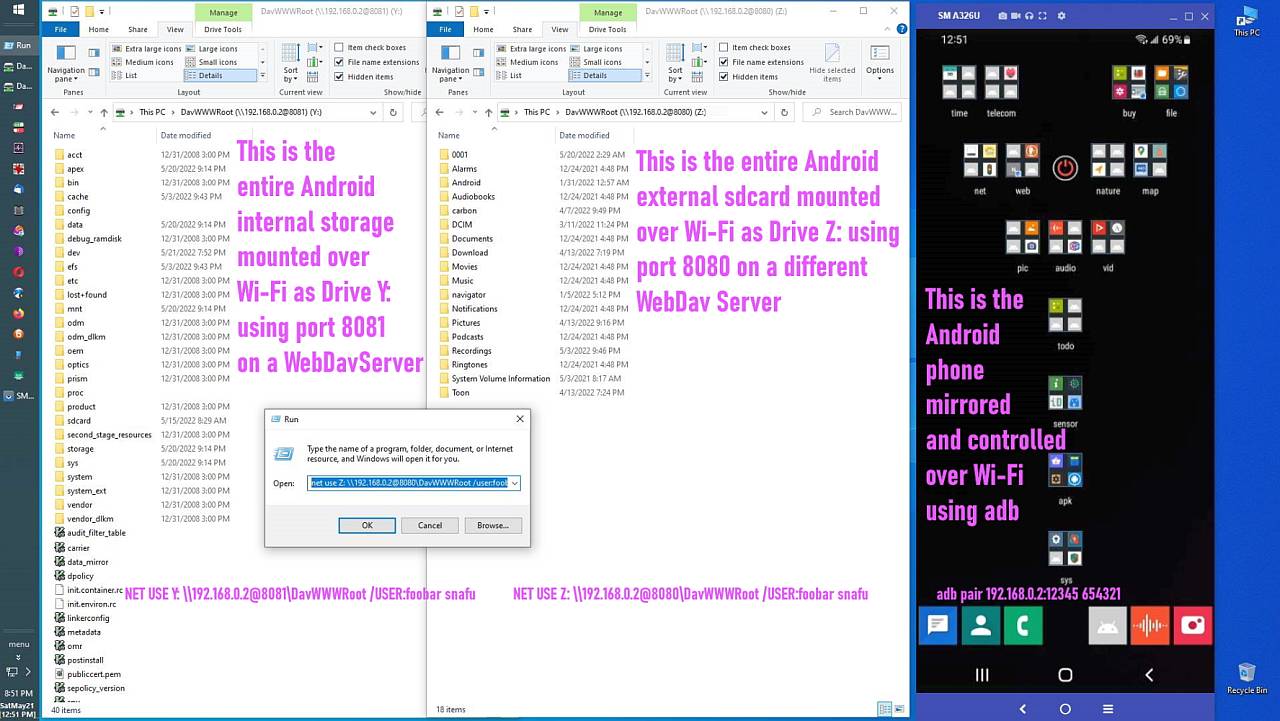
    Yes... but... all you need is the file explorer and "net use" & that works.
    <https://i.postimg.cc/BvJdKWzt/webdav06.jpg>

    You can't mount the Android filesystem as a Windows drive letter with FTP (unless you add third-party software). But WebDAV needs no software.

    Having the Android phone as a Windows drive has huge advantages, e.g., the Windows file explorer can save DIRECTLY from Windows to Android in 1 step.
    --- Synchronet 3.21a-Linux NewsLink 1.2
  • From Arno Welzel@usenet@arnowelzel.de to alt.comp.os.windows-11,alt.comp.os.windows-10,comp.mobile.android on Thu Jan 29 06:58:38 2026
    From Newsgroup: alt.comp.os.windows-11

    Maria Sophia, 2026-01-28 18:51:

    Arno Welzel wrote:
    Maria Sophia wrote:
    a. The built-in WebClient service is considered legacy by Microsoft.

    Even so, it has been working for me on Windows 10 for, oh, 5 years or so. >>
    Yes - but Windows 10 itself is also legacy now and for Windows 11
    Microsoft did not improve anything for the WebDAV support.

    Yes... but... all you need is the file explorer and "net use" & that works.
    <https://i.postimg.cc/BvJdKWzt/webdav06.jpg>

    You can't mount the Android filesystem as a Windows drive letter with FTP (unless you add third-party software). But WebDAV needs no software.

    The issue with WebDAV in Windows is, that it does not work realiable.

    Having the Android phone as a Windows drive has huge advantages, e.g., the Windows file explorer can save DIRECTLY from Windows to Android in 1 step.

    Using the Windows file explorer you don't need a drive letter at all.
    That's the reason, why namespaces exist in the explorer - to be able to
    access locations even when they don't have a drive letter.

    A drive letter is only useful if you want to access the data in *other* applications besides the Windows file explorer which *require* a drive
    letter.
    --
    Arno Welzel
    https://arnowelzel.de
    --- Synchronet 3.21a-Linux NewsLink 1.2
  • From Maria Sophia@mariasophia@comprehension.com to alt.comp.os.windows-11,alt.comp.os.windows-10,comp.mobile.android on Thu Jan 29 11:34:09 2026
    From Newsgroup: alt.comp.os.windows-11

    Arno Welzel wrote:
    You can't mount the Android filesystem as a Windows drive letter with FTP
    (unless you add third-party software). But WebDAV needs no software.

    The issue with WebDAV in Windows is, that it does not work realiable.

    Having the Android phone as a Windows drive has huge advantages, e.g., the >> Windows file explorer can save DIRECTLY from Windows to Android in 1 step.

    Using the Windows file explorer you don't need a drive letter at all.
    That's the reason, why namespaces exist in the explorer - to be able to access locations even when they don't have a drive letter.

    A drive letter is only useful if you want to access the data in *other* applications besides the Windows file explorer which *require* a drive letter.

    Hi Arno,

    It is good that you are pointing out the differences between WebDAV and
    FTP for connecting Windows to mobile devices. Those distinctions are real.

    Regarding your comment that WebDAV in Windows is not reliable, I do not
    doubt that it can fail. I am only saying that in my specific use model it
    has been reliable enough to be useful. If you have concrete failure cases
    it would help to list them, since the discussion here is about FTP vs
    WebDAV. Without examples it is hard to understand what you mean by
    unreliable in this context.

    My setup is simple. I run a free WebDAV server on Android or iOS, then use
    the built in Windows WebDAV client:

    net use Z: \\192.168.1.2@8000\DavWWWRoot /USER:joe * /PERSISTENT:YES

    No third party software on Windows, no shell extensions, no drivers.
    Windows maps it as a normal filesystem. For my purposes this has been
    stable, and the fact that it uses only built in components is a major advantage. Scripts that expect a persistent drive letter work fine with
    this mapping.

    The biggest practical benefit for me is that I can save APK files directly
    from a Windows browser session to the mobile device. APKs are useless on Windows, so saving them straight to the phone is the natural workflow.
    This is something FTP cannot do on Windows without third party redirectors, because Windows has no FTP filesystem provider.

    Only protocols with filesystem redirectors can be mapped as drives:
    1. SMB has one.
    2. WebDAV has one.
    3. FTP does not.

    That is a critical difference when the goal is full read write access to
    the visible mobile filesystem through normal Windows applications.

    You are correct that a drive letter is not required for basic file copying. Explorer namespaces work fine for that, and adb does not need a drive
    letter either. So yes, we can live without mapping the device.

    But the question remains. How do you directly save an APK obtained during a Windows web browsing session to the mobile device? That is the specific workflow where a mapped drive letter matters, and where WebDAV provides something that FTP cannot provide on Windows without extra software.

    If we arbitrarily toss SMB into the mix, this is my assessment:
    a. Can a web browser save an APK directly to Android with SMB?
    b. Can a web browser save an APK directly to Android with WebDav?
    c. Can a web browser save an APK directly to Android with FTP?

    The answer, when we tackle iOS & SMB, is surprisingly unintuitive!

    1. SMB
    A Windows browser can save directly to an SMB share, but only if the non-rooted/non-jailbroken mobile device is running an SMB server.

    A. Android
    Non-rooted Android cannot bind to privileged ports, which includes the
    standard SMB ports. Because of that, Android SMB servers must run on
    high ports. So SMB can work, but it is not useful on Android IMHO.

    B. iOS
    Shockingly, iOS is the only common consumer operating system that allows
    apps to bind to privileged ports, so an SMB server on iOS can run on the standard SMB ports and behave more like a normal SMB server.

    In practice this makes SMB on iOS more useful than on Android.

    In both cases, if the SMB server is reachable and writable, a Windows
    browser can save directly to it because SMB is a real filesystem
    provider in Windows.

    2. WebDAV
    A Windows browser can save directly to a mapped WebDAV drive letter.
    WebDAV has a filesystem redirector in Windows, so the mobile device appears
    as a normal drive. We can save an APK directly to Android during a Windows
    web browsing session (without needing to save it and then copy it over).

    3. FTP
    Unfortunately a Windows browser cannot save directly to an FTP location. Windows has no FTP filesystem provider, so FTP cannot be mapped, cannot be assigned a drive letter, and cannot appear in Save dialogs. Explorer can
    browse FTP, but only inside Explorer itself.

    Having said those distinctions between SMB/WebDAV/FTP I certainly agree
    with you that FTP/WebDAV are no longer being worked on my Microsoft.
    --
    Usenet is where people with vast knowledge converge to discuss ideas.
    --- Synchronet 3.21a-Linux NewsLink 1.2
  • From Maria Sophia@mariasophia@comprehension.com to alt.comp.os.windows-11,alt.comp.os.windows-10,comp.mobile.android on Thu Jan 29 12:10:45 2026
    From Newsgroup: alt.comp.os.windows-11

    Arno Welzel wrote:
    Maria Sophia, 2026-01-27 18:11:

    [...]
    1. Windows includes a native FTP client, but it does not include an FTP
    filesystem redirector.

    2. Because there is no redirector, Windows cannot mount an FTP server as a >> drive letter.

    3. Windows Explorer can open an FTP server as a virtual folder.
    This is called a Network Location, not a Network Drive.

    This is called a "Shell namespace".

    Also see: <https://en.wikipedia.org/wiki/Windows_Shell_namespace>

    Hi Arno,

    This is a great discussion because if these varying names have confused me
    over the decades, it's perhaps likely others like me are also confused.

    So I happily thank you for the clear explanation about Windows namespaces.

    Your point that Windows File Explorer exposes FTP only as a Shell
    namespace, is exactly right. That distinction is important, and it actually ties directly into why WebDAV behaves so differently from FTP.

    As you noted, FTP in Windows is handled as a Shell namespace. That is why Explorer can browse FTP, but Windows cannot mount FTP as a drive letter,
    cannot assign it a UNC share, and cannot expose it to Save dialogs.

    That's because there is no redirector behind it.

    WebDAV is different because Windows includes a WebDAV filesystem
    redirector. Since WebDAV has a redirector, Windows can treat it like a
    real filesystem. That is the perhaps the main reason net use works with
    WebDAV but not with FTP.

    What's extremely interesting to this distinction is that this is also apparently where the (case-insensitive) DavWWWRoot comes in.

    net use Z: \\192.168.1.2@8000\DavWWWRoot /USER:joe * /PERSISTENT:YES
    net use Z: /delete

    Apparently davwwwroot is a Microsoft-invented "synthetic share name".

    Contrary to what seems intuitive, DavWWWRoot is not an Android folder.
    Android (or iOS) has no idea what DavWWWRoot is, in and of itself.

    DavWWWRoot is a Windows namespace shim that exists apparently only because WebDAV has a redirector and Windows needs a fake share name to satisfy the
    UNC parser.

    SMB has real shares, but WebDAV does not, so Microsoft invented DavWWWRoot
    to stand in as the share name. Apparently it simply tells Windows to treat
    the root of the WebDAV server as the root of the mapped drive.

    Who knew?
    Not me.
    Now I do.

    Since this naming topic is drifting into the internal workings of the
    Windows WebDAV redirector, I will open a separate thread focused only on DavWWWRoot, what it is, and why Windows uses it & how it applies to mobile device file system sharing in a way that almost nobody knows how to do.

    Newsgroups: alt.comp.os.windows-10,alt.comp.os.windows-11,comp.mobile.android
    Subject: What is DavWWWRoot & why does Microsoft use it for WebDAV mappings?
    Date: Thu, 29 Jan 2026 12:05:50 -0500
    Message-ID: <10lg41e$a9d$1@nnrp.usenet.blueworldhosting.com>

    It's sheer genius how Microsoft allowed mounting of mobile devices!
    --
    Usenet is where people with vast knowledge converge to discuss ideas.
    --- Synchronet 3.21a-Linux NewsLink 1.2