• What on earth does TurboTax need Windows 11 for?

    From Maria Sophia@mariasophia@comprehension.com to alt.comp.os.windows-10,alt.comp.os.windows-11,misc.taxes on Tue Jan 27 19:37:11 2026
    From Newsgroup: alt.comp.os.windows-11

    I bought TurboTax at Costco today for $55.99 - $11 = $44.99 + 0% tax.

    At home I try to install it on Windows 10, and it says it won't load. Apparently it needs Windows 11.

    Why?
    What on earth could TurboTax need that only Windows 11 can supply?

    Is there a known workaround?
    --- Synchronet 3.21a-Linux NewsLink 1.2
  • From Maria Sophia@mariasophia@comprehension.com to alt.comp.os.windows-10,alt.comp.os.windows-11,misc.taxes on Tue Jan 27 20:32:02 2026
    From Newsgroup: alt.comp.os.windows-11

    Maria Sophia wrote:
    What on earth could TurboTax need that only Windows 11 can supply?

    I looked up the answer and even if you have the Windows 10 ESU Turbo Tax
    2025 (mine is the Deluxe 'cuz that's the lowest tier Costco sells), it
    won't run simply because Microsoft said they were dropping Win10 support.
    <https://ttlc.intuit.com/turbotax-support/en-us/help-article/download-products/end-support-windows-8-affect-turbotax-experience/L4v9atO3O_US_en_US>

    Apparently Win11 is a policy lockout, not a technical requirement.
    There is no Windows-11-exclusive feature that TurboTax depends on.
    Yet both the installer and the program itself checks the OS version.

    Intuit says you're fucked and they don't care. They say you can just use
    the online version, but if I had wanted online, I would have done that.

    Intuit says you can run it on a Windows 10 VM because they only check how
    many times the license has been used, and you get five licensed installs.

    Microsoft allows Windows 11 Home/Pro to run in a VM for personal use
    (so you can use Win11 indefinitely without entering a product key).

    Apparently TurboTax will run normally in an unactivated Windows 11 VM.
    But setting up a VM is a bitch on my older Windows 10 AMD desktop PC.

    Given Intuit's installer checks only the OS version number, there may be a reliable way to spoof the version, but I haven't found that method yet.

    The other choice is to return Turbo Tax Deluxe to Costco (even though it's opened) to buy some other tax software that reads 2024 turbotax data files.

    Apparently the only option left is to switch to H&R Block or TaxAct Desktop (both of which still support Windows 10 as of the 2025 filing season).

    Pretty much it seems the only viable alternative (given my tax situation)
    is H&R Block Deluxe + State (Desktop) or H&R Block Premium, both of which appear to read TurboTax files better than TaxAct Desktop does (AFAICT).

    TaxAct Desktop might work with an additional state, but from what I've seen
    in the past few minutes of searching, it doesn't import ttax data well.

    The Costco $45 TurboTax Deluxe + State gave you one federal and one state,
    and the federal e-file was free with the state being $25 - $10 = $15.
    You can only install it on five computers and then the license expires.

    H&R Block Premium (Desktop) + State also has a free federal e-file.
    You get 1 state included but that state e-file is usually ~$19.95.
    Exactly like TurboTax, you can only install it on five computers.

    H&R Block lets you prepare multiple state returns with the one included
    state program but each and every state e-file is still a flat $20 each.

    Comparing other things, last year (2024 tax season) TurboTax forced upon us
    a mothership account requirement, while H&R Block doesn't do that (AFAICT).

    Based on this comparison, even though I've been using TurboTax for decades, it's clearly a company that fucks us for no good reason, so good riddance.

    Just like I ditched Netflix forever when they raised their prices during
    the DVD mail order days, I think it's time to ditch TurboTax forever.

    Does anyone know where the best mailorder or walk-in price is for
    H&R Block Premium (Desktop) + State in the United States?

    Here are some links I'm exploring as we speak but it's not clear from the listings if the state is included or not (which changes things a lot).
    <https://www.walmart.com/browse/electronics/hr-block-software/3944_1089430_7288037_6600507>
    <https://www.newegg.com/p/N82E16832732207>
    <https://slickdeals.net/f/19139440-h-r-block-2025-tax-software-offer-premium-35-deluxe-20-deluxe-state-23-more-pc-mac-digital-or-key-card>
    <https://www.amazon.com/s?k=H%2526R+Block+Premium+%252B+State+2025+(PC+Download)>
    <https://www.amazon.com/s?k=H%26R+Block+Premium+%26+State+Tax+Software+2025>
    <https://www.hrblock.com/tax-software/deluxe-tax-software/>

    Is anyone in the US ahead of me on this where we can both help everyone?
    --
    When a company cares that little for the customer, the feeling is mutual.
    --- Synchronet 3.21a-Linux NewsLink 1.2
  • From Lynn McGuire@lynnmcguire5@gmail.com to alt.comp.os.windows-10,alt.comp.os.windows-11,misc.taxes on Tue Jan 27 19:54:32 2026
    From Newsgroup: alt.comp.os.windows-11

    On 1/27/2026 6:37 PM, Maria Sophia wrote:
    I bought TurboTax at Costco today for $55.99 - $11 = $44.99 + 0% tax.

    At home I try to install it on Windows 10, and it says it won't load. Apparently it needs Windows 11.
    Why?
    What on earth could TurboTax need that only Windows 11 can supply?

    Is there a known workaround?

    Are these people idiots ? They are going to lose half of their user
    base. Windows 10 is still the prevalent home pc software.

    Lynn

    --- Synchronet 3.21a-Linux NewsLink 1.2
  • From None@none@none.none to alt.comp.os.windows-10,alt.comp.os.windows-11,misc.taxes on Tue Jan 27 19:56:43 2026
    From Newsgroup: alt.comp.os.windows-11

    On 01/27/2026 19:32, Maria Sophia wrote:

    Is anyone in the US ahead of me on this where we can both help everyone?

    You DO know about IRS Free File, don't you? If your adjusted gross
    income is less than $89K you can choose from several providers there to
    file for nothing. Some of them may even handle your state return for
    free as well. If you're so well off that you don't qualify for *that,*
    there are Free File Fillable Forms you can use to file your federal
    return for free regardless of how much you make. The only catch there
    is you have to prepare the return yourself. I'd go to www.irs.gov and
    check it out if I were you.

    --- Synchronet 3.21a-Linux NewsLink 1.2
  • From Maria Sophia@mariasophia@comprehension.com to alt.comp.os.windows-10,alt.comp.os.windows-11,misc.taxes on Tue Jan 27 21:31:47 2026
    From Newsgroup: alt.comp.os.windows-11

    Lynn McGuire wrote:
    Are these people idiots ? They are going to lose half of their user
    base. Windows 10 is still the prevalent home pc software.

    I agree with you that half the world is still on Windows 10, and most of
    them are fully on support given the free 1-yr Microsoft extended support.

    Even though I've been using TurboTax for decades, they started pissing me
    off when they required the Internet a couple of years ago, but I caved in.
    <https://i.postimg.cc/MHMMMhCb/20years-of-turbotax.jpg>

    Then last year they pissed me off by requiring the mothership account.
    Again, I caved in even though an account causes a horrid loss of privacy.

    But now that they're requiring Window 11 for absolutely no good reason, I
    have no intention of caving in, even as I have been using it for decades.

    I think I'm going to buy H&R Block Tax Software Premium 2025 + State.
    It's roughly the same price as TurboTax Deluxe + State at Costco for
    a. One federal e-file
    b. One state e-file

    What I need to know before making that decision is what others have found
    for how well H&R Block Tax Software reads in the 2024 TurboTax data files.

    Anyone have experience with that which they can share with the rest of us?
    Q: How is the transition from TurboTax to H&R Block Tax Software?
    A: ?
    --
    When a company like TurboTax does something this customer unfriendly, then
    that tells us more than any amount of advertising could tell us about them.
    --- Synchronet 3.21a-Linux NewsLink 1.2
  • From Maria Sophia@mariasophia@comprehension.com to alt.comp.os.windows-10,alt.comp.os.windows-11,misc.taxes on Tue Jan 27 21:47:10 2026
    From Newsgroup: alt.comp.os.windows-11

    None wrote:
    On 01/27/2026 19:32, Maria Sophia wrote:

    Is anyone in the US ahead of me on this where we can both help everyone?

    You DO know about IRS Free File, don't you? If your adjusted gross
    income is less than $89K you can choose from several providers there to
    file for nothing. Some of them may even handle your state return for
    free as well. If you're so well off that you don't qualify for *that,* there are Free File Fillable Forms you can use to file your federal
    return for free regardless of how much you make. The only catch there
    is you have to prepare the return yourself. I'd go to www.irs.gov and
    check it out if I were you.

    Thank you for adding that additional good value for the team, since this
    thread is intended to help everyone in the USA who needs to do their taxes.

    I was NOT aware of IRS Free File so I looked it up after your kind advice.
    I may be wrong in my summary below so I ask for everyone to help hone this.

    There are apparently two IRS offerings with similar names to "free file".
    1. IRS Free File (the one with partner companies)
    <https://www.irs.gov/freefile> AGI <=$89K
    2. Free File Fillable Forms (DIY, no income limit)
    <https://www.irs.gov/e-file-providers/free-file-fillable-forms>

    Free File (the one with the AGI limit) is apparently great for:
    a. Simple W-2 returns
    b. Maybe a 1099 or two
    c. People who don't need depreciation schedules
    d. People who don't need carryovers
    e. People who don't need multi-state
    f. People who don't need to import last year's data
    etc.

    However, apparently Free File Fillable Forms would require us to:
    A. Manually compute depreciation
    B. Manually track carryovers
    C. Manually compute AMT
    D. Manually compute passive loss limitations
    E. Manually attach statements
    F. Manually handle multi-state allocations
    etc.

    For those with simple taxes, I'm sure that Free File will work for them.
    But from my research just today (admittedly, I'm new at this stuff),
    H&R Block Premium + State (Desktop) is the closest match to TurboTax Deluxe/Premier for someone with:
    i. Rentals
    ii. Depreciation
    iii. AMT loss Carryovers
    iv. Multi-state returns
    v. Windows 10
    vi. A need to import TurboTax data
    etc.

    However, anything I say above could be wrong (and likely is), as I only researched this today after finding out by accident how bad TurboTax got.
    --
    When a company cares that little for the customer, the feeling is mutual.
    --- Synchronet 3.21a-Linux NewsLink 1.2
  • From Turbo Tax User@turbo.tax@outlook.com to alt.comp.os.windows-10,alt.comp.os.windows-11 on Wed Jan 28 03:14:24 2026
    From Newsgroup: alt.comp.os.windows-11

    On 28/01/2026 00:37, Maria Sophia wrote:
    Is there a known workaround?

    Try using Windows 11 because it works for most modern windows software.

    --- Synchronet 3.21a-Linux NewsLink 1.2
  • From AJL@noemail@none.com to alt.comp.os.windows-11 on Wed Jan 28 03:53:52 2026
    From Newsgroup: alt.comp.os.windows-11

    On 1/27/26 5:37 PM, Maria Sophia wrote:
    I bought TurboTax at Costco today for $55.99 - $11 = $44.99 + 0% tax.

    At home I try to install it on Windows 10, and it says it won't load. >Apparently it needs Windows 11.

    Why?
    What on earth could TurboTax need that only Windows 11 can supply?

    Is there a known workaround?

    There is but you wouldn't like it. TurboTax online. Should work fine on a
    Windows10 browser. I've used it on Chromebooks for years...


    --- Synchronet 3.21a-Linux NewsLink 1.2
  • From =?UTF-8?B?Li4ud8Khw7HCp8KxwqTDsQ==?=@winstonmvp@gmail.com to alt.comp.os.windows-10,alt.comp.os.windows-11,misc.taxes on Tue Jan 27 22:56:30 2026
    From Newsgroup: alt.comp.os.windows-11

    On 1/27/2026 5:37 PM, Maria Sophia wrote:
    I bought TurboTax at Costco today for $55.99 - $11 = $44.99 + 0% tax.

    At home I try to install it on Windows 10, and it says it won't load. Apparently it needs Windows 11.
    Why?
    What on earth could TurboTax need that only Windows 11 can supply?

    Is there a known workaround?

    No, workaround.

    Requirement for Win21 is/was specified and available prior to purpose

    For TTax 2025
    - Costco web site for your version [1]
    => Product display picture
    - Requires Windows 11 or macOS Sonoma 14 or later
    => Product requirements
    - Requires Windows 11 or macOS Sonoma 14 or later

    [1]The $44.99 applies to the TTax 2025 Deluxe Federal + State

    <https://www.costco.com/p/-/turbotax-deluxe-2025-federal-e-file-state-download-for-pcmac-includes-10-credit-in-product/4000410296

    If you purchased the boxed version(sometimes available, no media,
    download link with activation code provided by Intuit), the boxed
    product shows the same requirement.
    --
    ...w¡ñ§±¤ñ
    --- Synchronet 3.21a-Linux NewsLink 1.2
  • From Chris@ithinkiam@gmail.com to alt.comp.os.windows-10,alt.comp.os.windows-11,misc.taxes on Wed Jan 28 08:35:00 2026
    From Newsgroup: alt.comp.os.windows-11

    Lynn McGuire <lynnmcguire5@gmail.com> wrote:
    On 1/27/2026 6:37 PM, Maria Sophia wrote:
    I bought TurboTax at Costco today for $55.99 - $11 = $44.99 + 0% tax.

    At home I try to install it on Windows 10, and it says it won't load.
    Apparently it needs Windows 11.
    Why?
    What on earth could TurboTax need that only Windows 11 can supply?

    Is there a known workaround?

    Are these people idiots ?

    The only idiots are people buying something that is clearly incompatible
    with their needs and then complain about it.

    They are going to lose half of their user
    base. Windows 10 is still the prevalent home pc software.

    Windows 11 has been around over four years and win10 was officially EOL's
    last October. Totally not unreasonable for a financial organisation to
    remove support for out-of-date platforms.


    --- Synchronet 3.21a-Linux NewsLink 1.2
  • From Maria Sophia@mariasophia@comprehension.com to alt.comp.os.windows-10,alt.comp.os.windows-11,misc.taxes on Wed Jan 28 03:44:57 2026
    From Newsgroup: alt.comp.os.windows-11

    ...w¡ñ§±¤ñ wrote:
    What on earth could TurboTax need that only Windows 11 can supply?

    Is there a known workaround?

    No, workaround.

    Requirement for Win21 is/was specified and available prior to purpose

    For TTax 2025
    - Costco web site for your version [1]
    => Product display picture
    - Requires Windows 11 or macOS Sonoma 14 or later
    => Product requirements
    - Requires Windows 11 or macOS Sonoma 14 or later

    [1]The $44.99 applies to the TTax 2025 Deluxe Federal + State

    <https://www.costco.com/p/-/turbotax-deluxe-2025-federal-e-file-state-download-for-pcmac-includes-10-credit-in-product/4000410296

    If you purchased the boxed version(sometimes available, no media,
    download link with activation code provided by Intuit), the boxed
    product shows the same requirement.

    Hi Winston,

    Intuit made an abrupt wholly unexpected needlessly punitive change that
    breaks long-standing expectations, and users will likely only discover it
    after trying to install the product (or, being forewarned, as we are now).

    As you can see I've been using Intuit TurboTax for a very long time and it
    has worked with whatever Windows version I had when I bought that software.
    <https://i.postimg.cc/MHMMMhCb/20years-of-turbotax.jpg>

    I bought it at Costco assuming the same would be true, because why wouldn’t I? Windows 10 ESU is still fully supported through October 2026, and no
    other major U.S. tax software has dropped Windows 10. TurboTax appears to
    be the only one requiring Windows 11 for 2025. And for no good reason.

    Remember, Intuit is well known for dropping unexpected bomb shells on its customer, which tells us a lot about how Intuit marketing feels about us.

    In the 2014 tax year (TurboTax 2015 release), Intuit removed several major forms from TurboTax Deluxe, including, Schedule C (self-employment),
    Schedule D (investments), Schedule E (rental income, K-1s), Schedule F
    (farm income), etc.

    Just as Intuit is doing here, without any overt notice whatsoever, Intuit moved all of those into the more expensive Premier and Home & Business editions. People like me who had used Deluxe for years suddenly discovered
    they couldn't complete their returns without upgrading mid-process. The reaction was so negative that Intuit offered free upgrades to Premier for affected Deluxe customers that year. Ask me how I know this fact.

    The negative publicity was so great that the following year, and
    thereafter, Intuit restored the missing forms back into Deluxe.

    It was a major controversy, and Intuit reversed course only after a wave of complaints and bad press, where Intuit has a history of being hostile to customers such as when TurboTax suddenly required the Internet almost full
    time in 2022 and when TurboTax more recently made the marketing mothership privacy-robbing account mandatory in tax year 2024 (ask me how I know).

    Around that time Intuit marketing, taking a lead from Apple, also expanded:
    a. data-collection prompts
    b. marketing consent screens
    c. cloud-sync nudges
    d. "verify your identity" loops tied to the Intuit account
    etc.
    Where that's so many attacks against the customer that it's clear Intuit is hostile to their customers because they're not doing this for you.

    As far as I can tell by doing the research yesterday, there's no earthly
    reason Intuit should have made this arbitrary decision to force Windows 11.

    However, if anyone can find an answer to the question, that would be nice:
    Q: What on earth does TurboTax need Windows 11 for?
    A: ?
    --
    When a company like Intuit has a long history of being hostile to their customer base, we no longer should reward that company with our business.
    --- Synchronet 3.21a-Linux NewsLink 1.2
  • From Maria Sophia@mariasophia@comprehension.com to alt.comp.os.windows-10,alt.comp.os.windows-11,misc.taxes on Wed Jan 28 03:56:44 2026
    From Newsgroup: alt.comp.os.windows-11

    Chris wrote:
    Lynn McGuire <lynnmcguire5@gmail.com> wrote:
    On 1/27/2026 6:37 PM, Maria Sophia wrote:
    I bought TurboTax at Costco today for $55.99 - $11 = $44.99 + 0% tax.

    At home I try to install it on Windows 10, and it says it won't load.
    Apparently it needs Windows 11.
    Why?
    What on earth could TurboTax need that only Windows 11 can supply?

    Is there a known workaround?

    Are these people idiots ?

    The only idiots are people buying something that is clearly incompatible
    with their needs and then complain about it.

    They are going to lose half of their user
    base. Windows 10 is still the prevalent home pc software.

    Windows 11 has been around over four years and win10 was officially EOL's last October. Totally not unreasonable for a financial organisation to
    remove support for out-of-date platforms.

    Hi Chris,

    What version of Windows are you on?
    Are you aware that Win10 ESU is fully supported until at last October 2026?

    The main question in this thread is still unanswered, which is:
    Q: What on earth does TurboTax need Windows 11 for?
    A: ?

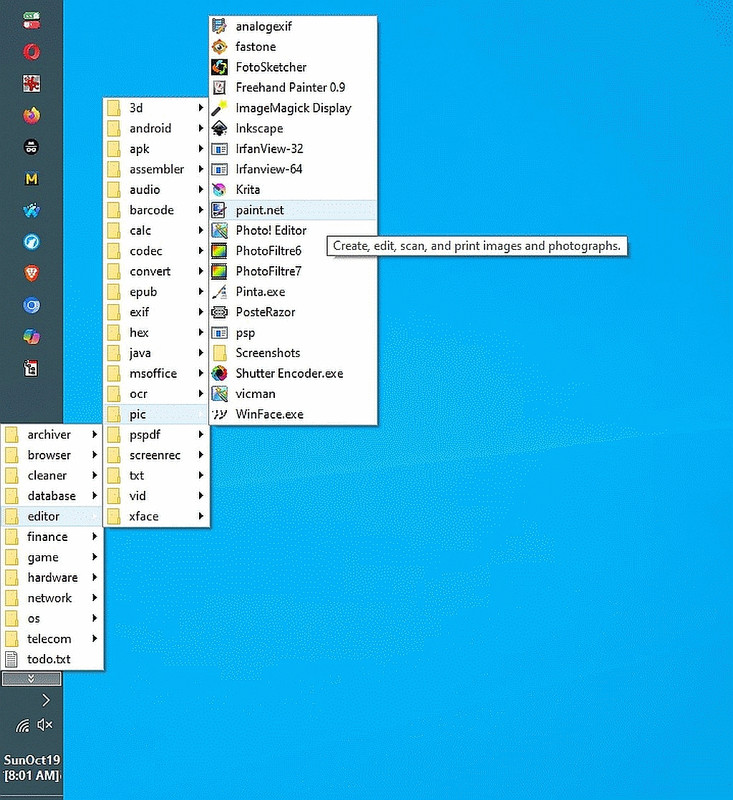
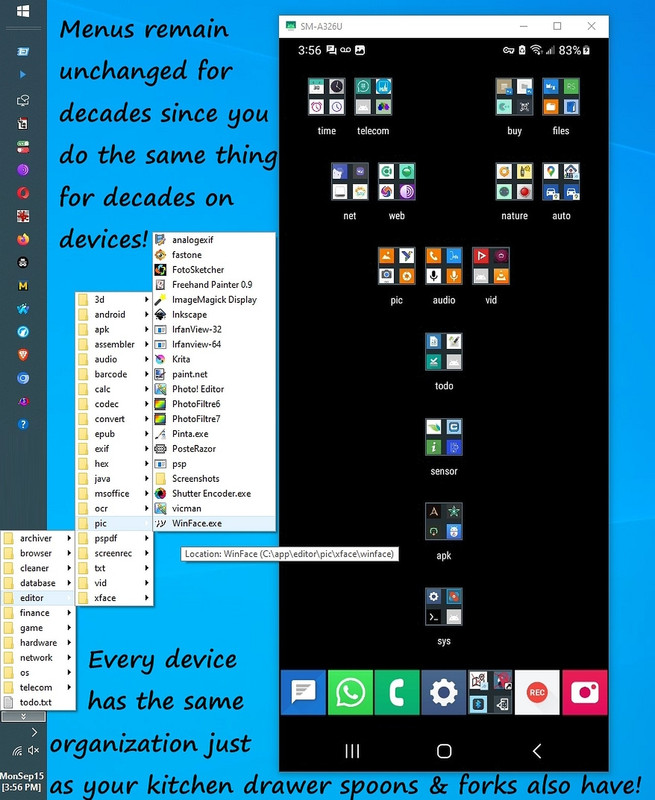
    It doesn't matter that Windows 11 is inferior to Windows 10 (e.g.,
    Microsoft removed the ability to pin a cascade menu to the taskbar).
    <https://i.postimg.cc/brHnQj4Y/pic-menu.jpg>

    What matters is half the world is still using Windows 10, and that Windows
    10 ESU is fully supported for the bulk of the period people do their taxes.

    As I described to Winston, Intuit has no earthly reason to enforce a move
    to Windows 11 simply because their marketing dept is hostile to users.

    When only Intuit tax software suddenly and almost secretly becomes incompatible, and when NO OTHER TAX SOFTWARE did this, something is amiss.

    I have no problem returning my opened copy of TurboTax to Costco, and I
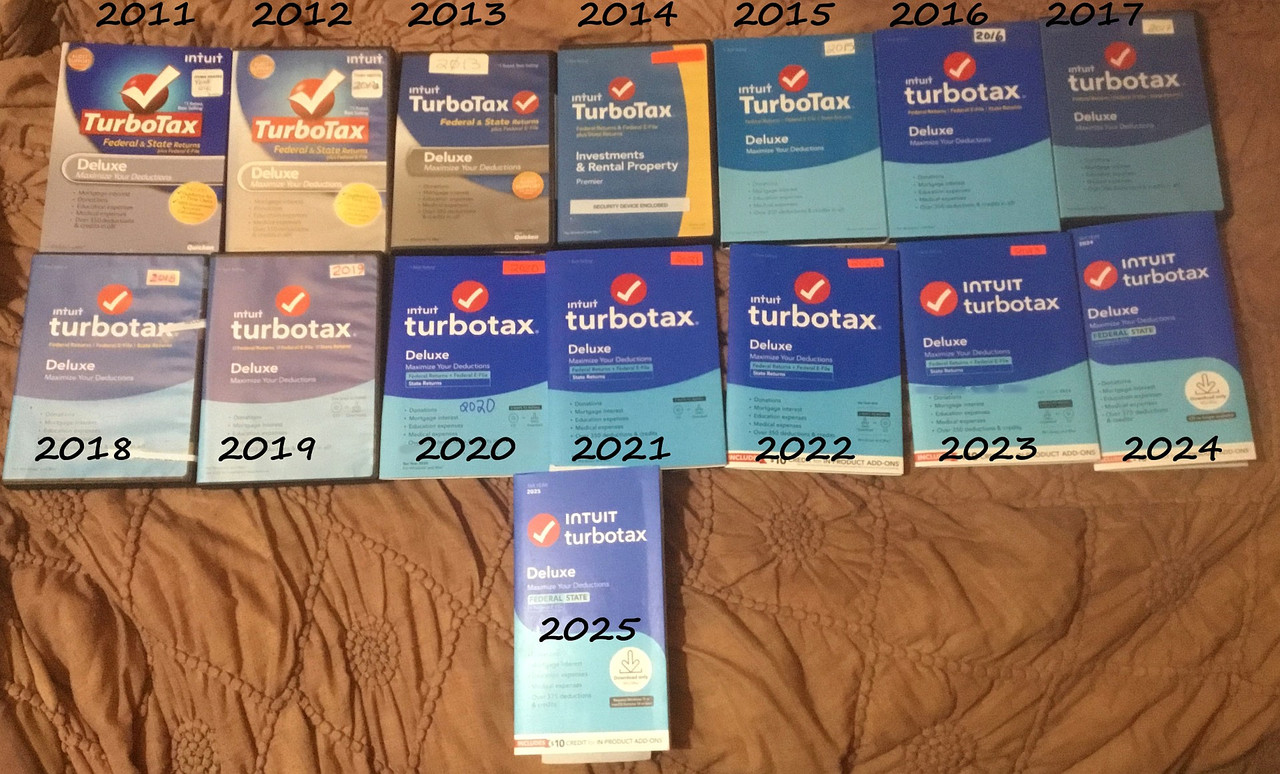
    have no problem buying H&R Block software instead even as I've been using TurboTax for so many years in a row, that I can't find all the packages.
    <https://i.postimg.cc/MHMMMhCb/20years-of-turbotax.jpg>

    But no more.
    When a marketing organization is that hostile to customers, they're out.

    If anyone has real-world experience migrating from TurboTax to H&R Block
    tax software, that would be a very useful tangent for this helpful thread.
    --
    Companies that try to be like Apple always claim it's for your own good.
    --- Synchronet 3.21a-Linux NewsLink 1.2
  • From Maria Sophia@mariasophia@comprehension.com to alt.comp.os.windows-10,alt.comp.os.windows-11 on Wed Jan 28 04:06:24 2026
    From Newsgroup: alt.comp.os.windows-11

    Turbo Tax User wrote:
    On 28/01/2026 00:37, Maria Sophia wrote:
    Is there a known workaround?

    Try using Windows 11 because it works for most modern windows software.

    Every year, like clockwork, Costo puts TurboTax on sale for about ten bucks
    off the normal price, so I've been buying the Deluxe version at that time.
    <https://i.postimg.cc/MHMMMhCb/20years-of-turbotax.jpg>
    Year, after year, after year, after year after year I've been doing that.

    But no more.

    It doesn't even matter that Windows 11 is lost functionality over Windows
    10, because there's nothing that TurboTax needs that is only in Windows 11.

    Apparently it doesn't even matter to Intuit that Windows 10 is fully
    supported at least to October 2026 either, as my research shows, so far,
    that there's absolutely zero checks if we're on the Windows 10 ESU program.

    And, apparently it doesn't matter to Intuit that EVERY OTHER TAX SOFTWARE
    works just fine with Windows 10 (as it should) including H&R Block Deluxe.

    Intuit knew they would lose long-standing customers by this action.
    And Intuit opted to enforce this purely punitive action nonetheless.

    But, maybe there is a good "reason" Intuit is punishing its customers?
    If so, then we need to simply answer the question below with actual fact.

    Q: What on earth does TurboTax need Windows 11 for?
    A: ?
    --
    When a company makes half the world's PC's incompatible for no good reason, that says a lot about how little that company cares for its own customers.
    --- Synchronet 3.21a-Linux NewsLink 1.2
  • From Herbert Kleebauer@klee@unibwm.de to alt.comp.os.windows-10,alt.comp.os.windows-11,misc.taxes on Wed Jan 28 10:24:22 2026
    From Newsgroup: alt.comp.os.windows-11

    On 1/28/2026 9:56 AM, Maria Sophia wrote:
    Chris wrote:

    At home I try to install it on Windows 10, and it says it won't load.
    Apparently it needs Windows 11.
    Why?
    What on earth could TurboTax need that only Windows 11 can supply?

    Don't ask this question in usenet but ask Google:

    https://ttlc.intuit.com/community/articles/community-news-announcements/turbotax-windows-10-desktop-software-end-of-life/05/3708302


    Are these people idiots ?

    Are Microsoft or Adobe idiots because they don't want to
    sell Office or Photoshop but only sell an abo?


    When only Intuit tax software suddenly and almost secretly becomes incompatible, and when NO OTHER TAX SOFTWARE did this, something is amiss.

    Suddenly?

    || Today, we sent a reminder communication to our valued Windows 10
    || Desktop customers informing them that TurboTax Desktop personal
    || software for tax year 2025 and beyond will require Windows 11 or
    || future operating systems.


    But no more.
    When a marketing organization is that hostile to customers, they're out.

    The marketing organization has to generate income for the company:

    || If you purchase TurboTax Desktop personal software for tax year
    || 2025 and cannot install it because you have Windows 10, we have
    || you covered. You will receive an in-product offer to switch to
    || our TurboTax Online Premium service at no additional cost (includes
    || one federal and one state return).

    --- Synchronet 3.21a-Linux NewsLink 1.2
  • From Carlos E.R.@robin_listas@es.invalid to alt.comp.os.windows-10,alt.comp.os.windows-11,misc.taxes on Wed Jan 28 10:28:39 2026
    From Newsgroup: alt.comp.os.windows-11

    On 2026-01-28 09:35, Chris wrote:
    Lynn McGuire <lynnmcguire5@gmail.com> wrote:
    On 1/27/2026 6:37 PM, Maria Sophia wrote:
    I bought TurboTax at Costco today for $55.99 - $11 = $44.99 + 0% tax.

    At home I try to install it on Windows 10, and it says it won't load.
    Apparently it needs Windows 11.
    Why?
    What on earth could TurboTax need that only Windows 11 can supply?

    Is there a known workaround?

    Are these people idiots ?

    The only idiots are people buying something that is clearly incompatible
    with their needs and then complain about it.

    Does the box clearly say in reasonable sized lettering that it is
    Windows 11 only?


    They are going to lose half of their user
    base. Windows 10 is still the prevalent home pc software.

    Windows 11 has been around over four years and win10 was officially EOL's last October. Totally not unreasonable for a financial organisation to
    remove support for out-of-date platforms.

    Windows 10 is still under official support. M$ changed minds.

    Otherwise, it is somewhat ridiculous for a software to demand a certain version of the operating system if there is not actual need.
    --
    Cheers, Carlos.
    ES🇪🇸, EU🇪🇺;
    --- Synchronet 3.21a-Linux NewsLink 1.2
  • From Maria Sophia@mariasophia@comprehension.com to alt.comp.os.windows-11,alt.comp.os.windows-10,misc.taxes on Wed Jan 28 04:33:08 2026
    From Newsgroup: alt.comp.os.windows-11

    AJL wrote:
    On 1/27/26 5:37 PM, Maria Sophia wrote:
    I bought TurboTax at Costco today for $55.99 - $11 = $44.99 + 0% tax.

    At home I try to install it on Windows 10, and it says it won't load. >>Apparently it needs Windows 11.

    Why?
    What on earth could TurboTax need that only Windows 11 can supply?

    Is there a known workaround?

    There is but you wouldn't like it. TurboTax online. Should work fine on a
    Windows10 browser. I've used it on Chromebooks for years...

    Hi AJL,

    Yet again, Intuit blindsided loyal users, this time by requiring Win11 for
    the 25 tax year when the version of Windows was never previously an issue.

    The workaround I was asking about would have been a registry hack of some
    sort, most likely, that told TurboTax to install anyway, since there is no earthly reason that Turbotax shouldn't work just fine on Windows 10 PCs.

    As you suggested, buying TurboTax Online would technically solve it, but
    you know me well enough that doing anything like that online is anathema.

    You can see that I've used the Costco TurboTax desktop version for years
    and never once had to worry about whether it would run on the current
    Windows release. Windows 10 is still supported by Microsoft through October 2026, so it never crossed my mind that Intuit would suddenly cut it off.
    <https://i.postimg.cc/MHMMMhCb/20years-of-turbotax.jpg>

    This isn't the first time Intuit blindsided its loyal users though, so, for
    me, it's simply the straw that broke the camel's back because a punitive
    action like this with no underlying justification says a lot about Intuit.
    1. Intuit sneakily removed key schedules from Deluxe around tax year 2014
    2. Intuit sneakily added the Internet requirement around tax year 2022
    3. Intuit enforced the privacy-robbing account around tax year 2023
    4. Intuit enforced an unnecessary Windows 11 requirement in tax year 2025

    They only get three strikes.
    And that's four.

    They're out.

    More to the point, as far as I can tell, no other major consumer tax
    software has dropped Windows 10. H&R Block, TaxAct, etc. still run fine on Windows 10. TurboTax seems to be the only one forcing this upgrade.

    Why?

    This thread, in order to remain fruitful for those reading, needs to morph toward replacements for Intuit TurboTax that work with our home computers.

    On Amazon, I found this to be the best price, so far, at least for now:
    $42.50 H&R Block Deluxe + State (desktop)
    Federal e-file is free (included with the software).
    Each state e-file is $19.95 per state return

    Note that the price between the two companies' Deluxe is about the same.
    $55.99 - $11 = $44.99 Intuit TurboTax Deluxe + State (desktop)
    Federal e-file is free (included with the software).
    Each state e-file is $25 per state return but you get $10 off once

    Total for H&R Block Deluxe + State (desktop) fed+state efile = $62.45
    Total for TurboTax Deluxe + State (desktop) fed+state efile = $59.99

    The delta is about $2.50 which means the prices are essentially the same.
    What matters now is the functionality differences.

    Anyone have real-world advice on how TurboTax compares to H&R Block?
    --
    When a company can't explain why they made this move, you know they didn't
    do it for your own good. There is some other reason why Intuit did this.
    --- Synchronet 3.21a-Linux NewsLink 1.2
  • From Carlos E.R.@robin_listas@es.invalid to alt.comp.os.windows-10,alt.comp.os.windows-11,misc.taxes on Wed Jan 28 10:40:43 2026
    From Newsgroup: alt.comp.os.windows-11

    On 2026-01-28 01:37, Maria Sophia wrote:
    I bought TurboTax at Costco today for $55.99 - $11 = $44.99 + 0% tax.

    At home I try to install it on Windows 10, and it says it won't load. Apparently it needs Windows 11.
    Why?
    What on earth could TurboTax need that only Windows 11 can supply?

    Is there a known workaround?

    :-P

    Emigrate to a reasonable country such as Spain, where the tax software
    is created by the government and is free as in gratis. Even professional
    tax accountants use it. Bad news for software developers :-P

    The software runs in every operating system inside a web browser like
    Firefox. It connects online to the tax agency computers, and your forms
    are actually stored there, not in your computer. You might not like
    that, I guess. Who cares, you are going to submit the forms to them anyway.

    When you login in, it is possible that the government has completed the
    form for you, so you only have to review it, sign it, and pay (or be
    paid). In more complicated cases, they still fill in as much data as
    they know.

    If you don't have a computer or are not happy with a computer, no
    problem: just get an appointment at the tax agency and they will fill
    the forms for you. Gratis.

    Our taxes in action. The government tries to make paying the taxes as
    easy as they can. :-D
    --
    Cheers, Carlos.
    ES🇪🇸, EU🇪🇺;
    --- Synchronet 3.21a-Linux NewsLink 1.2
  • From Andy Burns@usenet@andyburns.uk to alt.comp.os.windows-10,alt.comp.os.windows-11,misc.taxes on Wed Jan 28 09:55:59 2026
    From Newsgroup: alt.comp.os.windows-11

    Carlos E.R. wrote:

    Emigrate to a reasonable country such as Spain, where the tax software
    is created by the government and is free as in gratis. Even professional
    tax accountants use it. Bad news for software developers

    Presumably you are free to use alternate software?

    --- Synchronet 3.21a-Linux NewsLink 1.2
  • From Maria Sophia@mariasophia@comprehension.com to alt.comp.os.windows-10,alt.comp.os.windows-11,misc.taxes on Wed Jan 28 04:57:44 2026
    From Newsgroup: alt.comp.os.windows-11

    Carlos E.R. wrote:
    The only idiots are people buying something that is clearly incompatible
    with their needs and then complain about it.

    Does the box clearly say in reasonable sized lettering that it is
    Windows 11 only?

    Hi Carlos,

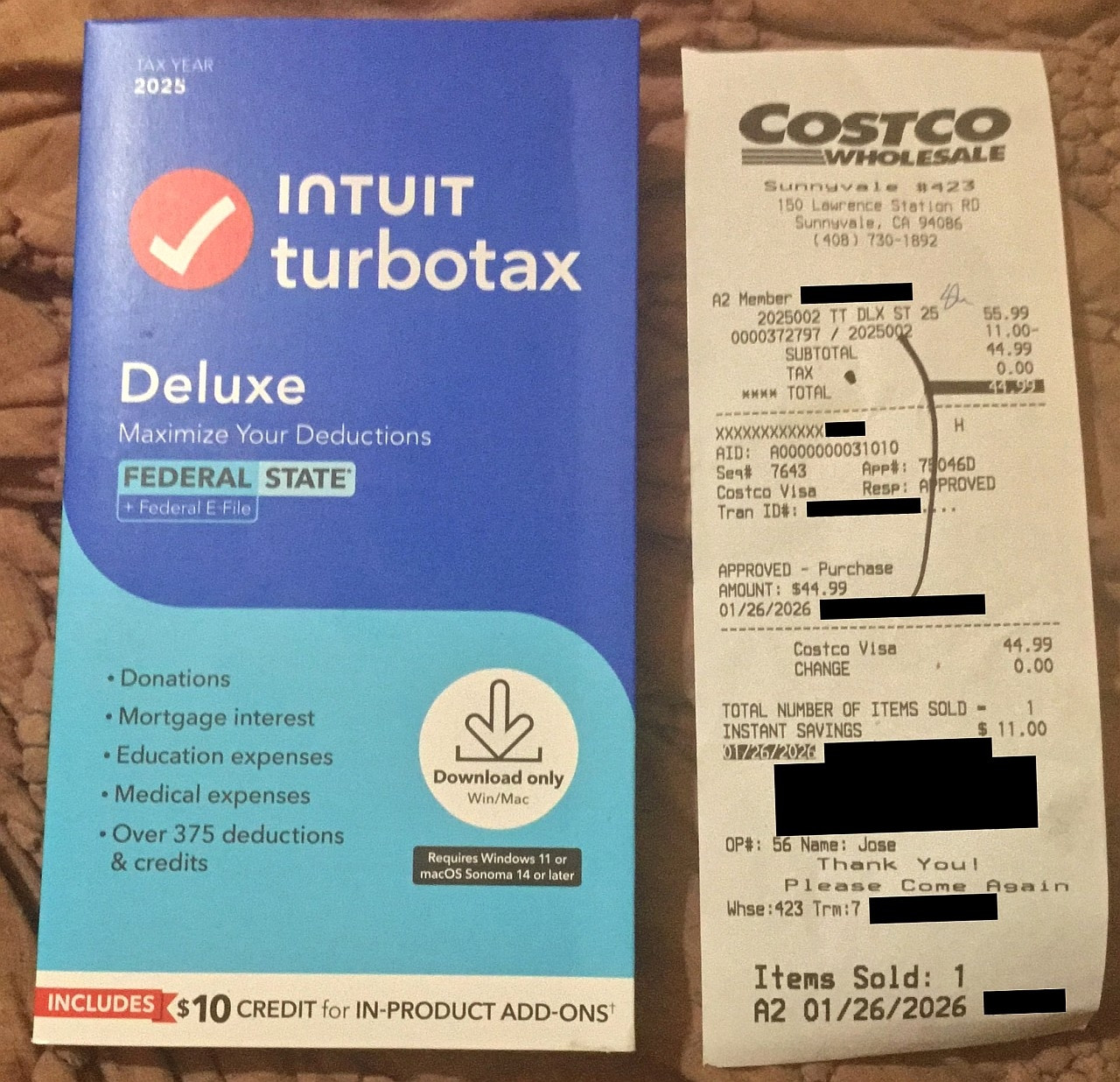
    I'll let the users judge for themselves so I snapped this photo just now:
    <https://i.postimg.cc/QCrzhp1y/turbotax-requires-win11.jpg>

    Be advised that this never happened before, so the user isn't expecting it.

    Consider it kind of like buying an Intuit toaster and not thinking to check that it suddenly requires a smart-home hub that it never required before,
    and that it has no reason for requiring it, and that no other toaster but
    the Intuit toaster enforces the arbitrary smart-home hub requirement, and,
    that there is no earthly reason why it would ever need that smart-home hub.

    You wouldn't even think of looking at the fine print to figure that out. Remember, I've been buying Deluxe every year at the January sale price.
    <https://i.postimg.cc/MHMMMhCb/20years-of-turbotax.jpg>

    Note that the packaging doesn't differ from the packaging over the years,
    so, again, nothing stands out that you would even "think" to check since there's no earthly reason for Windows 11 to be a requirement anyway.

    It never occurred to me that only Intuit forced such a requirement that it doesn't need, and that it has no earthly reason for enforcing upon us.

    They are going to lose half of their user
    base. Windows 10 is still the prevalent home pc software.

    Windows 11 has been around over four years and win10 was officially EOL's
    last October. Totally not unreasonable for a financial organisation to
    remove support for out-of-date platforms.

    Windows 10 is still under official support. M$ changed minds.

    I was hoping that Intuit was smart enough to look for the ESU keys in the Windows registry, but as far as I can tell, it's a dumb hard-coded check.

    Otherwise, it is somewhat ridiculous for a software to demand a certain version of the operating system if there is not actual need.

    As far as I can tell from extensive searching, it's an arbitrary decision.

    But I'm not the only arbiter of fact on this Usenet group, so I will ask:
    Q: What on earth does TurboTax need Windows 11 for?
    A: ?
    --
    Any company that makes this great of a change without being very clear
    about it isn't a company that appears to care about their customer base.
    --- Synchronet 3.21a-Linux NewsLink 1.2
  • From Andy Burns@usenet@andyburns.uk to alt.comp.os.windows-10,alt.comp.os.windows-11,misc.taxes on Wed Jan 28 10:16:14 2026
    From Newsgroup: alt.comp.os.windows-11

    Carlos E.R. wrote:

    Does the box clearly say in reasonable sized lettering that it is
    Windows 11 only?
    I think it's download rather than boxed, but it does say

    <https://costco.com/p/-/turbotax-deluxe/4000410325>
    --- Synchronet 3.21a-Linux NewsLink 1.2
  • From Maria Sophia@mariasophia@comprehension.com to alt.comp.os.windows-10,alt.comp.os.windows-11,misc.taxes on Wed Jan 28 05:20:02 2026
    From Newsgroup: alt.comp.os.windows-11

    Herbert Kleebauer wrote:
    On 1/28/2026 9:56 AM, Maria Sophia wrote:
    Chris wrote:

    At home I try to install it on Windows 10, and it says it won't load. >>>>> Apparently it needs Windows 11.
    Why?
    What on earth could TurboTax need that only Windows 11 can supply?

    Don't ask this question in usenet but ask Google: https://ttlc.intuit.com/community/articles/community-news-announcements/turbotax-windows-10-desktop-software-end-of-life/05/3708302

    Hi Herbert,

    Since we strive to add value in every thread, here's a summary of that
    helpful link so that others can benefit from us both reading it now.
    <https://ttlc.intuit.com/community/articles/community-news-announcements/turbotax-windows-10-desktop-software-end-of-life/05/3708302>
    Intuit announced that TurboTax Desktop (personal editions) for Tax Year
    2025 and beyond will not run on Windows 10. Only Windows 11 or later
    will be supported. TurboTax Desktop Business editions will support
    Windows 10 for one final year (TY2025), but after that, business
    users must also purchase Windows 11 or switch to TurboTax Online.

    Why Intuit says they're doing this
    a. Intuit erroneously states that Microsoft ended free security updates
    for Windows 10 on October 14, 2025.
    b. Intuit also erroneously states that Microsoft only offers a paid
    ESU (Extended Security Updates) program for consumers, but Intuit
    claims it only covers critical fixes and Intuit additionally claims
    "very few consumers" will buy it.
    c. Intuit says running tax software on an OS without full security
    support is too risky and yet Intuit is clueless that full security
    support is free (and paid) for Windows 10 up to at least October 26.

    True to their marketing roots, Intuit apparently says if you buy TurboTax Desktop 2025 and can't install it because you're on Windows 10, Intuit will offer you TurboTax Online Premium at no extra cost, including:
    1 federal return
    1 state return
    But if I had wanted to use insecure online software, I never would have purchased the desktop versions in the first place over all these years.

    Much like Apple propaganda, the Intuit message frames their arbitrary and
    yet unnecessarily Draconian marketing decision as a 'security necessity',
    but Intuit marketing, at the same time, also heavily promotes TurboTax
    Online by emphasizing features not available in the desktop version.

    Are these people idiots ?

    Are Microsoft or Adobe idiots because they don't want to
    sell Office or Photoshop but only sell an abo?

    I think her point was that half the world is on Windows 10, and that
    there's no reason for requiring Windows 11 and that no other tax software
    (that we know of) made this Draconian decision, and my point is that it's
    not something you'd even "think" of looking for in the fine print.

    When only Intuit tax software suddenly and almost secretly becomes
    incompatible, and when NO OTHER TAX SOFTWARE did this, something is amiss.

    Suddenly?

    The package looks no different, overall, from all the other packages:
    <https://i.postimg.cc/MHMMMhCb/20years-of-turbotax.jpg>
    Although, if you knew to look for the fine print, it does say it:
    <https://i.postimg.cc/QCrzhp1y/turbotax-requires-win11.jpg>

    But checking for that fine print after using the software for decades is
    sort of like buying a microwave and realizing it won't run unless your
    Wi-Fi router is the newest standard that only half the world is on.

    See also:
    <https://ttlc.intuit.com/turbotax-support/en-us/help-article/download-products/end-support-windows-8-affect-turbotax-experience/L4v9atO3O_US_en_US>
    Intuit's support page explains that TurboTax Desktop 2025 will not run
    on Windows 10. Only Windows 11 (64-bit) or later is supported.
    If you're still on Windows 10 after October 14, 2025, you must
    either purchase a Windows 11 PC or switch to TurboTax Online.

    Yet again, Intuit erroneously claims that Windows 10 ESU doesn't exist. TurboTax Desktop Business will still run on Windows 10 for Tax Year 2025.

    || Today, we sent a reminder communication to our valued Windows 10
    || Desktop customers informing them that TurboTax Desktop personal
    || software for tax year 2025 and beyond will require Windows 11 or
    || future operating systems.


    But no more.
    When a marketing organization is that hostile to customers, they're out.

    The marketing organization has to generate income for the company:

    This isn't the first time Intuit blindsided its loyal users though, so, for
    me, it's simply the straw that broke the camel's back because a punitive
    action like this with no underlying justification says a lot about Intuit.
    1. Intuit sneakily removed key schedules from Deluxe around tax year 2014
    2. Intuit sneakily added the Internet requirement around tax year 2022
    3. Intuit enforced the privacy-robbing account around tax year 2023
    4. Intuit enforced an unnecessary Windows 11 requirement in tax year 2025

    I have found that H&R Block Deluxe + State (desktop) is about the same
    price for one federal e-file and one state e-file as the Costco sale is.

    My main question is what have people found is their experience when
    ditching TurboTax in favor of the equivalent H&R Block product line?
    --
    Every thread I author is intended to be a useful resource to thousands of people who have the same needs, wants & desires as this is a common need.
    --- Synchronet 3.21a-Linux NewsLink 1.2
  • From Maria Sophia@mariasophia@comprehension.com to alt.comp.os.windows-10,alt.comp.os.windows-11,misc.taxes on Wed Jan 28 05:39:41 2026
    From Newsgroup: alt.comp.os.windows-11

    Andy Burns wrote:
    Carlos E.R. wrote:

    Does the box clearly say in reasonable sized lettering that it is
    Windows 11 only?
    I think it's download rather than boxed, but it does say

    <https://costco.com/p/-/turbotax-deluxe/4000410325>

    Hi Andy,

    Thanks for pointing that out, where every January Costo has a sale on
    TurboTax for about $10 off on the Deluxe Federal + State desktop version.
    <https://www.costco.com/p/-/turbotax-deluxe-2025-federal-e-file-state-download-for-pcmac-includes-10-credit-in-product/4000410296>

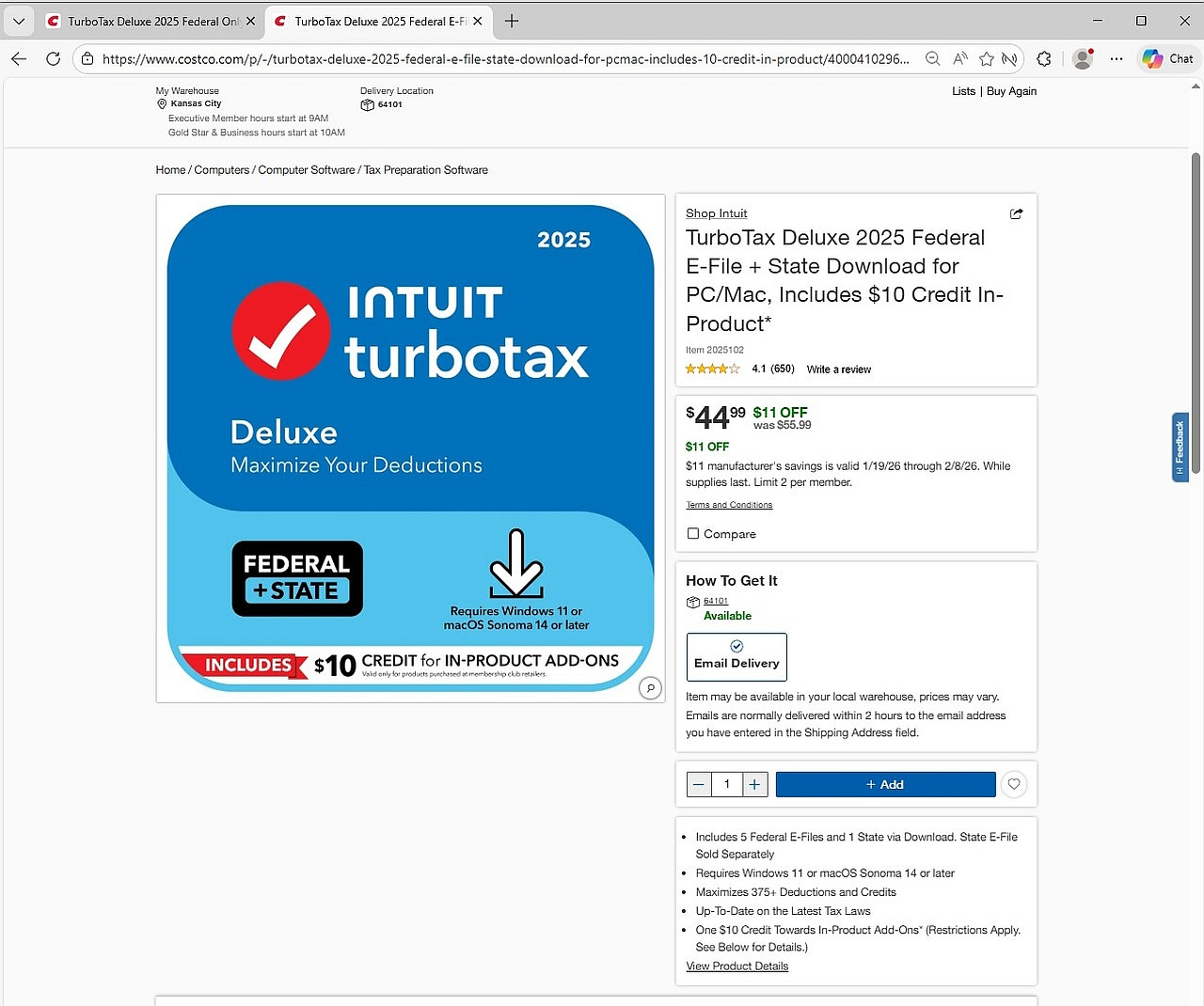
    Since sales prices are ephemeral, here's a screenshot of the listing:
    <https://i.postimg.cc/Nfrz5Ggj/Costco-Online-Turbo-Tax.jpg>

    Note that the package at the store is slightly different in presentation:
    <https://i.postimg.cc/QCrzhp1y/turbotax-requires-win11.jpg>

    And make careful note that over the years, there has always been a "black
    box" of fine print that you never needed to read because this never
    happened to TurboTax before, and, more importantly, no other personal tax software that is equivalent (as far as I know) has this Win11 requirement.
    <https://i.postimg.cc/MHMMMhCb/20years-of-turbotax.jpg>

    The main point I will make, considering it's obvious I've used TurboTax for years, is you wouldn't even think of looking for an unnecessary Windows 11 requirement for software that not only doesn't need Windows 11, but when no other personal tax software requires Windows 11 (and, it turns out, the business version of TurboTax will work just fine on Windows 10 according to
    the link that Herbert kindly provided to us earlier in this very thread).

    Looking to see if TurboTax has an arbitrary Draconian requirement for
    software that half the world isn't on is sort of like looking to see if a
    new car you buy only works if you have an iPhone connected to its dash.

    It's such an unearthly requirement, you wouldn't think of looking for it.
    --- Synchronet 3.21a-Linux NewsLink 1.2
  • From Maria Sophia@mariasophia@comprehension.com to alt.comp.os.windows-10,alt.comp.os.windows-11,misc.taxes on Wed Jan 28 06:00:24 2026
    From Newsgroup: alt.comp.os.windows-11

    Andy Burns wrote:
    Carlos E.R. wrote:

    Emigrate to a reasonable country such as Spain, where the tax software
    is created by the government and is free as in gratis. Even professional
    tax accountants use it. Bad news for software developers

    Presumably you are free to use alternate software?

    My suggestion is for people to send something like this to their contacts
    in the technical news industry. Aren't you in that industry, Andy?

    How's this for a technical lead?

    Subject: Story tip: TurboTax Desktop 2025 blocks Windows 10 using incorrect claims about Microsoft support

    To whom it may concern:

    I would like to share a consumer tech story with significant public impact. Intuit has quietly made TurboTax Desktop 2025 incompatible with Windows 10, even though Windows 10 continues to receive Microsoft security updates
    through the Extended Security Updates program until October 2026.

    This affects millions of taxpayers who rely on the desktop version for
    privacy, offline use, and continuity of multi year tax data.

    According to Intuit's own announcement: <https://ttlc.intuit.com/community/articles/community-news-announcements/turbotax-windows-10-desktop-software-end-of-life/05/3708302>

    1. TurboTax Desktop personal editions for Tax Year 2025 and beyond will not
    run on Windows 10.
    2. Only Windows 11 or later will be supported.
    3. TurboTax Desktop Business will continue to run on Windows 10 for one
    final year, which contradicts Intuit's claim that Windows 10 is
    unsupported.

    Intuit's justification is based on several incorrect or misleading claims:

    A. Intuit states that Microsoft ended free security updates for Windows 10
    on October 14 2025, but omits that ESU provides security updates through October 2026.

    B. Intuit claims Microsoft only offers a paid ESU program for consumers and that it only covers critical fixes. In reality ESU covers critical and important security patches.

    C. Intuit claims Windows 10 lacks full security support, yet TurboTax
    Desktop Business continues to run on Windows 10, which shows the
    requirement is not technical.

    A second Intuit support page repeats the same incorrect statements: <https://ttlc.intuit.com/turbotax-support/en-us/help-article/download-products/end-support-windows-8-affect-turbotax-experience/L4v9atO3O_US_en_US>

    If a Windows 10 user buys TurboTax Desktop 2025, the software refuses to install. Intuit then offers to move the customer to TurboTax Online Premium
    at no extra cost, which pushes users into a cloud product many avoid for privacy reasons.

    Half the world is still on Windows 10, and no other major tax software
    vendor has dropped Windows 10 support. TurboTax Desktop has never required
    a sudden Windows version jump before.

    The packaging looks nearly identical to previous years, and the Windows 11 requirement is buried in fine print that long time users would not think to check. Photos:
    <https://i.postimg.cc/MHMMMhCb/20years-of-turbotax.jpg>
    <https://i.postimg.cc/QCrzhp1y/turbotax-requires-win11.jpg>

    This is the equivalent of buying a new car and discovering it only works if
    you have an iPhone connected to the dash. It is not something any consumer would think to verify.

    This is also part of a pattern of anti consumer changes:

    1. Removal of key schedules from TurboTax Deluxe around Tax Year 2014
    2. Mandatory internet activation around Tax Year 2022
    3. Mandatory Intuit account around Tax Year 2023
    4. Now an unnecessary Windows 11 requirement in Tax Year 2025

    This appears to be a forced migration strategy to push users from the
    privacy preserving desktop product into TurboTax Online, which is more profitable and gives Intuit more control over user data.

    Given TurboTax's market dominance and the number of Windows 10 users
    affected, this is a meaningful consumer story involving misleading security claims, forced upgrades, and a break from industry norms.

    I have provided photos of the packaging, screenshots of Intuit's
    statements, and details of my experience attempting to install TurboTax
    2025 on Windows 10.

    Thank you for considering this consumer-focused current news story.
    --- Synchronet 3.21a-Linux NewsLink 1.2
  • From Andy Burns@usenet@andyburns.uk to alt.comp.os.windows-10,alt.comp.os.windows-11,misc.taxes on Wed Jan 28 11:04:31 2026
    From Newsgroup: alt.comp.os.windows-11

    Maria Sophia wrote:

    According to Intuit's own announcement:

    1. TurboTax Desktop personal editions for Tax Year 2025 and beyond will not run on Windows 10.
    2. Only Windows 11 or later will be supported.
    3. TurboTax Desktop Business will continue to run on Windows 10 for one
    final year, which contradicts Intuit's claim that Windows 10 is
    unsupported.

    I can't see any feature within WinUI3 or SDK which (if used) would
    exclude running on Win10, some places hint that the PrinManager API
    might require Win11, but Microsoft's API docs say otherwise.

    --- Synchronet 3.21a-Linux NewsLink 1.2
  • From Chris@ithinkiam@gmail.com to alt.comp.os.windows-10,alt.comp.os.windows-11,misc.taxes on Wed Jan 28 11:25:43 2026
    From Newsgroup: alt.comp.os.windows-11

    Carlos E.R. <robin_listas@es.invalid> wrote:
    On 2026-01-28 09:35, Chris wrote:
    Lynn McGuire <lynnmcguire5@gmail.com> wrote:
    On 1/27/2026 6:37 PM, Maria Sophia wrote:
    I bought TurboTax at Costco today for $55.99 - $11 = $44.99 + 0% tax.

    At home I try to install it on Windows 10, and it says it won't load.
    Apparently it needs Windows 11.
    Why?
    What on earth could TurboTax need that only Windows 11 can supply?

    Is there a known workaround?

    Are these people idiots ?

    The only idiots are people buying something that is clearly incompatible
    with their needs and then complain about it.

    Does the box clearly say in reasonable sized lettering that it is
    Windows 11 only?

    See if you can spot it? ;)


    They are going to lose half of their user
    base. Windows 10 is still the prevalent home pc software.

    Windows 11 has been around over four years and win10 was officially EOL's
    last October. Totally not unreasonable for a financial organisation to
    remove support for out-of-date platforms.

    Windows 10 is still under official support. M$ changed minds.

    Nope. They still state clearly it is EOL. https://support.microsoft.com/en-us/windows/windows-10-support-has-ended-on-october-14-2025-2ca8b313-1946-43d3-b55c-2b95b107f281

    Yes, ESU exists, but is a limited fig leaf to soften the blow.

    Otherwise, it is somewhat ridiculous for a software to demand a certain version of the operating system if there is not actual need.

    These are never technical decisions. Either risk mitigation or commercially driven.


    --- Synchronet 3.21a-Linux NewsLink 1.2
  • From Chris@ithinkiam@gmail.com to alt.comp.os.windows-10,alt.comp.os.windows-11,misc.taxes on Wed Jan 28 11:25:45 2026
    From Newsgroup: alt.comp.os.windows-11

    Herbert Kleebauer <klee@unibwm.de> wrote:


    Are these people idiots ?

    Are Microsoft or Adobe idiots because they don't want to
    sell Office or Photoshop but only sell an abo?


    When only Intuit tax software suddenly and almost secretly

    "Almost secretly" LOL!

    It's right there on the front of the packet!

    incompatible, and when NO OTHER TAX SOFTWARE did this, something is amiss.

    Suddenly?

    || Today, we sent a reminder communication to our valued Windows 10
    || Desktop customers informing them that TurboTax Desktop personal
    || software for tax year 2025 and beyond will require Windows 11 or
    || future operating systems.


    But no more.
    When a marketing organization is that hostile to customers, they're out.

    The marketing organization has to generate income for the company:

    || If you purchase TurboTax Desktop personal software for tax year
    || 2025 and cannot install it because you have Windows 10, we have
    || you covered. You will receive an in-product offer to switch to
    || our TurboTax Online Premium service at no additional cost (includes
    || one federal and one state return).


    Seems reasonable.


    --- Synchronet 3.21a-Linux NewsLink 1.2
  • From Chris@ithinkiam@gmail.com to alt.comp.os.windows-10,alt.comp.os.windows-11,misc.taxes on Wed Jan 28 11:25:47 2026
    From Newsgroup: alt.comp.os.windows-11

    Carlos E.R. <robin_listas@es.invalid> wrote:
    On 2026-01-28 01:37, Maria Sophia wrote:
    I bought TurboTax at Costco today for $55.99 - $11 = $44.99 + 0% tax.

    At home I try to install it on Windows 10, and it says it won't load.
    Apparently it needs Windows 11.
    Why?
    What on earth could TurboTax need that only Windows 11 can supply?

    Is there a known workaround?

    :-P

    Emigrate to a reasonable country such as Spain, where the tax software
    is created by the government and is free as in gratis. Even professional
    tax accountants use it. Bad news for software developers :-P

    The software runs in every operating system inside a web browser like Firefox. It connects online to the tax agency computers, and your forms
    are actually stored there, not in your computer. You might not like
    that, I guess. Who cares, you are going to submit the forms to them anyway.

    When you login in, it is possible that the government has completed the
    form for you, so you only have to review it, sign it, and pay (or be
    paid). In more complicated cases, they still fill in as much data as
    they know.

    If you don't have a computer or are not happy with a computer, no
    problem: just get an appointment at the tax agency and they will fill
    the forms for you. Gratis.

    Our taxes in action. The government tries to make paying the taxes as
    easy as they can. :-D

    Yeah but, you forget that government = evil in US minds. Since Jan 2025
    that is accurate, tbf.

    The UK is not that easy, but then the vast majority of people don't need to fill in a tax return themselves as it's all done by the employer.

    --- Synchronet 3.21a-Linux NewsLink 1.2
  • From Maria Sophia@mariasophia@comprehension.com to alt.comp.os.windows-10,alt.comp.os.windows-11,misc.taxes on Wed Jan 28 06:38:28 2026
    From Newsgroup: alt.comp.os.windows-11

    Chris wrote:
    Herbert Kleebauer <klee@unibwm.de> wrote:


    Are these people idiots ?

    Are Microsoft or Adobe idiots because they don't want to
    sell Office or Photoshop but only sell an abo?


    When only Intuit tax software suddenly and almost secretly

    "Almost secretly" LOL!
    It's right there on the front of the packet!

    Hi Chris,

    You need to stop a moment to try to understand that the package isn't what
    you buy, especially since it's a software download and the package models
    are the same every year.

    Imagine you have been renting the same car model every year for twenty
    years for your Christmas trip to Tahoe as you needed, let's say, 4WD.

    This 4WD rental car has always worked with any normal gasoline pump, and no other 4WD car maker requires anything different.

    Then, suddenly, after you've rented it already, you find out belatedly that
    the new model will only run if you use a brand new fuel nozzle that only
    half the gas stations in the country even have.

    Their justification is that the old nozzle is "no longer supported," but
    you then discover that the business fleet version of the exact same car
    still works perfectly fine with the old nozzle for another full year.

    That is the same situation here. We have been buying TurboTax Desktop
    every year for decades, there has never been a need to check for a bizarre
    new requirement, no competing tax software requires Windows 11, and
    Intuit's own business edition proves their justification is not true.

    It is not something any reasonable person would think to look for in the
    fine print unless they've been forewarned ahead of time to look for it.

    || If you purchase TurboTax Desktop personal software for tax year
    || 2025 and cannot install it because you have Windows 10, we have
    || you covered. You will receive an in-product offer to switch to
    || our TurboTax Online Premium service at no additional cost (includes
    || one federal and one state return).


    Seems reasonable.

    It's a brazen sales pitch, Chris. Based on lies. Sound familiar?

    Remember, the justification is based on a lie that Windows 10 isn't
    supported and yet the business edition works just fine with Win10.

    Does that sound like a company you happen to buy your iPhone from?
    --- Synchronet 3.21a-Linux NewsLink 1.2
  • From Maria Sophia@mariasophia@comprehension.com to alt.comp.os.windows-10,alt.comp.os.windows-11,misc.taxes on Wed Jan 28 06:45:56 2026
    From Newsgroup: alt.comp.os.windows-11

    Chris wrote:
    The only idiots are people buying something that is clearly incompatible >>> with their needs and then complain about it.

    Does the box clearly say in reasonable sized lettering that it is
    Windows 11 only?

    See if you can spot it? ;)

    When we buy TurboTax, we always buy the same version (e.g., Deluxe,
    Premiere, etc.) but that's all that normally matters because nowadays, it's just a software key since you actually download the installation program.

    There's nothing in the box but the key, Chris.
    So why would you be reading the fine print on the box?

    Deluxe is Deluxe and always has been (except in 2014, but that's a detail).

    Imagine you have been buying the same brand of kitchen blender every year
    for twenty years. It has always worked with any normal wall outlet, and
    every other blender on the market still works with the same outlet.

    Then suddenly the new model refuses to run unless your house has a brand
    new type of electrical socket that only half the homes in the country even have.

    The company claims the old socket is "no longer supported," but you then
    find out that the commercial version of the exact same blender still works perfectly fine with the old socket for another full year.

    That is the same situation here. We have been buying TurboTax Desktop for decades, there has never been a need to check for a strange new
    requirement, no competing tax software requires Windows 11, and Intuit's
    own business edition proves their justification is not true.

    It is not something any reasonable person would think to check in the fine print.

    They are going to lose half of their user
    base. Windows 10 is still the prevalent home pc software.

    Windows 11 has been around over four years and win10 was officially EOL's >>> last October. Totally not unreasonable for a financial organisation to
    remove support for out-of-date platforms.

    Windows 10 is still under official support. M$ changed minds.

    Nope. They still state clearly it is EOL. https://support.microsoft.com/en-us/windows/windows-10-support-has-ended-on-october-14-2025-2ca8b313-1946-43d3-b55c-2b95b107f281

    Yes, ESU exists, but is a limited fig leaf to soften the blow.

    Windows 10 ESU is supported by Microsoft, Chris.

    And worse, you have to purchase a new Windows 11 machine to use TurboTax desktop, which is a pretty big penalty for something that's not needed.

    Plus, the justification is based on brazen lies, so that is evidence that
    it's more of a marketing pitch than a serious concern of Intuit.

    Otherwise, it is somewhat ridiculous for a software to demand a certain
    version of the operating system if there is not actual need.

    These are never technical decisions. Either risk mitigation or commercially driven.

    It's clear Intuit is pushing people toward their cloud offerings, Chris, especially when they base their justification on brazen lies like they did.

    Since you own an iPhone, you're familiar with that tactic, are you not?
    --- Synchronet 3.21a-Linux NewsLink 1.2
  • From Andy Burns@usenet@andyburns.uk to alt.comp.os.windows-10,alt.comp.os.windows-11,misc.taxes on Wed Jan 28 12:35:17 2026
    From Newsgroup: alt.comp.os.windows-11

    Chris wrote:

    Carlos E.R. wrote:

    The government tries to make paying the taxes as
    easy as they can. :-D

    The UK is not that easy, but then the vast majority of people don't need to fill in a tax return themselves as it's all done by the employer.

    The UK self-assessment online filing has improved *A* *LOT* over what it
    used to be, particularly in not being overloaded as we approach
    deadline day, but there are some situations it doesn't cater for.

    --- Synchronet 3.21a-Linux NewsLink 1.2
  • From Carlos E.R.@robin_listas@es.invalid to alt.comp.os.windows-10,alt.comp.os.windows-11,misc.taxes on Wed Jan 28 14:53:14 2026
    From Newsgroup: alt.comp.os.windows-11

    On 2026-01-28 10:57, Maria Sophia wrote:
    Carlos E.R. wrote:
    The only idiots are people buying something that is clearly incompatible >>> with their needs and then complain about it.

    Does the box clearly say in reasonable sized lettering that it is
    Windows 11 only?

    Hi Carlos,

    I'll let the users judge for themselves so I snapped this photo just now: <https://i.postimg.cc/QCrzhp1y/turbotax-requires-win11.jpg>

    Be advised that this never happened before, so the user isn't expecting it.

    Well, it does say that "requires Windows 11", but I can understand that
    you did not expect this and did not see it, as you have been buying it
    every year. Happens to everybody at sometime.

    It is arbitrary, but there are other vendors.

    ...

    But I'm not the only arbiter of fact on this Usenet group, so I will ask:
    Q: What on earth does TurboTax need Windows 11 for?
    A: ?

    That's impossible to say, but it is possible that the program developers
    chose to use the W11 11 API which surely has new functions not available
    on W10. Sure, you can develop the software using the W10 API, but it is
    their choice.

    There are developer tools that tell you what functions a program is
    using, and with some work you can find if they belong to the W11 API.

    You can vote with your feet.

    Return your purchase if they accept it, and tell them why. Buy at the
    same time another software.
    --
    Cheers, Carlos.
    ES🇪🇸, EU🇪🇺;
    --- Synchronet 3.21a-Linux NewsLink 1.2
  • From Carlos E.R.@robin_listas@es.invalid to alt.comp.os.windows-10,alt.comp.os.windows-11,misc.taxes on Wed Jan 28 14:55:05 2026
    From Newsgroup: alt.comp.os.windows-11

    On 2026-01-28 10:55, Andy Burns wrote:
    Carlos E.R. wrote:

    Emigrate to a reasonable country such as Spain, where the tax software
    is created by the government and is free as in gratis. Even
    professional tax accountants use it. Bad news for software developers

    Presumably you are free to use alternate software?


    Sure, but what purpose would have a developer to create it? No business
    case :-)

    It must have some advantage, like detecting what deductions you can
    apply to pay less, like a professional tax accountant would do.
    --
    Cheers, Carlos.
    ES🇪🇸, EU🇪🇺;
    --- Synchronet 3.21a-Linux NewsLink 1.2
  • From Carlos E.R.@robin_listas@es.invalid to alt.comp.os.windows-10,alt.comp.os.windows-11,misc.taxes on Wed Jan 28 14:56:32 2026
    From Newsgroup: alt.comp.os.windows-11

    On 2026-01-28 12:00, Maria Sophia wrote:
    Andy Burns wrote:
    Carlos E.R. wrote:

    Emigrate to a reasonable country such as Spain, where the tax
    software is created by the government and is free as in gratis. Even
    professional tax accountants use it. Bad news for software developers

    Presumably you are free to use alternate software?

    My suggestion is for people to send something like this to their contacts
    in the technical news industry. Aren't you in that industry, Andy?

    Keep it short.
    --
    Cheers, Carlos.
    ES🇪🇸, EU🇪🇺;
    --- Synchronet 3.21a-Linux NewsLink 1.2
  • From Mr. Man-wai Chang@toylet.toylet@gmail.com to alt.comp.os.windows-10,alt.comp.os.windows-11,misc.taxes on Wed Jan 28 22:33:21 2026
    From Newsgroup: alt.comp.os.windows-11

    On 1/28/2026 8:37 AM, Maria Sophia wrote:
    I bought TurboTax at Costco today for $55.99 - $11 = $44.99 + 0% tax.

    At home I try to install it on Windows 10, and it says it won't load. Apparently it needs Windows 11.

    The program possibly needs older versions of DotNet Framework, and maybe
    older versions of C++ Runtime!
    --
    @~@ Simplicity is Beauty! Remain silent! Drink, Blink, Stretch!
    / v \ May the Force and farces be with you! Live long and prosper!!
    /( _ )\ https://sites.google.com/site/changmw/
    ^ ^ https://github.com/changmw/changmw
    --- Synchronet 3.21a-Linux NewsLink 1.2
  • From Andy Burns@usenet@andyburns.uk to alt.comp.os.windows-10,alt.comp.os.windows-11,misc.taxes on Wed Jan 28 15:13:57 2026
    From Newsgroup: alt.comp.os.windows-11

    "Carlos E.R." wrote:

    Andy Burns wrote:

    Presumably you are free to use alternate software?

    Sure, but what purpose would have a developer to create it? No business
    case :-)

    It must have some advantage, like detecting what deductions you can
    apply to pay less, like a professional tax accountant would do.
    In my case I use paid software, because it integrates with my business accounting software (so self-employment records are pulled into my
    personal tax records)
    --- Synchronet 3.21a-Linux NewsLink 1.2
  • From Mr. Man-wai Chang@toylet.toylet@gmail.com to alt.comp.os.windows-10,alt.comp.os.windows-11,misc.taxes on Wed Jan 28 23:19:51 2026
    From Newsgroup: alt.comp.os.windows-11

    On 1/28/2026 8:35 PM, Andy Burns wrote:
    Chris wrote:

    Carlos E.R. wrote:

    The government tries to make paying the taxes as
    easy as they can. :-D

    The UK is not that easy, but then the vast majority of people don't need to >> fill in a tax return themselves as it's all done by the employer.

    The UK self-assessment online filing has improved *A* *LOT* over what it
    used to be, particularly in not being overloaded as we approach
    deadline day, but there are some situations it doesn't cater for.

    Guys and gals: you are moving from software to taxation to politics...
    way way off-topic! :)
    --
    @~@ Simplicity is Beauty! Remain silent! Drink, Blink, Stretch!
    / v \ May the Force and farces be with you! Live long and prosper!!
    /( _ )\ https://sites.google.com/site/changmw/
    ^ ^ https://github.com/changmw/changmw
    --- Synchronet 3.21a-Linux NewsLink 1.2
  • From =?UTF-8?B?Li4ud8Khw7HCp8KxwqTDsSA=?=@winstonmvp@gmail.com to alt.comp.os.windows-10,alt.comp.os.windows-11 on Wed Jan 28 09:14:09 2026
    From Newsgroup: alt.comp.os.windows-11

    Carlos E.R. wrote on 1/28/2026 2:28 AM:
    On 2026-01-28 09:35, Chris wrote:
    Lynn McGuire <lynnmcguire5@gmail.com> wrote:
    On 1/27/2026 6:37 PM, Maria Sophia wrote:
    I bought TurboTax at Costco today for $55.99 - $11 = $44.99 + 0% tax.

    At home I try to install it on Windows 10, and it says it won't load.
    Apparently it needs Windows 11.
    Why?
    What on earth could TurboTax need that only Windows 11 can supply?

    Is there a known workaround?

    Are these people idiots ?

    The only idiots are people buying something that is clearly incompatible
    with their needs and then complain about it.

    Does the box clearly say in reasonable sized lettering that it is Windows
    11 only?

    The boxed product(where available) and downloadable only purchase method,
    the ad for purchasing(Costco or all other providers purchase options -
    e.g. Sam's Club, Best Buy, Staples, Intuit - all specify Windows 11 as a requirement for TTax 2025.
    --
    ...w¡ñ§±¤ñ
    --- Synchronet 3.21a-Linux NewsLink 1.2
  • From Frank Slootweg@this@ddress.is.invalid to alt.comp.os.windows-10,alt.comp.os.windows-11,misc.taxes on Wed Jan 28 16:30:59 2026
    From Newsgroup: alt.comp.os.windows-11

    [Repost. Someone felt the need to remove the alt.comp.os.windows-11 and misc.taxes groups. Don't do that, and if you do, *say* so! :-(]

    Dennis <nobody@nowhere.invalid> wrote:
    On Wed, 28 Jan 2026 05:20:02 -0500, Maria Sophia <mariasophia@comprehension.com> wrote:

    True to their marketing roots, Intuit apparently says if you buy TurboTax >Desktop 2025 and can't install it because you're on Windows 10, Intuit will >offer you TurboTax Online Premium at no extra cost, including:
    1 federal return
    1 state return
    But if I had wanted to use insecure online software, I never would have >purchased the desktop versions in the first place over all these years.

    I wouldn't be surprised if at some point they drop the desktop version completely.

    In our country - The Netherlands - we have a web-version already for
    twelve years. Just to many platforms to make platform-specific versions
    for. What use is a Windows version if people have an Android tablet or
    an iPad or a ChromeBook or ... ad infinitum.

    Like Carlos mentioned for Spain, ours is also free (as in gratis) and provided by the Dutch tax office ('Belastingdienst').

    As mentioned, the 'offline' 'privacy' argument is bogus. because they
    already have the 'private' information or will get it anyway.

    N.B. We started with a PC version [1] which was supplied on 3.5"
    diskette and when you were done filing your tax return, you just sent
    back the diskette in the provided envelope. *Those* were the days! :-)

    [1] The PC version started at least in 2001 (I still have the backup to
    prove it! :-)), but perhaps earlier. Not sure if there was only a
    Windows version and a Linux version or perhaps earlier also a DOS
    version.
    --- Synchronet 3.21a-Linux NewsLink 1.2
  • From AJL@noemail@none.com to alt.comp.os.windows-11 on Wed Jan 28 16:40:07 2026
    From Newsgroup: alt.comp.os.windows-11

    On 1/28/26 2:33 AM, Maria Sophia wrote:
    AJL wrote:
    On 1/27/26 5:37 PM, Maria Sophia wrote:
    I bought TurboTax at Costco today for $55.99 - $11 = $44.99 + 0% tax.

    At home I try to install it on Windows 10, and it says it won't load. >>>Apparently it needs Windows 11.

    Why?
    What on earth could TurboTax need that only Windows 11 can supply?


    Is there a known workaround?

    There is but you wouldn't like it. TurboTax online. Should work fine on a
    Windows10 browser. I've used it on Chromebooks for years...

    The workaround I was asking about would have been a registry hack of some >sort, most likely, that told TurboTax to install anyway,

    I would worry about using hacked software that will have access to my most
    sensitive financial details.

    As you suggested, buying TurboTax Online would technically solve it, but
    you know me well enough that doing anything like that online is anathema.

    I don't see the security difference. Your store bought TurboTax also goes
    online. Your financial details travel online not only to TurboTax servers
    but are also relayed online to Uncle Sam. And if you're like me your yearly
    tax statements (income, investments, interest, etc.) come online...

    But being security conscious is wise. I use Chromebooks for my sensitive
    stuff for that reason. Many here will likely disagree but the general
    consensus seems to be that they are safer than Windows. Ask (gasp) Google
    for the details...

    You can see that I've used the Costco TurboTax desktop version for years
    and never once had to worry about whether it would run on the current
    Windows release.

    Unfortunately things change. Fortunately there's other tax companies to
    choose from. Good luck...
    --- Synchronet 3.21a-Linux NewsLink 1.2
  • From Maria Sophia@mariasophia@comprehension.com to alt.comp.os.windows-10,alt.comp.os.windows-11,misc.taxes on Wed Jan 28 12:39:07 2026
    From Newsgroup: alt.comp.os.windows-11

    Frank Slootweg wrote:
    Dennis <nobody@nowhere.invalid> wrote:
    True to their marketing roots, Intuit apparently says if you buy TurboTax >>>Desktop 2025 and can't install it because you're on Windows 10, Intuit will >>>offer you TurboTax Online Premium at no extra cost, including:
    1 federal return
    1 state return
    But if I had wanted to use insecure online software, I never would have >>>purchased the desktop versions in the first place over all these years.

    I wouldn't be surprised if at some point they drop the desktop version
    completely.

    In our country - The Netherlands - we have a web-version already for
    twelve years. Just to many platforms to make platform-specific versions
    for. What use is a Windows version if people have an Android tablet or
    an iPad or a ChromeBook or ... ad infinitum.

    Like Carlos mentioned for Spain, ours is also free (as in gratis) and provided by the Dutch tax office ('Belastingdienst').

    As mentioned, the 'offline' 'privacy' argument is bogus. because they already have the 'private' information or will get it anyway.

    N.B. We started with a PC version [1] which was supplied on 3.5"
    diskette and when you were done filing your tax return, you just sent
    back the diskette in the provided envelope. *Those* were the days! :-)

    [1] The PC version started at least in 2001 (I still have the backup to
    prove it! :-)), but perhaps earlier. Not sure if there was only a
    Windows version and a Linux version or perhaps earlier also a DOS
    version.

    Intuit isn't part of the government so they do not already have your
    private personal financial data unless you choose to give it to them.

    And nobody would do that, which is why the "online" version has huge risk.

    Although maybe someone who has used the "online" web version of Intuit's TurboTax can explain to the rest of us how exactly they secure your data?
    --- Synchronet 3.21a-Linux NewsLink 1.2
  • From Maria Sophia@mariasophia@comprehension.com to alt.comp.os.windows-10,alt.comp.os.windows-11,misc.taxes on Wed Jan 28 12:45:20 2026
    From Newsgroup: alt.comp.os.windows-11

    ...w¡ñ§±¤ñ wrote:
    The only idiots are people buying something that is clearly incompatible >>> with their needs and then complain about it.

    Does the box clearly say in reasonable sized lettering that it is Windows >> 11 only?

    The boxed product(where available) and downloadable only purchase method, the ad for purchasing(Costco or all other providers purchase options -
    e.g. Sam's Club, Best Buy, Staples, Intuit - all specify Windows 11 as a requirement for TTax 2025.

    Again and again I must point out it's like buying spaghetti and only
    finding out later that in the ingredients, there's no pasta involved.

    You wouldn't even think of looking at the ingredients of a "whole chicken"
    to find out that there's a new small print line saying "no chicken inside".

    It's like buying a "coffee maker" and then discovering in the fine print
    that it doesn't actually make coffee as it's just a kettle to boil water.

    When you buy TurboTax Deluxe, all you (used to) need to know is "Deluxe".

    And remember, the limitation is really there to sell you the online stuff based on the articles that Herbert and I found on the Internet from Intuit.

    Note, the "business" TurboTax doesn't require you to buy a whole new PC.
    Only the personal TurboTax won't run unless you purchase a Win11 new PC.
    --- Synchronet 3.21a-Linux NewsLink 1.2
  • From AJL@noemail@none.com to alt.comp.os.windows-11 on Wed Jan 28 18:08:57 2026
    From Newsgroup: alt.comp.os.windows-11

    On 1/28/26 10:39 AM, Maria Sophia wrote:

    Intuit isn't part of the government so they do not already have your
    private personal financial data unless you choose to give it to them.

    They do. When I sign into my online TurboTax account this year all my
    personal details (from my past tax forms) will be already be filled in.
    Love it, saves time...

    And nobody would do that, which is why the "online" version has huge risk.

    Same risk a Uncle Sam. Or your doctors office. Everything's online these
    days...

    Although maybe someone who has used the "online" web version of Intuit's >TurboTax can explain to the rest of us how exactly they secure your data?

    I suspect the TurboTax online version uses the same servers and has the same
    security as as the store bought version. Then of course I repeat: There's
    also Uncle Sam's servers with all that personal data... 8-O

    My GUESS is that the biggest security risk is at the user end such as using
    a discontinued OS. Wait lemme check. Whew, this Chromebook I'm posting with
    is up to date.

    But to be fair this Chromebook's AUE is up next year and I've only had it
    for 4 years. I think they give you 10 years now but that's from manufacture
    and I didn't check when I bought this one. So Maria, it'll become just like
    your Windows 10 machine. It'll still work but the security???


    --- Synchronet 3.21a-Linux NewsLink 1.2
  • From jerryab@jerryab@juno.com to alt.comp.os.windows-10,alt.comp.os.windows-11,misc.taxes on Wed Jan 28 13:10:13 2026
    From Newsgroup: alt.comp.os.windows-11

    On Tue, 27 Jan 2026 19:37:11 -0500, Maria Sophia <mariasophia@comprehension.com> wrote:

    What on earth could TurboTax need that only Windows 11 can supply?

    Is there a known workaround?

    Don't know, don't care. THEIR problem--because I don't use their stuff
    any more. Used their free online version for some years, then they
    "went stupid". NOT interested in paying for "stupid", so went
    elsewhere. Still free online tax prep/submission, so not concerned.

    Used to have a CPA do my tax stuff and submit it electronically. No
    more. I retired and did the stuff online for free.

    Key point: If you have a fairly complex return, then a CPA may be the
    way to go. Not because of the complexity, but because a pro will have
    a LOT more info about changes in tax crap you may not. Also, it is a
    great way to CYA *because* your taxes were done (checked and verified)
    by a pro. Sure, there is a cost--there always is. Cheap insurance. It
    is ALL tax deductible, so it is timing/cash-flow--nothing more.

    If you keep detailed records all year (as I did)--and turn that all
    over to the CPA with your spreadsheet completed, then you can do a lot
    of the drudge stuff in advance and be able to spot errors--your own
    AND by the CPA's software and/or data entry before they bite you. Have
    seen that and they fixed it before it was sent in by the CPA. It will
    also reduce the cost AND make you feel more "in control" of the
    bureaucracy-end of each tax year (i.e., first quarter of the next
    year).

    I did it all on a single large spreadsheet (self-created long ago) and
    re-used the same (blank) income/expenses spreadsheet every year. CPA
    loved it. Took me less than a day to fill it out from empty.
    --- Synchronet 3.21a-Linux NewsLink 1.2
  • From Char Jackson@none@none.invalid to alt.comp.os.windows-11,alt.comp.os.windows-10,misc.taxes on Wed Jan 28 13:54:12 2026
    From Newsgroup: alt.comp.os.windows-11

    On Wed, 28 Jan 2026 04:33:08 -0500, Maria Sophia <mariasophia@comprehension.com> wrote:

    Yet again, Intuit blindsided loyal users, this time by requiring Win11 for >the 25 tax year when the version of Windows was never previously an issue.

    I've been using Turbotax since 1984 and I wasn't blindsided.

    Intuit sent out an email alerting me to this change on 8/21/2025 and a
    second notice, mostly identical to the first, on 10/22/25. Plus, the
    product listing on Amazon, where I usually buy mine, clearly said
    Windows 11 required.

    --- Synchronet 3.21a-Linux NewsLink 1.2
  • From =?UTF-8?B?Li4ud8Khw7HCp8KxwqTDsSA=?=@winstonmvp@gmail.com to alt.comp.os.windows-11,alt.comp.os.windows-10 on Wed Jan 28 13:40:55 2026
    From Newsgroup: alt.comp.os.windows-11

    Char Jackson wrote on 1/28/2026 12:54 PM:
    On Wed, 28 Jan 2026 04:33:08 -0500, Maria Sophia <mariasophia@comprehension.com> wrote:

    Yet again, Intuit blindsided loyal users, this time by requiring Win11 for >> the 25 tax year when the version of Windows was never previously an issue.

    I've been using Turbotax since 1984 and I wasn't blindsided.

    Intuit sent out an email alerting me to this change on 8/21/2025 and a
    second notice, mostly identical to the first, on 10/22/25. Plus, the
    product listing on Amazon, where I usually buy mine, clearly said
    Windows 11 required.

    Similar notification, two notices, Sept 2025, early Nov. 2025 that Win11
    was required for 2025 editions.

    Have purchased 'Deluxe' edition from Staples in past, Amazon was cheaper
    this year - both sources' content for purchase indicated Win11 requirement.

    Intuit reason for ceased support for use on Win10 was specific and due to
    MSFT ending support for Win10 security(regardless of ESU option) updates.
    -i.e. Intuit prioritizing usage for security reasons.
    - not much different than Intuit practice in the past that ended
    support for use on Windows 7 in 2020, and reiterated Win7 not possible
    for the next 4 yrs. 2024 editions required Win10 or Win11(with initial availability in late 2023). Thus, it was inevitable that once Win10 EOL occurred, Win11 would be the only supported o/s for use for purchased
    home installed editions.
    --
    ...w¡ñ§±¤ñ
    --- Synchronet 3.21a-Linux NewsLink 1.2
  • From =?UTF-8?B?Li4ud8Khw7HCp8KxwqTDsSA=?=@winstonmvp@gmail.com to alt.comp.os.windows-10,alt.comp.os.windows-11 on Wed Jan 28 14:00:03 2026
    From Newsgroup: alt.comp.os.windows-11

    jerryab wrote on 1/28/2026 12:10 PM:

    Key point: If you have a fairly complex return, then a CPA may be the
    way to go. Not because of the complexity, but because a pro will have
    a LOT more info about changes in tax crap you may not. Also, it is a
    great way to CYA *because* your taxes were done (checked and verified)
    by a pro. Sure, there is a cost--there always is. Cheap insurance. It
    is ALL tax deductible, so it is timing/cash-flow--nothing more.


    Itemizing deductions usage for US taxes ranges from 8-14% for the most
    recent tax years, been declining rapidly since 2020, some due to the
    standard deduction increasing

    Since 2020
    Married, jointly standard deduction increase ~30%, for seniors over 65
    ~39% before extra over 65 $6000 deduction(reduced at higher income)

    Single deduction increase ~30%. higher for over 65

    Fyi...for most taxpayers for years 2018-2025 tax preparers'
    fees(miscellaneous deduction category) were not tax deductible per the
    2017 TCJA(Tax Cut an Jobs Act), the last legislation eliminated
    miscellaneous deductions(due to the increase in standard deduction and
    special over 65 deductions)
    --
    ...w¡ñ§±¤ñ
    --- Synchronet 3.21a-Linux NewsLink 1.2
  • From Carlos E.R.@robin_listas@es.invalid to alt.comp.os.windows-10,alt.comp.os.windows-11,misc.taxes on Wed Jan 28 22:04:54 2026
    From Newsgroup: alt.comp.os.windows-11

    On 2026-01-28 17:30, Frank Slootweg wrote:
    [Repost. Someone felt the need to remove the alt.comp.os.windows-11 and misc.taxes groups. Don't do that, and if you do, *say* so! :-(]

    Dennis <nobody@nowhere.invalid> wrote:
    On Wed, 28 Jan 2026 05:20:02 -0500, Maria Sophia
    <mariasophia@comprehension.com> wrote:

    True to their marketing roots, Intuit apparently says if you buy TurboTax >>> Desktop 2025 and can't install it because you're on Windows 10, Intuit will >>> offer you TurboTax Online Premium at no extra cost, including:
    1 federal return
    1 state return
    But if I had wanted to use insecure online software, I never would have
    purchased the desktop versions in the first place over all these years.

    I wouldn't be surprised if at some point they drop the desktop version
    completely.

    In our country - The Netherlands - we have a web-version already for twelve years. Just to many platforms to make platform-specific versions
    for. What use is a Windows version if people have an Android tablet or
    an iPad or a ChromeBook or ... ad infinitum.

    Like Carlos mentioned for Spain, ours is also free (as in gratis) and provided by the Dutch tax office ('Belastingdienst').

    As mentioned, the 'offline' 'privacy' argument is bogus. because they already have the 'private' information or will get it anyway.

    N.B. We started with a PC version [1] which was supplied on 3.5"
    diskette and when you were done filing your tax return, you just sent
    back the diskette in the provided envelope. *Those* were the days! :-)

    [1] The PC version started at least in 2001 (I still have the backup to
    prove it! :-)), but perhaps earlier. Not sure if there was only a
    Windows version and a Linux version or perhaps earlier also a DOS
    version.

    Yep.

    Here they started with a Windows version only, but soon changed to a
    Java software that should be able to run on any computer. And then, they changed to an online version that did not need us to install anything at
    all.
    --
    Cheers, Carlos.
    ES🇪🇸, EU🇪🇺;
    --- Synchronet 3.21a-Linux NewsLink 1.2
  • From Carlos E.R.@robin_listas@es.invalid to alt.comp.os.windows-10,alt.comp.os.windows-11,misc.taxes on Wed Jan 28 22:12:03 2026
    From Newsgroup: alt.comp.os.windows-11

    On 2026-01-28 18:45, Maria Sophia wrote:
    ...w�񧱤�  wrote:
    The only idiots are people buying something that is clearly
    incompatible
    with their needs and then complain about it.

    Does the box clearly say in reasonable sized lettering that it is
    Windows 11 only?

    The boxed product(where available) and downloadable only purchase
    method, the ad for purchasing(Costco or all other providers purchase
    options - e.g. Sam's Club, Best Buy, Staples, Intuit - all specify
    Windows 11 as a requirement for TTax 2025.

    Again and again I must point out it's like buying spaghetti and only
    finding out later that in the ingredients, there's no pasta involved.

    Sure. But Windows 11 required is clearly printed in the box. If you try
    to return the opened box, it is quite possible that the shop will say
    that the box clearly says it is for Windows 11 and ignore your
    protestations, and they will be right. It is your fault, sorry. Even if
    I understand you, even if it is an easy mistake to do, they did tell
    you, and not in the fine print.

    So do try to return it, but it is possible they refuse to refund your
    money. Depends on how nice they are.
    --
    Cheers, Carlos.
    ES🇪🇸, EU🇪🇺;
    --- Synchronet 3.21a-Linux NewsLink 1.2
  • From Carlos E.R.@robin_listas@es.invalid to alt.comp.os.windows-10,alt.comp.os.windows-11,misc.taxes on Wed Jan 28 22:18:27 2026
    From Newsgroup: alt.comp.os.windows-11

    On 2026-01-28 16:13, Andy Burns wrote:
    "Carlos E.R." wrote:

    Andy Burns wrote:

    Presumably you are free to use alternate software?

    Sure, but what purpose would have a developer to create it? No
    business case :-)

    It must have some advantage, like detecting what deductions you can
    apply to pay less, like a professional tax accountant would do.
    In my case I use paid software, because it integrates with my business accounting software (so self-employment records are pulled into my
    personal tax records)

    Ok, yes, that makes a lot of sense.


    Guessing, it is possible that accounting software in Spain prepares tax
    data ready to add into the tax form. I don't know if ready to import or
    you have to type it. Or, they can create their own tax software.

    However, creating tax software is a hugely complex thing to do, the law
    is a very complicated thing. And every year the software has to change
    and adapt to the year regulations.
    --
    Cheers, Carlos.
    ES🇪🇸, EU🇪🇺;
    --- Synchronet 3.21a-Linux NewsLink 1.2
  • From Turbo Tax User@turbo.tax@outlook.com to alt.comp.os.windows-10,alt.comp.os.windows-11 on Wed Jan 28 21:34:45 2026
    From Newsgroup: alt.comp.os.windows-11

    On 28/01/2026 09:06, Maria Sophia wrote:
    Intuit knew they would lose long-standing customers by this action.
    And Intuit opted to enforce this purely punitive action nonetheless.

    Are there any other competitively priced options with a user-friendly interface like TurboTax?

    Ultimately, you want a programme that you only need to use once a year.
    Have you considered running it in a virtual machine with Windows 11?
    Once you have filed your tax return, you can delete the virtual machine
    so that Windows 11 cannot access your personal data! :).


    --- Synchronet 3.21a-Linux NewsLink 1.2
  • From Maria Sophia@mariasophia@comprehension.com to alt.comp.os.windows-11,alt.comp.os.windows-10,misc.taxes on Wed Jan 28 17:01:32 2026
    From Newsgroup: alt.comp.os.windows-11

    AJL wrote:
    There is but you wouldn't like it. TurboTax online. Should work fine on a >>> Windows10 browser. I've used it on Chromebooks for years...

    The workaround I was asking about would have been a registry hack of some >>sort, most likely, that told TurboTax to install anyway,

    I would worry about using hacked software that will have access to my most
    sensitive financial details.

    As far as I'm aware, the TurboTax desktop program only has access to your sensitive financial details on the Windows computer. Not on the cloud.

    As you suggested, buying TurboTax Online would technically solve it, but >>you know me well enough that doing anything like that online is anathema.

    I don't see the security difference.

    They're huge the differences.
    a. In one case, all your sensitive financial data is online
    b. In the other case (i.e., the desktop software), none of it is online.

    Your store bought TurboTax also goes
    online.

    Huh? It goes online for two reasons during the installation.
    A. To validate your key
    B. To update the algorithms

    Your financial details travel online not only to TurboTax servers
    but are also relayed online to Uncle Sam. And if you're like me your yearly
    tax statements (income, investments, interest, etc.) come online...

    If you print your tax forms from your desktop to your printer, then they're
    not online. If you e-file, I'm not sure in what form that they're online.

    Does anyone have better insight into how e-filing is protected online?

    But being security conscious is wise. I use Chromebooks for my sensitive
    stuff for that reason. Many here will likely disagree but the general
    consensus seems to be that they are safer than Windows. Ask (gasp) Google
    for the details...

    Well, the less a device goes online, the better, which is one reason I was upset when Intuit *required* the privacy-robbing mothership account.

    One by one, Intuit has been following the disgusting lead of Apple.

    You can see that I've used the Costco TurboTax desktop version for years >>and never once had to worry about whether it would run on the current >>Windows release.

    Unfortunately things change. Fortunately there's other tax companies to
    choose from. Good luck...

    I already bought H&R Block Deluxe with State desktop. Luckily, Costco will
    take back the TurboTax even though I've already opened it up to install it.

    I hope Intuit loses half their customer base, but not everyone is as
    principled as I am when a marketing company tries to screw us secretly.
    --- Synchronet 3.21a-Linux NewsLink 1.2
  • From Maria Sophia@mariasophia@comprehension.com to alt.comp.os.windows-11,alt.comp.os.windows-10,misc.taxes on Wed Jan 28 17:07:27 2026
    From Newsgroup: alt.comp.os.windows-11

    ...w¡ñ§±¤ñ wrote:
    Char Jackson wrote on 1/28/2026 12:54 PM:
    On Wed, 28 Jan 2026 04:33:08 -0500, Maria Sophia
    <mariasophia@comprehension.com> wrote:

    Yet again, Intuit blindsided loyal users, this time by requiring Win11 for >>> the 25 tax year when the version of Windows was never previously an issue. >>
    I've been using Turbotax since 1984 and I wasn't blindsided.

    Intuit sent out an email alerting me to this change on 8/21/2025 and a
    second notice, mostly identical to the first, on 10/22/25. Plus, the
    product listing on Amazon, where I usually buy mine, clearly said
    Windows 11 required.

    Similar notification, two notices, Sept 2025, early Nov. 2025 that Win11
    was required for 2025 editions.

    Have purchased 'Deluxe' edition from Staples in past, Amazon was cheaper this year - both sources' content for purchase indicated Win11 requirement.

    Interesting. I believe both of you. Thanks for that useful information.

    Everyone here knows me well so they know I would never create an online
    account to any marketing organization, least of all Intuit marketing,
    unless I am forced to at the point of a gun.

    You know I don't have a Microsoft Account and I use Windows just fine.
    You all know I don't have a Google Account on Android & it works fine.

    You know I've set up plenty of iOS devices w/o the Apple Account (aka Apple
    ID) but they don't do well without that privacy robbing mothership account.

    You even know I set up a kid's Windows 11 recently avoiding the privacy
    robbing mothership account which is really used by Marketing to sell you.

    Intuit reason for ceased support for use on Win10 was specific and due to MSFT ending support for Win10 security(regardless of ESU option) updates.
    -i.e. Intuit prioritizing usage for security reasons.
    - not much different than Intuit practice in the past that ended
    support for use on Windows 7 in 2020, and reiterated Win7 not possible
    for the next 4 yrs. 2024 editions required Win10 or Win11(with initial availability in late 2023). Thus, it was inevitable that once Win10 EOL occurred, Win11 would be the only supported o/s for use for purchased
    home installed editions.

    Since I've used TurboTax for decades, I am well aware that a
    privacy-robbing marketing mothership account was required two years ago, as
    I recall.

    I contacted Intuit Customer Support and they wouldn't let me register the software without creating that marketing-induced privacy robbing account.

    So, of course, I have that account.
    But it uses a throwaway email.

    You all believe me because you know me well.
    So I don't doubt they sent that email to the bogus registration address.
    --- Synchronet 3.21a-Linux NewsLink 1.2
  • From Maria Sophia@mariasophia@comprehension.com to alt.comp.os.windows-10,alt.comp.os.windows-11,misc.taxes on Wed Jan 28 17:28:12 2026
    From Newsgroup: alt.comp.os.windows-11

    Turbo Tax User wrote:
    On 28/01/2026 09:06, Maria Sophia wrote:
    Intuit knew they would lose long-standing customers by this action.
    And Intuit opted to enforce this purely punitive action nonetheless.

    Are there any other competitively priced options

    Sure.

    I already bought H&R Block Premier with State for $42.50 on Amazon.
    It's less than the TurboTax Premier but only by about $7.50.

    Since state e-filing on TurboTax is effectively $15 (with the $10
    discount), that gets eaten up by the H&R Block $19.95 state efile fee.

    Effectively, they're about two bucks different, which is nothing.
    I didn't even know all of this until Intuit forced me to go elsewhere.

    with a user-friendly interface like TurboTax?

    I am reasonably happy with the TurboTax interface as can be seen that I've
    been using it, seemingly for decades, despite the many warts & flaws.
    <https://i.postimg.cc/MHMMMhCb/20years-of-turbotax.jpg>

    However, Intuit marketing basically forced me to throw in the towel,
    so when I looked elsewhere, it seems H&R Block is "just as good".

    I'll write up a review of the H&R block software for the team, but I have
    no reason to believe it's not as good or even better perhaps than Intuit.

    Blame Intuit marketing for forcing me out the door to even look though.

    Ultimately, you want a programme that you only need to use once a year.
    Have you considered running it in a virtual machine with Windows 11?

    Thanks for that suggestion, which I already fleshed out earlier in the
    thread, since Microsoft allows unlimited VMs & Intuit allows 5 installs.

    Like everyone on the Windows newsgroup, we're all extremely familiar with
    VMs, where, I, for one, am sick of them, but I'm on AMD hardware where the graphics doesn't work as well with Hyper-V (which also has port allocation issues which we've discussed in gory detail as VM is an internal port hog).

    If Intuit marketing made the decision that we have only two choices, either
    buy a new PC or add a virtual machine, I'll instead look elsewhere for s/w.

    The very fact that it's being proposed is an indication that Intuit
    marketing is hostile to their own customer base, since it's absurd.

    Once you have filed your tax return, you can delete the virtual machine
    so that Windows 11 cannot access your personal data! :).

    When a company is as bad as Intuit is to their customers, just as Netflix
    was when they deceitfully effectively doubled the price by halving the
    service more than a decade ago, it's our responsibility to drop them.

    Bear in mind this isn't the first, second or even third time Intuit
    marketing tried to pull a fast one on its loyal customers.

    This is simply the straw that broke the camel's back in my case.
    1. Intuit sneakily removed key schedules from Deluxe around tax year 2014
    2. Intuit sneakily added the Internet requirement around tax year 2022
    3. Intuit enforced the privacy-robbing account around tax year 2023
    4. Intuit enforced an unnecessary Windows 11 requirement in tax year 2025

    When you look deeply at Intuit's "stated" reasoning, it falls flat.

    The problem is that it's so obvious Intuit is lying, that just the fact
    that it's so obvious Intuit is lying shows how little they care about us.

    Intuit clearly thinks we're stupid.
    If not stupid, then gullible.

    Yet...
    a. There is no security concern, even to Intuit, who allows
    business users to use Windows 10 and who doesn't even check
    if we're on the extended support Microsoft offered for free.

    b. Then Intuit lied about the extent of that support, since it
    is full security support even as Intuit lied that it wasn't.

    c. Worse, Intuit brazenly lied on their own web site, with that bogus
    letter from the president where she openly lied saying Microsoft
    doesn't offer support to personal users - which is another lie.

    d. Then, the real reason Intuit is doing it shows up as they try
    to strong arm us into the "free" premier upgrade online.

    The fact that Intuit clearly brazenly lied means they don't care.
    It can't be that they don't know Microsoft supports Windows 10.

    Anyway, I solved the problem by ditching Intuit forever today.
    I hope half the USA does that so Intuit marketing learns a lesson.

    Intuit can only be hostile to its own customers to a critical point.
    When the marketing team boils the water too high, we tend to jump.

    Note: The business tax software works on Windows 10, so the decision is
    purely marketing in origin. It's a ploy to get us to go to online premier.
    --- Synchronet 3.21a-Linux NewsLink 1.2
  • From =?UTF-8?B?Li4ud8Khw7HCp8KxwqTDsQ==?=@winstonmvp@gmail.com to alt.comp.os.windows-10,alt.comp.os.windows-11,misc.taxes on Wed Jan 28 15:29:03 2026
    From Newsgroup: alt.comp.os.windows-11

    On 1/28/2026 10:45 AM, Maria Sophia wrote:
    ...w�񧱤�  wrote:
    The only idiots are people buying something that is clearly
    incompatible
    with their needs and then complain about it.

    Does the box clearly say in reasonable sized lettering that it is
    Windows 11 only?

    The boxed product(where available) and downloadable only purchase
    method, the ad for purchasing(Costco or all other providers purchase
    options - e.g. Sam's Club, Best Buy, Staples, Intuit - all specify
    Windows 11 as a requirement for TTax 2025.

    Again and again I must point out it's like buying spaghetti and only
    finding out later that in the ingredients, there's no pasta involved.

    There are certainly will always be a subset group of people incapable of purchasing something without understanding it's incumbent upon them to
    make an informed decision.
    - Your experience would seem to fall in that group's subset quantity.

    When you find a box of spaghetti that doesn't provide required labeling content of the ingredients for the spaghetti inside the box(the content
    is almost always viewable via the clear window on the box or clear
    package showing the spaghetti) feel free to post a picture.
    --
    ...w¡ñ§±¤ñ
    --- Synchronet 3.21a-Linux NewsLink 1.2
  • From Maria Sophia@mariasophia@comprehension.com to alt.comp.os.windows-10,alt.comp.os.windows-11,misc.taxes on Wed Jan 28 17:38:35 2026
    From Newsgroup: alt.comp.os.windows-11

    Carlos E.R. wrote:
    Sure. But Windows 11 required is clearly printed in the box. If you try
    to return the opened box, it is quite possible that the shop will say
    that the box clearly says it is for Windows 11 and ignore your protestations, and they will be right. It is your fault, sorry. Even if
    I understand you, even if it is an easy mistake to do, they did tell
    you, and not in the fine print.

    So do try to return it, but it is possible they refuse to refund your
    money. Depends on how nice they are.


    Hi Carlos,

    Thanks for trying to protect me, but I'm not worried about the return.

    I'm not even in a rush as Costco will allow me to return it forever, as
    long as they don't consider it "electronics". People abused the electronics unlimited return policy, so they changed that years ago.

    I'll write a letter to Costco when I get a chance asking them to ditch
    Intuit and go with a more reputable company. I already wrote to the media.

    As you know, I'm not the type of person to take corporate abuse like this without doing something about it to protect people who will be hurt by it.

    Intuit's suggestion to buy a new PC or install ttax in a VM is so absurd
    that it shows that they are openly hostile to their own loyal customers.

    But thanks for worrying about me...

    In the USA, you can return almost anything at most reputable stores.
    Even opened software.

    Even years from now.
    (Although I never tried it with software before.)

    It's called "Customer Service" for a reason. :)
    Something Intuit marketing should take a lesson about.
    --- Synchronet 3.21a-Linux NewsLink 1.2
  • From =?UTF-8?B?Li4ud8Khw7HCp8KxwqTDsQ==?=@winstonmvp@gmail.com to alt.comp.os.windows-11,alt.comp.os.windows-10,misc.taxes on Wed Jan 28 15:38:43 2026
    From Newsgroup: alt.comp.os.windows-11

    On 1/28/2026 3:07 PM, Maria Sophia wrote:
    ...w�񧱤�  wrote:
    Char Jackson wrote on 1/28/2026 12:54 PM:
    On Wed, 28 Jan 2026 04:33:08 -0500, Maria Sophia
    <mariasophia@comprehension.com> wrote:

    Yet again, Intuit blindsided loyal users, this time by requiring
    Win11 for
    the 25 tax year when the version of Windows was never previously an
    issue.

    I've been using Turbotax since 1984 and I wasn't blindsided.

    Intuit sent out an email alerting me to this change on 8/21/2025 and a
    second notice, mostly identical to the first, on 10/22/25. Plus, the
    product listing on Amazon, where I usually buy mine, clearly said
    Windows 11 required.

    Similar notification, two notices, Sept 2025, early Nov. 2025 that
    Win11 was required for 2025 editions.

    Have purchased 'Deluxe' edition from Staples in past, Amazon was
    cheaper this year - both sources' content for purchase indicated Win11
    requirement.

    Interesting. I believe both of you. Thanks for that useful information.
    You're welcome.

    Everyone here knows me well so they know I would never create an online account to any marketing organization, least of all Intuit marketing,
    unless I am forced to at the point of a gun.
    Apparently, you deviated from the 'gun' requirement<g>, using a
    throw-away email to create the account.

    You all believe me because you know me well.
    So I don't doubt they sent that email to the bogus registration address.

    The email notices were just another courtesy. The requirement available
    prior to completing the purchase(Win11 required) was clearly specified.
    - unfortunate for you and possibly others having the same
    concern(maybe some of those exist in different forums or feedback services/reviews - online, social media, etc.

    Good luck if you choose to return it.
    --
    ...w¡ñ§±¤ñ
    --- Synchronet 3.21a-Linux NewsLink 1.2
  • From Maria Sophia@mariasophia@comprehension.com to alt.comp.os.windows-10,alt.comp.os.windows-11,misc.taxes on Wed Jan 28 17:48:26 2026
    From Newsgroup: alt.comp.os.windows-11

    ...w¡ñ§±¤ñ wrote:
    Again and again I must point out it's like buying spaghetti and only
    finding out later that in the ingredients, there's no pasta involved.

    There are certainly will always be a subset group of people incapable of purchasing something without understanding it's incumbent upon them to
    make an informed decision.
    - Your experience would seem to fall in that group's subset quantity.

    When you find a box of spaghetti that doesn't provide required labeling content of the ingredients for the spaghetti inside the box(the content
    is almost always viewable via the clear window on the box or clear
    package showing the spaghetti) feel free to post a picture.

    Hi Winston,

    I do thank you for the veiled compliment assuming I'm omnipotent.
    But I must shyly defer to refute your compliment by saying I'm not.

    I clearly said it never occurred to me that Intuit would be so hostile to
    its loyal customers as to brazenly lie on their own web site about WHY they
    did this.

    Did you miss that explanation?
    Do you need me to describe it again?

    It's based mostly on the link from Intuit explaining their rationale that Herbert kindly produced yesterday for the team to ponder.

    I'm tired of explaining the four places that Intuit lied in that rationale,
    but I hope you read those posts before you continue to "blame the victim".

    You blaming me is like Apple blaming the users for "holding it wrong".
    We can't know ahead of time that which are due only to poor design Winston.

    Remember, Intuit's rationale is chock full of lies about Microsoft Support, which I'm sure works on the clueless, but we're all apprised of Win10 ESU.

    Even if we weren't apprised of Windows 10 ESU (which Intuit claims doesn't exist for personal users), notice that the Business tax software works with windows 10, so it's not a supported version of Windows 10 that's the
    reason.

    The reason Intuit marketing is openly hostile to half their customer base
    in the USA has more to do with their plan to upsell a "free" Premier online tool, which is obvious when you read the bottom half of Intuit's excuse.

    This reminds me of Apple's battery gate, where nothing that came out of
    Apple made sense because they were merely making up lies to back up a
    marketing move (for which Apple paid half a billion dollars for).

    The fact remains:
    TurboTax Deluxe would work just fine in Windows 10 with support.
    Intuit doesn't even bother to check for the ESU support status.
    And they allow business users to be on Windows 10 anyway.
    Still without even bothering to check for the ESU support status.
    And then, Intuit marketing openly lied about Microsoft's support position.
    After all that, Intuit marketing tried to upsell us on their online stuff.

    I know all of that now, but I didn't know any of that yesterday.
    It was only Intuit Marketing's hostile moves that made me even bother.

    For you to claim all that should have been intuitive to me, is giving me
    far more credit than I deserve, although I do appreciate your compliments.
    --- Synchronet 3.21a-Linux NewsLink 1.2
  • From Maria Sophia@mariasophia@comprehension.com to alt.comp.os.windows-10,alt.comp.os.windows-11,misc.taxes on Wed Jan 28 17:59:22 2026
    From Newsgroup: alt.comp.os.windows-11

    AJL wrote:
    On 1/28/26 10:39 AM, Maria Sophia wrote:

    Intuit isn't part of the government so they do not already have your >>private personal financial data unless you choose to give it to them.

    They do. When I sign into my online TurboTax account this year all my
    personal details (from my past tax forms) will be already be filled in.
    Love it, saves time...

    Hi AJL,

    We're different when it comes to our knowledge & perspective on privacy.
    You know me well enough to know I'm not naive about online privacy.

    I didn't even have an Intuit online account until they forced everyone
    into creating one a couple of years ago. And even now, when I sign into
    that account, none of my prior tax data magically appears.

    So if your account pre-populates everything, that simply means YOU
    voluntarily uploaded your past returns to Intuit's servers at some point.

    I didn't. I won't. And I'm not about to start giving them my personal
    financial history just because they'd prefer it that way.

    Same risk as Uncle Sam. Or your doctor's office. Everything's online
    these days...

    That's not really equivalent.

    My doctor and the IRS *must* have certain information because they're the entities that actually use it. Intuit is a private, profit-driven company
    whose entire business model depends on collecting, storing, and monetizing
    user data.

    Pretending those risks are identical doesn't make them identical.

    I suspect the TurboTax online version uses the same servers
    and has the same security as the store-bought version.

    That statement seems to indicate you don't understand
    a. Intuit has "online" tax calculations, versus
    b. Intuit has software you download online (and use locally)

    They're not the same thing.

    Intuit doesn't publish meaningful details about how the online version is secured, how long data is retained, who has access, or what third-party services are involved.

    With the desktop version, at least the data stays on *my* machine unless I explicitly choose otherwise.

    My GUESS is that the biggest security risk is at the user end such
    as using a discontinued OS.

    Sure, user-side security matters. But that doesn't magically make cloud
    storage safe. A Chromebook reaching AUE is one thing; handing a decade of
    tax returns to a corporation whose incentives don't align with mine is
    another.

    When my Windows 10 machine ages out, it doesn't suddenly start uploading
    my financial life to a server farm. The online TurboTax version does that
    by design.
    --- Synchronet 3.21a-Linux NewsLink 1.2
  • From Maria Sophia@mariasophia@comprehension.com to alt.comp.os.windows-11,alt.comp.os.windows-10,misc.taxes on Wed Jan 28 18:07:21 2026
    From Newsgroup: alt.comp.os.windows-11

    ...w¡ñ§±¤ñ wrote:
    On 1/28/2026 3:07 PM, Maria Sophia wrote:
    ...w�񧱤�  wrote:
    Char Jackson wrote on 1/28/2026 12:54 PM:
    On Wed, 28 Jan 2026 04:33:08 -0500, Maria Sophia
    <mariasophia@comprehension.com> wrote:

    Yet again, Intuit blindsided loyal users, this time by requiring
    Win11 for
    the 25 tax year when the version of Windows was never previously an >>>>> issue.

    I've been using Turbotax since 1984 and I wasn't blindsided.

    Intuit sent out an email alerting me to this change on 8/21/2025 and a >>>> second notice, mostly identical to the first, on 10/22/25. Plus, the
    product listing on Amazon, where I usually buy mine, clearly said
    Windows 11 required.

    Similar notification, two notices, Sept 2025, early Nov. 2025 that
    Win11 was required for 2025 editions.

    Have purchased 'Deluxe' edition from Staples in past, Amazon was
    cheaper this year - both sources' content for purchase indicated Win11
    requirement.

    Interesting. I believe both of you. Thanks for that useful information.
    You're welcome.

    Everyone here knows me well so they know I would never create an online
    account to any marketing organization, least of all Intuit marketing,
    unless I am forced to at the point of a gun.
    Apparently, you deviated from the 'gun' requirement<g>, using a
    throw-away email to create the account.

    You all believe me because you know me well.
    So I don't doubt they sent that email to the bogus registration address.

    The email notices were just another courtesy. The requirement available prior to completing the purchase(Win11 required) was clearly specified.
    - unfortunate for you and possibly others having the same
    concern(maybe some of those exist in different forums or feedback services/reviews - online, social media, etc.

    Good luck if you choose to return it.

    Thanks for all your help and that from the others because I was clueless yesterday when Intuit blindsided me, but now I think I'm on board.

    In a way, I probably will thank Intuit Marketing for forcing me to look elsewhere, even as I was perfectly happy using their software until now.

    I already bought H&R Block Premier with State for $42.50 on Amazon.
    It's less than the TurboTax Premier but only by about $7.50.

    Since state e-filing on TurboTax is effectively $15 (with the $10
    discount), that gets eaten up by the H&R Block $19.95 state efile fee.

    Effectively, they're about two bucks different, which is nothing.
    I didn't even know all of this until Intuit forced me to go elsewhere.

    I generally don't rush to do my taxes, but when I do them, I will strive to write up a report so that everyone benefits from my experience, as always.

    As for Costco, in the USA, we don't worry about returning stuff.

    Right now I'm concentrating on writing to the media and I need to find the address at Costco marketing to tell them to put up a big warning sign.

    Wish me luck! :)
    --- Synchronet 3.21a-Linux NewsLink 1.2
  • From AJL@noemail@none.com to alt.comp.os.windows-11 on Wed Jan 28 23:25:01 2026
    From Newsgroup: alt.comp.os.windows-11

    On 1/28/26 3:01 PM, Maria Sophia wrote:
    AJL wrote:

    I would worry about using hacked software that will have access to my most >> sensitive financial details.

    As far as I'm aware, the TurboTax desktop program only has access to your >sensitive financial details on the Windows computer. Not on the cloud.

    You're right. Google says that with the desktop edition your tax files are
    stored on your device whereas with the online edition they are stored in
    the cloud.

    I don't see the security difference.

    They're huge the differences.
    a. In one case, all your sensitive financial data is online
    b. In the other case (i.e., the desktop software), none of it is online.

    Apparently true if you don't use desktop TurboTax to file online. I guess it
    never occurred to me that someone would do that.

    Your financial details travel online not only to TurboTax servers
    but are also relayed online to Uncle Sam. And if you're like me your yearly >>tax statements (income, investments, interest, etc.) come online...

    If you print your tax forms from your desktop to your printer, then they're >not online.

    What good are paper tax returns these days? Do folks still mail them in? I
    suppose they do. That would be a much bigger security risk IMO.

    If you e-file, I'm not sure in what form that they're online.

    So you would hand copy from printed forms to a keyboard to e-file? That
    sounds like a major PITA.

    Does anyone have better insight into how e-filing is protected online?

    Good question. Probably as least as good as your doctors records or (gasp)
    TurboTax.

    Well, the less a device goes online, the better, which is one reason I was >upset when Intuit *required* the privacy-robbing mothership account.

    I find that my online TurboTax account saves me lots of time. It fills in
    lots of the blanks on a new return for me by getting info from a past
    return. It compares my entries to last year flagging anything suspicious.
    My former tax returns are available if needed. And I can continue filing on
    any of my toys (or a new one) mid-return be they Windows, Android, or
    Chrome. Even Windows 10... ;)

    I already bought H&R Block Deluxe with State desktop. Luckily, Costco will >take back the TurboTax even though I've already opened it up to install it.

    Think Costco will resell your used TurboTax code to someone else... 8-O

    I hope Intuit loses half their customer base, but not everyone is as >principled as I am when a marketing company tries to screw us secretly.

    Not me. I've always had good service from TurboTax. But as always YMMV...

    --- Synchronet 3.21a-Linux NewsLink 1.2
  • From Stan Brown@someone@example.com to alt.comp.os.windows-10,alt.comp.os.windows-11,misc.taxes on Thu Jan 29 07:15:44 2026
    From Newsgroup: alt.comp.os.windows-11

    On Tue, 27 Jan 2026 19:56:43 -0600, None wrote:
    On 01/27/2026 19:32, Maria Sophia wrote:

    Is anyone in the US ahead of me on this where we can both help everyone?

    You DO know about IRS Free File, don't you? If your adjusted gross
    income is less than $89K you can choose from several providers there to
    file for nothing. Some of them may even handle your state return for
    free as well. If you're so well off that you don't qualify for *that,* there are Free File Fillable Forms you can use to file your federal
    return for free regardless of how much you make. The only catch there
    is you have to prepare the return yourself. I'd go to www.irs.gov and
    check it out if I were you.

    I have used FreeTaxUSA for several years and have been very pleased.
    It has interview-style inputs similar to Turbo or Block, and its
    helpful hints are actually helpful (usually). It handles my IRS-
    assigned IP PIN just fine, and it has every form and schedule,
    including things like the foreign tax credit and the QBI deduction.

    Federal returns seem to be free for incomes higher than the threshold
    "None" mentioned. State returns are free if you're under the
    threshold, $14.99 if you're over. Electronic filing is free. I highly recommend them.

    Please note: to get free filing you should start at the IRS's free
    file portal <https://www.irs.gov/file-your-taxes-for-free>. At least
    some software will require payment if you go directly to the
    software, even though the very same software is free if you get to
    it through the IRS site.
    --
    "The power of accurate observation is frequently called cynicism by
    those who don't have it." --George Bernard Shaw
    --- Synchronet 3.21a-Linux NewsLink 1.2
  • From Maria Sophia@mariasophia@comprehension.com to alt.comp.os.windows-11,alt.comp.os.windows-10,misc.taxes on Thu Jan 29 12:46:46 2026
    From Newsgroup: alt.comp.os.windows-11

    AJL wrote:
    On 1/28/26 3:01 PM, Maria Sophia wrote:
    AJL wrote:

    I would worry about using hacked software that will have access to my most >>> sensitive financial details.

    As far as I'm aware, the TurboTax desktop program only has access to your >>sensitive financial details on the Windows computer. Not on the cloud.

    You're right. Google says that with the desktop edition your tax files are
    stored on your device whereas with the online edition they are stored in
    the cloud.

    I don't see the security difference.

    They're huge the differences.
    a. In one case, all your sensitive financial data is online
    b. In the other case (i.e., the desktop software), none of it is online.

    Apparently true if you don't use desktop TurboTax to file online. I guess it
    never occurred to me that someone would do that.

    Your financial details travel online not only to TurboTax servers
    but are also relayed online to Uncle Sam. And if you're like me your yearly >>>tax statements (income, investments, interest, etc.) come online...

    If you print your tax forms from your desktop to your printer, then they're >>not online.

    What good are paper tax returns these days? Do folks still mail them in? I
    suppose they do. That would be a much bigger security risk IMO.

    If you e-file, I'm not sure in what form that they're online.

    So you would hand copy from printed forms to a keyboard to e-file? That
    sounds like a major PITA.

    Does anyone have better insight into how e-filing is protected online?

    Good question. Probably as least as good as your doctors records or (gasp)
    TurboTax.

    Well, the less a device goes online, the better, which is one reason I was >>upset when Intuit *required* the privacy-robbing mothership account.

    I find that my online TurboTax account saves me lots of time. It fills in
    lots of the blanks on a new return for me by getting info from a past
    return. It compares my entries to last year flagging anything suspicious.
    My former tax returns are available if needed. And I can continue filing on
    any of my toys (or a new one) mid-return be they Windows, Android, or
    Chrome. Even Windows 10... ;)

    I already bought H&R Block Deluxe with State desktop. Luckily, Costco will >>take back the TurboTax even though I've already opened it up to install it.

    Think Costco will resell your used TurboTax code to someone else... 8-O

    I hope Intuit loses half their customer base, but not everyone is as >>principled as I am when a marketing company tries to screw us secretly.

    Not me. I've always had good service from TurboTax. But as always YMMV...

    Hi AJL,

    Thank you for discussing elegantly your experience and concerns, especially what I'll coin as the "day-after" privacy concerns we all likely may have.

    Almost all of what you wrote above is perfectly reasonable, as people
    treat financial-data privacy differently, but it seems we need to first
    discuss together amongst ourselves the various models in order to confirm
    that there are at least a half-dozen distinct Desktop-to-Fed/State flows.

    For clarity, here are the distinct TurboTax tax filing flows that I am personally aware are available to U.S. residents. What matters is that
    these flows differ greatly in how much of our tax data is stored online.

    FLOW 1: TurboTax Online (everything stored in Intuit's cloud)
    1. We use TurboTax in a browser or mobile app.
    2. Our full return is stored on Intuit's servers.
    3. Past returns are stored there too.
    4. E-filing is submitted from Intuit's servers.
    5. Day-after: our full return remains in Intuit's cloud until we delete
    it. Nothing is removed automatically.

    FLOW 2: TurboTax Desktop with e-file (local storage, one-time upload)
    1. We install TurboTax on Windows or macOS.
    2. Our return stays on our computer.
    3. When we e-file, a single encrypted submission is sent to IRS/State.
    4. Nothing else is stored online unless we choose to upload it.
    5. Day-after: Intuit does not retain a copy of the full return unless we
    used optional cloud features. The IRS keeps the submitted data.

    FLOW 3: TurboTax Desktop with print-and-mail (fully local)
    1. We install TurboTax locally.
    2. Our return stays local.
    3. We print the forms and mail them.
    4. No online transmission occurs.
    5. Day-after: no tax data is stored online anywhere. Only our local copy
    and the mailed paper forms exist.

    FLOW 4: TurboTax Desktop with optional Intuit account sync
    1. We install TurboTax locally.
    2. We sign into an Intuit account.
    3. TurboTax uploads parts of our return for syncing or pre-fill.
    4. Some data is stored in the cloud even though we used desktop software.
    5. Day-after: whatever we allowed to sync remains in our Intuit account
    until we delete it.

    FLOW 5: TurboTax Desktop with online document import
    1. We install TurboTax locally.
    2. We import W-2s, 1099s, etc. from financial institutions.
    3. These imports travel through Intuit's servers.
    4. Our return stays local, but imported documents pass through the cloud.
    5. Day-after: the imported documents may remain on Intuit's servers
    depending on the institution and import method. The return itself
    remains local unless we upload it.

    FLOW 6: TurboTax Desktop fully offline (privacy-focused)
    1. We install TurboTax.
    2. We disconnect the computer from the internet.
    3. We enter everything manually.
    4. We print and mail the return.
    5. No online transmission at all.
    6. Day-after: no tax data exists online. Everything remains local or on
    the paper forms we mailed.

    These flows are often confused in discussion. The privacy exposure varies widely depending on which one we are actually using.

    Flows 1, 4, and 5
    Intuit stores data, so the day-after behavior is relevant.

    Flows 2, 3, and 6
    Intuit does not store the return (unless we choose to), so the day-after
    behavior is essentially "nothing remains online.

    But wait... there's more! :)

    For completeness, H&R Block has parallel filing flows that are similar to TurboTax. The privacy exposure depends on which model we choose.

    H&R BLOCK FLOW 1: H&R Block Online (cloud-based)
    1. We use H&R Block in a browser or mobile app.
    2. Our full return is stored on H&R Block's servers.
    3. Past returns are stored there too.
    4. E-filing is submitted from their servers.
    5. Day-after: our return remains in their cloud until we delete it.

    H&R BLOCK FLOW 2: H&R Block Desktop with e-file (local, one-time upload)
    1. We install H&R Block software on Windows or macOS.
    2. Our return stays on our computer.
    3. When we e-file, a single encrypted submission is sent to IRS/State.
    4. Nothing else is stored online unless we choose to upload it.
    5. Day-after: H&R Block does not retain the full return unless we used
    optional cloud features. The IRS keeps the submitted data.

    H&R BLOCK FLOW 3: H&R Block Desktop with print-and-mail (fully local)
    1. We install the software locally.
    2. Our return stays local.
    3. We print and mail the forms.
    4. No online transmission occurs.
    5. Day-after: no tax data is stored online anywhere.

    H&R BLOCK FLOW 4: H&R Block Desktop with optional cloud backup
    1. We install the software locally.
    2. We sign into an H&R Block account.
    3. The software may upload parts of our return for backup or pre-fill.
    4. Some data is stored in the cloud even though we used desktop software.
    5. Day-after: whatever we allowed to sync remains in our H&R Block account
    until we delete it.

    H&R BLOCK FLOW 5: H&R Block Desktop with online document import
    1. We install the software locally.
    2. We import W-2s, 1099s, etc. from financial institutions.
    3. These imports travel through H&R Block's servers.
    4. Our return stays local, but imported documents pass through the cloud.
    5. Day-after: imported documents may remain on their servers depending on
    the institution and import method.

    H&R BLOCK FLOW 6: H&R Block Desktop fully offline (privacy-focused)
    1. We install the software.
    2. We disconnect the computer from the internet.
    3. We enter everything manually.
    4. We print and mail the return.
    5. Day-after: no tax data exists online.

    These H&R Block flows mirror the TurboTax flows closely. The privacy differences come from whether we use online features, cloud accounts, or document imports.

    But wait.... there's (always) more to fully understand the privacy picture!

    In this thread, "None" brought up, early on, that there are also two IRS
    free filing pathways that bypass all this talk of commercial tax software:

    IRS FLOW 7: IRS Free File (partner companies, AGI <= $89K)
    1. We use a partner company's online software.
    <https://www.irs.gov/freefile>
    2. Our return is stored on the partner's servers.
    3. E-filing is submitted from their servers.
    4. Day-after: our return remains in their cloud until we delete it.

    IRS FLOW 8: Free File Fillable Forms (DIY electronic forms)
    1. We fill out electronic versions of IRS paper forms.
    <https://www.irs.gov/e-file-providers/free-file-fillable-forms>
    2. We e-file directly to the IRS.
    3. No commercial company stores our return.
    4. Day-after: only the IRS retains the submitted data.

    These two IRS flows sit outside the TurboTax and H&R Block ecosystems and
    are often overlooked when discussing privacy and filing options.

    In summary, everyone here knows I'm a privacy advocate, and therefore
    everyone knows that I'm allergic to marketing invading our privacy, so I
    think it's important before we discuss privacy in detail, to be clear about
    the various flows that are available to us, and how they impact privacy.

    Don't you?
    --
    Since I invest vast energy into researching & carefully composing articles intended to help others, I've taken the liberty to restore original ngs.
    --- Synchronet 3.21a-Linux NewsLink 1.2
  • From Carlos E.R.@robin_listas@es.invalid to alt.comp.os.windows-10,alt.comp.os.windows-11,misc.taxes on Thu Jan 29 20:06:57 2026
    From Newsgroup: alt.comp.os.windows-11

    On 2026-01-28 13:42, Dennis wrote:
    On Tue, 27 Jan 2026 19:37:11 -0500, Maria Sophia <mariasophia@comprehension.com> wrote:

    I bought TurboTax at Costco today for $55.99 - $11 = $44.99 + 0% tax.

    At home I try to install it on Windows 10, and it says it won't load.
    Apparently it needs Windows 11.

    Why?
    What on earth could TurboTax need that only Windows 11 can supply?

    They did the same thing the last time MS dropped support for an OS (was
    it 2016?). I was due for an upgrade anyway so I bought a win10 notebook.

    I got this win11 notebook in 2025. Now, with rumors of win12 coming out,
    I wonder if I'll get screwed as far as TT is concerned. I don't plan on buying a new notebook for another 5 or 6 years. I might have to look
    into H&R Block at some point.

    If virtualization software like vmware runs in your W10 laptop, you
    might install W11 (obtained cheap from Amazon) inside the virtual
    machine. Or same thing with a Linux host.
    --
    Cheers, Carlos.
    ES🇪🇸, EU🇪🇺;
    --- Synchronet 3.21a-Linux NewsLink 1.2
  • From Maria Sophia@mariasophia@comprehension.com to alt.comp.os.windows-10,alt.comp.os.windows-11,misc.taxes on Thu Jan 29 14:28:41 2026
    From Newsgroup: alt.comp.os.windows-11

    Carlos E.R. wrote:
    On 2026-01-28 13:42, Dennis wrote:
    On Tue, 27 Jan 2026 19:37:11 -0500, Maria Sophia
    <mariasophia@comprehension.com> wrote:

    I bought TurboTax at Costco today for $55.99 - $11 = $44.99 + 0% tax.

    At home I try to install it on Windows 10, and it says it won't load.
    Apparently it needs Windows 11.

    Why?
    What on earth could TurboTax need that only Windows 11 can supply?

    They did the same thing the last time MS dropped support for an OS (was
    it 2016?). I was due for an upgrade anyway so I bought a win10 notebook.

    I got this win11 notebook in 2025. Now, with rumors of win12 coming out,
    I wonder if I'll get screwed as far as TT is concerned. I don't plan on
    buying a new notebook for another 5 or 6 years. I might have to look
    into H&R Block at some point.

    If virtualization software like vmware runs in your W10 laptop, you
    might install W11 (obtained cheap from Amazon) inside the virtual
    machine. Or same thing with a Linux host.

    Hi Carlos,

    Thank you for that helpful suggestion of using a VM within Windows/Linux.

    Since this is both a tax-related & Windows-related discussion of equal
    interest to both, I would like to clarify one parenthetical tidbit above:
    (obtained cheap from Amazon)

    AFAIK, we can run Windows 11 in a Linux/MacOS/Windows VM for free, but it
    is not fully licensed unless we activate it. Yet, we're allowed to install
    and use it unactivated with a watermark and a few cosmetic limitations,
    <https://www.tomshardware.com/software/windows/windows-11-free-or-cheap>
    "You don't have to pay the full $139-$199 price for Windows.
    You can download and run Windows 11 for free without activation
    if you can live with a desktop watermark, limited personalization
    options, and no support from Microsoft. If you do want all the features
    of an activated version of Windows, you can buy a cheap activation key
    from a third-party site for $20-$25, and often even less if you can
    find a sale."

    So that more fully covers the concept of (obtained cheap from Amazon).

    Let's note though that we'd have to really love Intuit's marketing plan to
    go to the trouble of a VM (especially on my older AMD/Nvidia hardware) just
    to compensate for what amounts to a bad decision by Intuit marketing.

    If someone has access to the Intuit management or marketing team, maybe
    they can shoot them an email suggesting that their arbitrary decision to
    impose such a severe yet wholly unwarranted penalty on its loyal customers
    may impact their bottom line in terms of forcing the frog out of the pot.

    Once the frog jumps out of that Intuit pot, they've lost it forever.
    I've already obtained the H&R block software at an equivalent price.

    I'll only jump back into the pot if it's so bad that I have to do that.

    Most likely though, Intuit lost me forever by brazenly lying to me about
    why they imposed an arbitrary restriction that I have to buy a new PC
    (or that I have to use a VM or that I have to submit to "online" taxes).
    --
    My conversations are deep because they cover more detail than most do.
    --- Synchronet 3.21a-Linux NewsLink 1.2
  • From Carlos E.R.@robin_listas@es.invalid to alt.comp.os.windows-10,alt.comp.os.windows-11,misc.taxes on Thu Jan 29 21:56:08 2026
    From Newsgroup: alt.comp.os.windows-11

    On 2026-01-29 20:28, Maria Sophia wrote:
    Carlos E.R. wrote:
    On 2026-01-28 13:42, Dennis wrote:
    On Tue, 27 Jan 2026 19:37:11 -0500, Maria Sophia
    <mariasophia@comprehension.com> wrote:

    I bought TurboTax at Costco today for $55.99 - $11 = $44.99 + 0% tax.

    At home I try to install it on Windows 10, and it says it won't load.
    Apparently it needs Windows 11.

    Why?
    What on earth could TurboTax need that only Windows 11 can supply?

    They did the same thing the last time MS dropped support for an OS (was
    it 2016?). I was due for an upgrade anyway so I bought a win10 notebook. >>>
    I got this win11 notebook in 2025. Now, with rumors of win12 coming out, >>> I wonder if I'll get screwed as far as TT is concerned. I don't plan on
    buying a new notebook for another 5 or 6 years. I might have to look
    into H&R Block at some point.

    If virtualization software like vmware runs in your W10 laptop, you
    might install W11 (obtained cheap from Amazon) inside the virtual
    machine. Or same thing with a Linux host.

    Hi Carlos,

    Thank you for that helpful suggestion of using a VM within Windows/Linux.

    Since this is both a tax-related & Windows-related discussion of equal interest to both, I would like to clarify one parenthetical tidbit above: (obtained cheap from Amazon)

    AFAIK, we can run Windows 11 in a Linux/MacOS/Windows VM for free, but it
    is not fully licensed unless we activate it. Yet, we're allowed to install and use it unactivated with a watermark and a few cosmetic limitations, <https://www.tomshardware.com/software/windows/windows-11-free-or-cheap>
    "You don't have to pay the full $139-$199 price for Windows.  You can download and run Windows 11 for free without activation  if you can live with a desktop watermark, limited personalization  options, and no
    support from Microsoft. If you do want all the features  of an activated version of Windows, you can buy a cheap activation key  from a third-
    party site for $20-$25, and often even less if you can  find a sale."

    So that more fully covers the concept of (obtained cheap from Amazon).

    I was saying this for Dennis (he is not happy about buying a new machine
    every five years), because it is a way of running W11 in a machine that doesn't have supported hardware, like no TPM. It will of course run slow.

    In fact I do this (Linux host), but the W11 virtual machine was updated
    from W10, and thus I do not have a M$ account. And the W10 machine was obtained cheap from Amazon. Fully legal, I understand.


    Let's note though that we'd have to really love Intuit's marketing plan to
    go to the trouble of a VM (especially on my older AMD/Nvidia hardware) just to compensate for what amounts to a bad decision by Intuit marketing.

    Sure, for you it is better to buy a different tax software. Don't forget
    to return the Intuit SW, as this sends a signal.

    ...
    --
    Cheers, Carlos.
    ES🇪🇸, EU🇪🇺;
    --- Synchronet 3.21a-Linux NewsLink 1.2
  • From =?UTF-8?B?Li4ud8Khw7HCp8KxwqTDsQ==?=@winstonmvp@gmail.com to alt.comp.os.windows-11,alt.comp.os.windows-10,misc.taxes on Fri Jan 30 00:07:13 2026
    From Newsgroup: alt.comp.os.windows-11

    On 1/28/2026 4:07 PM, Maria Sophia wrote:
    ...w¡ñ§±¤ñ wrote:
    The email notices were just another courtesy. The requirement
    available prior to completing the purchase(Win11 required) was clearly
    specified.
      - unfortunate for you and possibly others having the same
    concern(maybe some of those exist in different forums or feedback
    services/reviews - online, social media, etc.

    Good luck if you choose to return it.

    Thanks for all your help and that from the others because I was clueless yesterday when Intuit blindsided me, but now I think I'm on board.

    In a way, I probably will thank Intuit Marketing for forcing me to look elsewhere, even as I was perfectly happy using their software until now.

    I already bought H&R Block Premier with State for $42.50 on Amazon.
    It's less than the TurboTax Premier but only by about $7.50.

    Since state e-filing on TurboTax is effectively $15 (with the $10
    discount), that gets eaten up by the H&R Block $19.95 state efile fee.

    Effectively, they're about two bucks different, which is nothing.
    I didn't even know all of this until Intuit forced me to go elsewhere.

    Yes, alternatives are available, as long as it meets your needs.
    I've yet to read(but haven't looked extensively) if folks who installed
    Win11 on non-supported devices using the different bypass
    methods(disable TPM, Secure Boot, no MSFT account, etc.) having problems
    with TTax not installing or functioning.


    As for Costco, in the USA, we don't worry about returning stuff.

    Right now I'm concentrating on writing to the media and I need to find the address at Costco marketing to tell them to put up a big warning sign.


    :) Costco already has a warning sign...the offered product already
    indicates Win11 is required.
    --
    ...w¡ñ§±¤ñ
    --- Synchronet 3.21a-Linux NewsLink 1.2
  • From =?UTF-8?B?Li4ud8Khw7HCp8KxwqTDsQ==?=@winstonmvp@gmail.com to alt.comp.os.windows-10,alt.comp.os.windows-11,misc.taxes on Fri Jan 30 00:20:37 2026
    From Newsgroup: alt.comp.os.windows-11

    On 1/28/2026 3:48 PM, Maria Sophia wrote:
    ...w�񧱤� wrote:
    Again and again I must point out it's like buying spaghetti and only
    finding out later that in the ingredients, there's no pasta involved.

    There are certainly will always be a subset group of people incapable
    of purchasing something without understanding it's incumbent upon them
    to make an informed decision.
      - Your experience would seem to fall in that group's subset quantity.

    When you find a box of spaghetti that doesn't provide required
    labeling content of the ingredients for the spaghetti inside the
    box(the content is almost always viewable via the clear window on the
    box or clear package showing the spaghetti) feel free to post a picture.

    Hi Winston,

    I do thank you for the veiled compliment assuming I'm omnipotent.
    But I must shyly defer to refute your compliment by saying I'm not.

    I clearly said it never occurred to me that Intuit would be so hostile to
    its loyal customers as to brazenly lie on their own web site about WHY they did this.
    Did you miss that explanation? Do you need me to describe it again?

    It's based mostly on the link from Intuit explaining their rationale that Herbert kindly produced yesterday for the team to ponder.

    I'm tired of explaining the four places that Intuit lied in that rationale, but I hope you read those posts before you continue to "blame the victim".

    You blaming me is like Apple blaming the users for "holding it wrong".
    We can't know ahead of time that which are due only to poor design Winston.

    Remember, Intuit's rationale is chock full of lies about Microsoft Support, which I'm sure works on the clueless, but we're all apprised of Win10 ESU.

    Even if we weren't apprised of Windows 10 ESU (which Intuit claims doesn't exist for personal users), notice that the Business tax software works with windows 10, so it's not a supported version of Windows 10 that's the
    reason.

    The reason Intuit marketing is openly hostile to half their customer base
    in the USA has more to do with their plan to upsell a "free" Premier online tool, which is obvious when you read the bottom half of Intuit's excuse.

    This reminds me of Apple's battery gate, where nothing that came out of
    Apple made sense because they were merely making up lies to back up a marketing move (for which Apple paid half a billion dollars for).

    The fact remains:
    TurboTax Deluxe would work just fine in Windows 10 with support.
    Intuit doesn't even bother to check for the ESU support status.
    And they allow business users to be on Windows 10 anyway.
    Still without even bothering to check for the ESU support status.
    And then, Intuit marketing openly lied about Microsoft's support position. After all that, Intuit marketing tried to upsell us on their online stuff.

    I know all of that now, but I didn't know any of that yesterday.
    It was only Intuit Marketing's hostile moves that made me even bother.

    For you to claim all that should have been intuitive to me, is giving me
    far more credit than I deserve, although I do appreciate your compliments.

    Never said it should have been intuitive(your words), only that the
    system requirements for running TTax 2025 were and clearly available.
    Not checking those requirements is akin to making an uninformed decision
    to purchase.

    Every instance I've seen for Turbo Tax 2025(for use on Windows) from
    Intuit, Best Buy, Staples, Costco clearly specifies Windows 11 is required.

    Intuit requirements indicate:
    "Software minimum system requirements
    Product download, installation, and activation requires an Intuit
    Account and internet connection.
    Windows Download Products (Deluxe, Premier, Home & Business and Business)
    NOTE: TurboTax Business is Windows Only

    Operating Systems
    *****************Windows 11 (64-bit)*********************"

    Similar Win11 requirements exist for all the other resellers.
    --
    ...w¡ñ§±¤ñ
    --- Synchronet 3.21a-Linux NewsLink 1.2
  • From Maria Sophia@mariasophia@comprehension.com to alt.comp.os.windows-10,alt.comp.os.windows-11,misc.taxes on Fri Jan 30 02:40:29 2026
    From Newsgroup: alt.comp.os.windows-11

    ...w¡ñ§±¤ñ wrote:
    For you to claim all that should have been intuitive to me, is giving me
    far more credit than I deserve, although I do appreciate your compliments.

    Never said it should have been intuitive(your words), only that the
    system requirements for running TTax 2025 were and clearly available.
    Not checking those requirements is akin to making an uninformed decision
    to purchase.

    Yup. I'm the first person to openly publicly state I didn't even look.
    I've been using TurboTax so long, I didn't even think of the OS version.
    <https://i.postimg.cc/MHMMMhCb/20years-of-turbotax.jpg>

    Every instance I've seen for Turbo Tax 2025(for use on Windows) from
    Intuit, Best Buy, Staples, Costco clearly specifies Windows 11 is required.

    Yup. I never disagree with anyone who makes a logically sensible statement.
    So I won't disagree with you. Here's the actual Costco box I bought.
    <https://i.postimg.cc/QCrzhp1y/turbotax-requires-win11.jpg>

    Intuit requirements indicate:
    "Software minimum system requirements
    Product download, installation, and activation requires an Intuit
    Account and internet connection.
    Windows Download Products (Deluxe, Premier, Home & Business and Business)
    NOTE: TurboTax Business is Windows Only

    Operating Systems
    *****************Windows 11 (64-bit)*********************"

    Similar Win11 requirements exist for all the other resellers.

    Yup. I'm always open as I say things the way they truly are.
    Andy gave us all the link to the desktop version on Costco online:
    <https://i.postimg.cc/Nfrz5Ggj/Costco-Online-Turbo-Tax.jpg>

    While I physically bought the box at the warehouse, the box definitely
    states that it won't work with Windows 10.

    Note that the business version does work with Windows 10.
    Note that Intuit doesn't check if you're on ESU support.
    Note that Intuit lied on their web site by saying ESU doesn't exist.
    Note that Intuit tries to push you toward their "premier" version, which
    they will give you "for free" if you can't buy a new Win11 PC.

    Note that the "solution" suggested by Intuit is to either buy a new PC or
    to run it in a VM but in a VM, which is so absurd as to defy a response.

    The real solution turns out to be far more logical, where we can thank
    Intuit marketing for turning up the boil enough to make the frog jump.

    I picked up H&R Block Deluxe + State for about $7.50 less than the
    equivalent TurboTax product, but with the $19.95 efiling fee for the State (compared to TurboTax's $25 - $10 = $15), the H&R Block solution, with one state and both the federal & state efile turns ot to be $2.50 more
    expensive (which, in the scheme of things, is essentially the same).

    It should be noted I would NEVER had bothered to even look at the H&R Block software, but Intuit marketing forced me to do it at gunpoint, so to speak.

    It's almost as if Intuit marketing begged us to look elsewhere, isn't it?
    Half the world is still on Windows 10 (with full ESU support, mind you).

    What were they thinking?
    It actually scares me when a marketing organization is that clueless.
    --- Synchronet 3.21a-Linux NewsLink 1.2
  • From Maria Sophia@mariasophia@comprehension.com to alt.comp.os.windows-11,alt.comp.os.windows-10,misc.taxes on Fri Jan 30 02:52:24 2026
    From Newsgroup: alt.comp.os.windows-11

    ...w¡ñ§±¤ñ wrote:
    Effectively, they're about two bucks different, which is nothing.
    I didn't even know all of this until Intuit forced me to go elsewhere.

    Yes, alternatives are available, as long as it meets your needs.

    From my research, admittedly only a few hours worth, it's the same stuff.

    Bear in mind I would *never* have bothered to ditch TurboTax had their marketing organization not practically begged me to find an alternative.

    I've yet to read(but haven't looked extensively) if folks who installed Win11 on non-supported devices using the different bypass
    methods(disable TPM, Secure Boot, no MSFT account, etc.) having problems with TTax not installing or functioning.

    It's a good question to ask, but it begs the question of what is in Windows
    11 that I need, and the answer is nothing (as far as I can tell anyway).

    In fact, Windows 11 is lost functionality in terms of cascade menus.
    <https://i.postimg.cc/fW38dhsX/android-windows-menus.jpg>

    Q: Is there anything I'd want that is in Win11 but not in Win10?
    A: ? (it would have to be enough to warrant buying a new PC)

    As for Costco, in the USA, we don't worry about returning stuff.

    Right now I'm concentrating on writing to the media and I need to find the >> address at Costco marketing to tell them to put up a big warning sign.


    :) Costco already has a warning sign...the offered product already
    indicates Win11 is required.

    It's like "muscle memory"... :)

    We have to be clear here that I didn't even LOOK at the box I bought.

    Every January, like clockwork, TurboTax goes on sale at Costco.
    I pick up the lowest available version which is always Deluxe + State.

    I've done it so often it's like grabbing the same coffee creamer for 20
    years off the Costco shelves until one day they quietly switch the formula.

    You'd chastise me for not looking at the ingredients.
    And that's fair.

    But it's also fair that I used "muscle memory" too.
    --- Synchronet 3.21a-Linux NewsLink 1.2
  • From Paul@nospam@needed.invalid to alt.comp.os.windows-10,alt.comp.os.windows-11,misc.taxes on Fri Jan 30 05:20:59 2026
    From Newsgroup: alt.comp.os.windows-11

    On Thu, 1/29/2026 2:28 PM, Maria Sophia wrote:


    If virtualization software like vmware runs in
    your W10 laptop, you might install W11...

    At least you have options like that. A Windows 7 user
    has a lot fewer hosting softwares that can install there.

    And the hosting softwares are not always properly labeled.
    One developer said "we leave the old OSes behind when
    they go out of support, but we don't state anywhere whether
    the software works or not". I think they do in fact know
    it's a trap. (I had the same problem with this attitude,
    around copies of Wireshark, where when you needed OS
    version info, there was no hint which one was OK.)

    I suppose it's just human nature to torture people
    who aren't using "The New Shiny".

    Paul


    --- Synchronet 3.21a-Linux NewsLink 1.2
  • From Alan K.@alan@invalid.com to alt.comp.os.windows-10,alt.comp.os.windows-11,misc.taxes on Fri Jan 30 09:03:31 2026
    From Newsgroup: alt.comp.os.windows-11

    On 1/30/26 2:40 AM, Maria Sophia wrote:
    Yup. I'm always open as I say things the way they truly are.
    Andy gave us all the link to the desktop version on Costco online:
    <https://i.postimg.cc/Nfrz5Ggj/Costco-Online-Turbo-Tax.jpg>
    I have all those boxes too, and for the life of me I have no idea why I keep them.
    I even have printed copies of the returns, now that means more.
    --
    Linux Mint 22.3, Mozilla Thunderbird 140.7.0esr, Mozilla Firefox 147.0.1
    Alan K.
    --- Synchronet 3.21a-Linux NewsLink 1.2
  • From Paul@nospam@needed.invalid to alt.comp.os.windows-10,alt.comp.os.windows-11,misc.taxes on Fri Jan 30 14:16:09 2026
    From Newsgroup: alt.comp.os.windows-11

    On Thu, 1/29/2026 3:56 PM, Carlos E.R. wrote:

    I was saying this for Dennis (he is not happy about buying a new machine every five years),
    because it is a way of running W11 in a machine that doesn't have supported hardware,
    like no TPM. It will of course run slow.

    I wish we had better benchmarks for "slowness", just so we could
    identify factors that make it faster.

    Linux host-to-guest file I/O can manage 600MB/sec inside a VM.

    The Windows VMs seem to be lower than that, host-to-guest.
    It can be hard to tell if paravirtualization is being used
    when the hosting software has settings like "Default".

    On both Linux host (TMPFS) and Windows host (OSFMount), I can
    have a RAMDrive for the VM container to sit on. This does not
    do anything for I/O particularly, but it reduces the seek time
    to zero. It behaves more like an SSD, when all you own is a
    single slow HDD. But you need a lot of RAM to do that. And
    in the current RAMpocalypse I can't really advocate for this
    any more. When a Windows Guest boots and scans the shit out of C:
    you hardly notice.

    At one time, virtual machine file I/O was down
    around 1MB to 2MB/sec or so. And the graphics drew
    so slowly, you could see individual pixels getting
    painted row by row. To say it is slow today, it's
    nothing compared to how it was in early days. We were
    running x86 OS on top of a SPARC instruction set.

    A modern VM could have unaccelerated graphics. The driver
    is wrong or very wrong. The CPU takes up the slack (MESA
    is doing some of the work via software path).

    The Windows MBEC support can degrade performance on older
    than 10th gen CPUs. 8th gen CPUs sorta work. 4th gen CPUs
    some feature might be turned off.

    One virtualization product won't allow more than 2 cores. Silly.

    In a lot of these cases, there does not seem to be a lot of
    traction to fix it. You can use "PCI Passthru" to have a
    second GPU dedicated to the virtual machine, and then the
    driver is no longer driving virtual graphics, it is
    driving real graphics. The odds of that working are
    pretty close to zero :-) Just the fact my new computers
    don't have a PCI slot, rules out using my spare-dummy card
    for graphics.

    At some point, it's just better to say "screw it, I'm
    going physical" instead of virtual. And just install
    Windows 11 besides Windows 7, using Rufus for the boot
    stick preparation, and using the "Custom" install option,
    declare a 200GB partition and just slap it in.

    I'm averaging around a day each for these little projects,
    just to give some idea what sort of time allocation to expect.
    You might have a dozen tabs open in your browser, with recipes
    to "fix this or that". The AI can at least make you aware
    of stuff you need to fix, even if the recipes aren't complete.

    And Duckduckgo is turning out to be a better search than Google
    plague search.

    And where would I be if I didn't have two computers ?
    You can't be hardware poor and expect a quick result.

    Paul
    --- Synchronet 3.21a-Linux NewsLink 1.2
  • From =?UTF-8?B?Li4ud8Khw7HCp8KxwqTDsSA=?=@winstonmvp@gmail.com to alt.comp.os.windows-10,alt.comp.os.windows-11 on Fri Jan 30 13:29:39 2026
    From Newsgroup: alt.comp.os.windows-11

    Paul wrote on 1/30/2026 3:20 AM:

    And the hosting softwares are not always properly labeled.
    One developer said "we leave the old OSes behind when
    they go out of support, but we don't state anywhere whether
    the software works or not". I think they do in fact know
    it's a trap. (I had the same problem with this attitude,
    around copies of Wireshark, where when you needed OS
    version info, there was no hint which one was OK.)

    I suppose it's just human nature to torture people
    who aren't using "The New Shiny".

    Paul


    From Wireshark documenatation

    User Guide
    2. Who should read this document?
    The intended audience of this book is anyone using Wireshark.

    User Manual
    Chapter 1.2.1. Microsoft Windows
    Wireshark should support any version of Windows that is still within its extended support lifetime. At the time of writing this includes Windows
    11, 10, Server 2022, Server 2019, and Server 2016. It also requires the following:

    The Universal C Runtime. This is included with Windows 10 and Windows
    Server 2019 and is installed automatically on earlier versions if
    Microsoft Windows Update is enabled. Otherwise you must install KB2999226
    or KB3118401.
    Any modern 64-bit Intel or Arm processor.
    500 MB available RAM. Larger capture files require more RAM.
    500 MB available disk space. Capture files require additional disk space.
    Any modern display. 1280 × 1024 or higher resolution is recommended. Wireshark will make use of HiDPI or Retina resolutions if available.
    Power users will find multiple monitors useful.
    A supported network card for capturing
    Ethernet. Any card supported by Windows should work. See the wiki pages
    on Ethernet capture and offloading for issues that may affect your environment.
    802.11. See the Wireshark wiki page. Capturing raw 802.11 information may
    be difficult without special equipment.
    Other media. See https://wiki.wireshark.org/CaptureSetup/NetworkMedia.

    Older versions of Windows which are outside Microsoft’s extended
    lifecycle support window are no longer supported. It is often difficult
    or impossible to support these systems due to circumstances beyond our control, such as third party libraries on which we depend or due to
    necessary features that are only present in newer versions of Windows
    such as hardened security or memory management.
    </qp>

    Note the first line...
    "Wireshark should support any version of Windows that is still within its extended support lifetime."
    - it, in the same section it also states - "Older versions of Winodows
    which are Microsoft's extended support window are no longer supported."

    That information, most likely, pre-dates the end of extended support for Windows 10...but to be fair, it does not state the current version or
    earlier will no longer function on Windows 10.
    --
    ...w¡ñ§±¤ñ
    --- Synchronet 3.21a-Linux NewsLink 1.2
  • From =?UTF-8?B?Li4ud8Khw7HCp8KxwqTDsQ==?=@winstonmvp@gmail.com to alt.comp.os.windows-10,alt.comp.os.windows-11,misc.taxes on Fri Jan 30 13:49:45 2026
    From Newsgroup: alt.comp.os.windows-11

    On 1/30/2026 12:40 AM, Maria Sophia wrote:
    ...w�񧱤� wrote:
    Intuit requirements indicate:
    "Software minimum system requirements
    Product download, installation, and activation requires an Intuit
    Account and internet connection.
    Windows Download Products (Deluxe, Premier, Home & Business and Business)
      NOTE: TurboTax Business is Windows Only

    Operating Systems
    *****************Windows 11 (64-bit)*********************"


    While I physically bought the box at the warehouse, the box definitely
    states that it won't work with Windows 10.

    Note that the business version does work with Windows 10.

    I did not get that same indication, only that Turbo Tax Business is only available for Windows, not other o/s and the Turbo Tax Business for
    Windows still requires Windows 11(it's included[see above] with the
    other editions - Deluxe, Premiere, Home and Business, **Business**.

    Note that Intuit doesn't check if you're on ESU support.
    Not sure why would expect them too or if they should.
    ESU is security related, not o/s feature or requirement related.

    Note that Intuit lied on their web site by saying ESU doesn't exist.
    See above...but if you have a link for that lie, feel free to post it.

    Note that Intuit tries to push you toward their "premier" version, which
    they will give you "for free" if you can't buy a new Win11 PC.
    :) Common marketing strategy, push/spin the higher cost, higher margin,
    higher net revenue product with its its features/capabilities.
    -i.e. sell it, whether needed or not

    Note that the "solution" suggested by Intuit is to either buy a new PC or
    to run it in a VM but in a VM, which is so absurd as to defy a response.
    Not much different than the approach to run Win11 in a VM on
    unsupported equipment.


    It's almost as if Intuit marketing begged us to look elsewhere, isn't it?
    That's part of the applicablity of it being incumbent upon all of us to determine the requirements and make our own choices.
    => might appear as 'weasel words' but its hardly an inconsistent
    pattern that's been around for some time.

    Half the world is still on Windows 10 (with full ESU support, mind you).
    See above, doesn't matter. ESU is security related.
    --
    ...w¡ñ§±¤ñ
    --- Synchronet 3.21a-Linux NewsLink 1.2
  • From Maria Sophia@mariasophia@comprehension.com to alt.comp.os.windows-10,alt.comp.os.windows-11,misc.taxes on Fri Jan 30 16:29:50 2026
    From Newsgroup: alt.comp.os.windows-11

    ...w¡ñ§±¤ñ wrote:
    Half the world is still on Windows 10 (with full ESU support, mind you).
    See above, doesn't matter. ESU is security related.

    Intuit's written justification is security related. Not functionality.
    --- Synchronet 3.21a-Linux NewsLink 1.2
  • From Paul@nospam@needed.invalid to alt.comp.os.windows-10,alt.comp.os.windows-11 on Fri Jan 30 16:34:24 2026
    From Newsgroup: alt.comp.os.windows-11

    On Fri, 1/30/2026 3:29 PM, ...w¡ñ§±¤ñ wrote:
    Paul wrote on 1/30/2026 3:20 AM:

    And the hosting softwares are not always properly labeled.
    One developer said "we leave the old OSes behind when
    they go out of support, but we don't state anywhere whether
    the software works or not". I think they do in fact know
    it's a trap. (I had the same problem with this attitude,
    around copies of Wireshark, where when you needed OS
    version info, there was no hint which one was OK.)

    I suppose it's just human nature to torture people
    who aren't using "The New Shiny".

        Paul


    From Wireshark documenatation

    User Guide
    2. Who should read this document?
    The intended audience of this book is anyone using Wireshark.

    User Manual
    Chapter 1.2.1. Microsoft Windows
    Wireshark should support any version of Windows that is still within its extended support lifetime. At the time of writing this includes Windows 11, 10, Server 2022, Server 2019, and Server 2016. It also requires the following:

    The Universal C Runtime. This is included with Windows 10 and Windows Server 2019 and is installed automatically on earlier versions if Microsoft Windows Update is enabled. Otherwise you must install KB2999226 or KB3118401.
    Any modern 64-bit Intel or Arm processor.
    500 MB available RAM. Larger capture files require more RAM.
    500 MB available disk space. Capture files require additional disk space.
    Any modern display. 1280 × 1024 or higher resolution is recommended. Wireshark will make use of HiDPI or Retina resolutions if available. Power users will find multiple monitors useful.
    A supported network card for capturing
    Ethernet. Any card supported by Windows should work. See the wiki pages on Ethernet capture and offloading for issues that may affect your environment.
    802.11. See the Wireshark wiki page. Capturing raw 802.11 information may be difficult without special equipment.
    Other media. See https://wiki.wireshark.org/CaptureSetup/NetworkMedia.

    Older versions of Windows which are outside Microsoft’s extended lifecycle support window are no longer supported. It is often difficult or impossible to support these systems due to circumstances beyond our control, such as third party libraries on which we depend or due to necessary features that are only present in newer versions of Windows such as hardened security or memory management.
    </qp>

    Note the first line...
    "Wireshark should support any version of Windows that is still within its extended support lifetime."
     - it, in the same section it also states - "Older versions of Winodows which are Microsoft's extended support window are no longer supported."

    That information, most likely, pre-dates the end of extended support for Windows 10...but to be fair, it does not state the current version or earlier will no longer function on Windows 10.


    Well, actually, at the time, I was on MacOSX 10.2 or 10.3 and absolutely no "Wireshark
    versus MacOSX" information existed. I had to try them manually one at a time. Really :-/
    On MacOSX, the versioning was "really sharp", and only a couple files would work,
    and later releases might only work on 10.4 or whatever.

    The people who do this work, they really know what is going on, but they
    just don't give a fuck. Is it fair to have 10,000 people sitting there, downloading unnecessary copies and wasting bandwidth, and time, to find
    a version of your software that works ??? It boggled the mind.

    I've noticed some of the smaller developers, self-hosted, who will drop
    a few lines near the download section, to warn of trouble, or to indicate
    how the product was compiled/built, and that's a great help.

    Paul

    --- Synchronet 3.21a-Linux NewsLink 1.2
  • From Maria Sophia@mariasophia@comprehension.com to alt.comp.os.windows-10,alt.comp.os.windows-11 on Fri Jan 30 16:39:23 2026
    From Newsgroup: alt.comp.os.windows-11

    Paul wrote:
    On Fri, 1/30/2026 3:29 PM, ...w¡ñ§±¤ñ wrote:
    Paul wrote on 1/30/2026 3:20 AM:

    And the hosting softwares are not always properly labeled.
    One developer said "we leave the old OSes behind when
    they go out of support, but we don't state anywhere whether
    the software works or not". I think they do in fact know
    it's a trap. (I had the same problem with this attitude,
    around copies of Wireshark, where when you needed OS
    version info, there was no hint which one was OK.)

    I suppose it's just human nature to torture people
    who aren't using "The New Shiny".

        Paul


    From Wireshark documenatation
    <qp>
    User Guide
    2. Who should read this document?
    The intended audience of this book is anyone using Wireshark.

    User Manual
    Chapter 1.2.1. Microsoft Windows
    Wireshark should support any version of Windows that is still within its extended support lifetime. At the time of writing this includes Windows 11, 10, Server 2022, Server 2019, and Server 2016. It also requires the following:

    The Universal C Runtime. This is included with Windows 10 and Windows Server 2019 and is installed automatically on earlier versions if Microsoft Windows Update is enabled. Otherwise you must install KB2999226 or KB3118401.
    Any modern 64-bit Intel or Arm processor.
    500 MB available RAM. Larger capture files require more RAM.
    500 MB available disk space. Capture files require additional disk space.
    Any modern display. 1280 × 1024 or higher resolution is recommended. Wireshark will make use of HiDPI or Retina resolutions if available. Power users will find multiple monitors useful.
    A supported network card for capturing
    Ethernet. Any card supported by Windows should work. See the wiki pages on Ethernet capture and offloading for issues that may affect your environment.
    802.11. See the Wireshark wiki page. Capturing raw 802.11 information may be difficult without special equipment.
    Other media. See https://wiki.wireshark.org/CaptureSetup/NetworkMedia.

    Older versions of Windows which are outside Microsoft’s extended lifecycle support window are no longer supported. It is often difficult or impossible to support these systems due to circumstances beyond our control, such as third party libraries on which we depend or due to necessary features that are only present in newer versions of Windows such as hardened security or memory management.
    </qp>

    Note the first line...
    "Wireshark should support any version of Windows that is still within its extended support lifetime."
     - it, in the same section it also states - "Older versions of Winodows which are Microsoft's extended support window are no longer supported."

    That information, most likely, pre-dates the end of extended support for Windows 10...but to be fair, it does not state the current version or earlier will no longer function on Windows 10.


    Well, actually, at the time, I was on MacOSX 10.2 or 10.3 and absolutely no "Wireshark
    versus MacOSX" information existed. I had to try them manually one at a time. Really :-/
    On MacOSX, the versioning was "really sharp", and only a couple files would work,
    and later releases might only work on 10.4 or whatever.

    The people who do this work, they really know what is going on, but they
    just don't give a fuck. Is it fair to have 10,000 people sitting there, downloading unnecessary copies and wasting bandwidth, and time, to find
    a version of your software that works ??? It boggled the mind.

    I've noticed some of the smaller developers, self-hosted, who will drop
    a few lines near the download section, to warn of trouble, or to indicate
    how the product was compiled/built, and that's a great help.


    Decades ago, I worked with classified software on a contract with Fort
    Meade, where I learned that developers just try to get the job done.

    They figure, for the most part, if you can't figure out the quirks, then
    you shouldn't be using that software.

    If the software did the algorithm that they were paid to implement, that's
    all they cared about. Often, they're so pigeonholed that they never see
    what gosinta and what goesouta since each of those products are different development teams.
    --- Synchronet 3.21a-Linux NewsLink 1.2
  • From Carlos E.R.@robin_listas@es.invalid to alt.comp.os.windows-10,alt.comp.os.windows-11,misc.taxes on Fri Jan 30 23:22:38 2026
    From Newsgroup: alt.comp.os.windows-11

    On 2026-01-30 20:16, Paul wrote:
    On Thu, 1/29/2026 3:56 PM, Carlos E.R. wrote:

    I was saying this for Dennis (he is not happy about buying a new machine every five years),
    because it is a way of running W11 in a machine that doesn't have supported hardware,
    like no TPM. It will of course run slow.

    I wish we had better benchmarks for "slowness", just so we could
    identify factors that make it faster.

    Linux host-to-guest file I/O can manage 600MB/sec inside a VM.

    The Windows VMs seem to be lower than that, host-to-guest.
    It can be hard to tell if paravirtualization is being used
    when the hosting software has settings like "Default".

    On both Linux host (TMPFS) and Windows host (OSFMount), I can
    have a RAMDrive for the VM container to sit on. This does not
    do anything for I/O particularly, but it reduces the seek time
    to zero. It behaves more like an SSD, when all you own is a
    single slow HDD. But you need a lot of RAM to do that. And
    in the current RAMpocalypse I can't really advocate for this
    any more. When a Windows Guest boots and scans the shit out of C:
    you hardly notice.

    At one time, virtual machine file I/O was down
    around 1MB to 2MB/sec or so. And the graphics drew
    so slowly, you could see individual pixels getting
    painted row by row. To say it is slow today, it's
    nothing compared to how it was in early days. We were
    running x86 OS on top of a SPARC instruction set.

    A modern VM could have unaccelerated graphics. The driver
    is wrong or very wrong. The CPU takes up the slack (MESA
    is doing some of the work via software path).

    My Vmware claims there is no 3D support from the host, but I can play 3D
    games in Linux, like fgfs. I have AMD hardware and I did not install any proprietary drivers.


    The Windows MBEC support can degrade performance on older
    than 10th gen CPUs. 8th gen CPUs sorta work. 4th gen CPUs
    some feature might be turned off.

    One virtualization product won't allow more than 2 cores. Silly.

    In a lot of these cases, there does not seem to be a lot of
    traction to fix it. You can use "PCI Passthru" to have a
    second GPU dedicated to the virtual machine, and then the
    driver is no longer driving virtual graphics, it is
    driving real graphics. The odds of that working are
    pretty close to zero :-) Just the fact my new computers
    don't have a PCI slot, rules out using my spare-dummy card
    for graphics.

    At some point, it's just better to say "screw it, I'm
    going physical" instead of virtual. And just install
    Windows 11 besides Windows 7, using Rufus for the boot
    stick preparation, and using the "Custom" install option,
    declare a 200GB partition and just slap it in.

    I'm averaging around a day each for these little projects,
    just to give some idea what sort of time allocation to expect.
    You might have a dozen tabs open in your browser, with recipes
    to "fix this or that". The AI can at least make you aware
    of stuff you need to fix, even if the recipes aren't complete.

    And Duckduckgo is turning out to be a better search than Google
    plague search.

    And where would I be if I didn't have two computers ?
    You can't be hardware poor and expect a quick result.

    Paul

    {chuckle}
    --
    Cheers, Carlos.
    ES🇪🇸, EU🇪🇺;
    --- Synchronet 3.21a-Linux NewsLink 1.2
  • From =?UTF-8?B?Li4ud8Khw7HCp8KxwqTDsSA=?=@winstonmvp@gmail.com to alt.comp.os.windows-10,alt.comp.os.windows-11 on Sat Jan 31 01:42:48 2026
    From Newsgroup: alt.comp.os.windows-11

    Paul wrote on 1/30/2026 2:34 PM:
    On Fri, 1/30/2026 3:29 PM, ...w¡ñ§±¤ñ wrote:
    User Manual
    Chapter 1.2.1. Microsoft Windows
    Wireshark should support any version of Windows that is still within its extended support lifetime. At the time of writing this includes Windows 11, 10, Server 2022, Server 2019, and Server 2016. It also requires the following:

    Older versions of Windows which are outside Microsoft’s extended lifecycle support window are no longer supported. It is often difficult or impossible to support these systems due to circumstances beyond our control, such as third party libraries on which we depend or due to necessary features that are only present in newer versions of Windows such as hardened security or memory management.
    </qp>

    Note the first line...
    "Wireshark should support any version of Windows that is still within its extended support lifetime."
     - it, in the same section it also states - "Older versions of Winodows which are Microsoft's extended support window are no longer supported."

    That information, most likely, pre-dates the end of extended support for Windows 10...but to be fair, it does not state the current version or earlier will no longer function on Windows 10.


    Well, actually, at the time, I was on MacOSX 10.2 or 10.3 and absolutely no "Wireshark
    versus MacOSX" information existed. I had to try them manually one at a time. Really :-/
    On MacOSX, the versioning was "really sharp", and only a couple files would work,
    and later releases might only work on 10.4 or whatever.

    We've all struggled from time to time with software versions working/not working, absent of good documentation, lack of feature compatibility on
    any o/s chosen for use.

    Like you, iirc you mentioned in another thread, and many others I started
    on the Apple side vs. the IBM/MSFT/DOS side. Apple(1978-1997
    models(I,II, II+ //e, III(used from an accounting firm information tech auditor), MAC, skipped Lisa, skipped //c, more MAC).
    Windows-wise the first device was 1990(3.0), but comfort and majority of
    use going forward instead of Apple began 1994(W95 beta, NAV beta(Peter
    Norton, not Symantec) and MSN beta).

    The //e with a 10 MB Profile and two 3.5 floppy drives was my favorite
    Apple device. Ran a dial in BBS system(Sectorvision, 6 different
    groups/rooms) on that device for ~6 yrs ending in 1992, sign-up/use was
    free, donations accepted($1-2 max) - users peaked just shy of 300..sold
    the devices and the BBS software.

    Lol...instead of continuing buying newer MAC(selling and donated some of
    the older devices as later models became available), it made more sense
    to just buy Apple and start buying MSFT stock to periodically fund my
    hardware every so often.

    Don't know about you, but for me it was more about hobby, learning, and
    just another type of extra-curricular entertainment...48 yrs later, it
    still holds those same values. These days some of that is tempered with
    just Win10/11 and just a manageable amount of software.
    => I've yet to buy any software that was not compatible with my current Windows operating systems <g>
    --
    ...w¡ñ§±¤ñ
    --- Synchronet 3.21a-Linux NewsLink 1.2
  • From =?UTF-8?B?Li4ud8Khw7HCp8KxwqTDsSA=?=@winstonmvp@gmail.com to alt.comp.os.windows-10,alt.comp.os.windows-11 on Sat Jan 31 01:48:33 2026
    From Newsgroup: alt.comp.os.windows-11

    Alan K. wrote on 1/30/2026 7:03 AM:
    On 1/30/26 2:40 AM, Maria Sophia wrote:
    Yup. I'm always open as I say things the way they truly are.
    Andy gave us all the link to the desktop version on Costco online:
      <https://i.postimg.cc/Nfrz5Ggj/Costco-Online-Turbo-Tax.jpg>
    I have all those boxes too, and for the life of me I have no idea why I
    keep them.
    I even have printed copies of the returns, now that means more.

    +1 on TTax boxed product(contains the product key).
    - one of these days, since those older versions, boxes will never be
    used, but their disc media just might take the same path as those old AOL
    CD's => glue them to pigeon(clay) for skeet! PULL!
    - easier to see with reflective properties <g>
    --
    ...w¡ñ§±¤ñ
    --- Synchronet 3.21a-Linux NewsLink 1.2
  • From Maria Sophia@mariasophia@comprehension.com to alt.comp.os.windows-10,alt.comp.os.windows-11,misc.taxes on Sat Jan 31 12:34:16 2026
    From Newsgroup: alt.comp.os.windows-11

    ...w¡ñ§±¤ñ wrote:
    Alan K. wrote on 1/30/2026 7:03 AM:
    On 1/30/26 2:40 AM, Maria Sophia wrote:
    Yup. I'm always open as I say things the way they truly are.
    Andy gave us all the link to the desktop version on Costco online:
      <https://i.postimg.cc/Nfrz5Ggj/Costco-Online-Turbo-Tax.jpg>
    I have all those boxes too, and for the life of me I have no idea why I
    keep them.
    I even have printed copies of the returns, now that means more.

    +1 on TTax boxed product(contains the product key).
    - one of these days, since those older versions, boxes will never be
    used, but their disc media just might take the same path as those old AOL CD's => glue them to pigeon(clay) for skeet! PULL!
    - easier to see with reflective properties <g>

    Ditto on everything Alan and Winston said, as I concur that I save all the TurboTax CDs on my "tax shelf" even as there's likely no chance of re-use.

    I even saved the turbotax installers which I download from the TurboTax web site in the later versions where the Costco "box" is just a printed key.

    As Alan K. astutely noted, the printed PDF is the most useful archival
    format for quick lookups (e.g., when someone asks for your 2020 AGI).

    However, I save the final ttax data binaries along with the PDFs,
    Nowadays I only print the state & federal main pages & common schedules.

    Back to Alan's astute assessment, I agree that I save the old TurboTax CD's (and now the cardboard things) for reasons that I "might" need them.

    But I never do.

    However... if I were eve to be audited, I might need them...
    But I've survived 8 decades of life without ever getting audited.

    I guess that means I pay more than what I needed to pay in taxes. :)
    --- Synchronet 3.21a-Linux NewsLink 1.2