• Re: Windows Certificate? It's a forced password change!!

    From Mr. Man-wai Chang@toylet.toylet@gmail.com to alt.comp.os.windows-10,alt.comp.os.windows-11 on Thu Mar 12 22:06:09 2026
    From Newsgroup: alt.comp.os.windows-11

    On 3/6/2026 7:30 AM, Jack wrote:
    Windows Secure Boot is EXPIRING: Do This Before June 2026!
    Windows Secure Boot certificates are reaching their "End of Life"
    starting June 2026. If you haven't updated your UEFI CA certificates,
    your PC's boot-level security is about to expire and you may have
    serious problems booting up your machine.

    Basically, renewing a security certificate is like mandatory periodic
    password change!!
    --
    @~@ Simplicity is Beauty! Remain silent! Drink, Blink, Stretch!
    / v \ May the Force and farces be with you! Live long and prosper!!
    /( _ )\ https://sites.google.com/site/changmw/
    ^ ^ https://github.com/changmw/changmw
    --- Synchronet 3.21d-Linux NewsLink 1.2
  • From Frank Slootweg@this@ddress.is.invalid to alt.comp.os.windows-10,alt.comp.os.windows-11 on Thu Mar 12 15:26:07 2026
    From Newsgroup: alt.comp.os.windows-11

    Paul <nospam@needed.invalid> wrote:
    On Tue, 3/10/2026 2:06 PM, Java Jive wrote:
    On 2026-03-10 14:23, Paul wrote:

    Turning off Fast Startup, is for if you are a multibooter. If you only
    use the one OS on the laptop, then leaving Fast Startup enabled is fine.

    Also you should disable it if you use imaging software to back up
    your system disk.


    You can back up the system hot. Not a problem.

    Yes, that's the scenario I described in my response to Java Jive, NOT
    an offline backup using the Rescue media

    (That's why it uses VSS, the Volume Shadow Service, it
    freezes a "snapshot" of the OS files, and anything saved
    after the ten second quiesce phase, will be backed up
    on your *next* backup.)

    Backing up from a Rescue CD, the X: OS partition there does not
    have VSS, but the C: filesystem is at rest and so it is
    easier to back up (compared to backing up hot).

    Macrium can pretend to record the pagefile.sys while the
    OS is running on C: , but the contents are all zero. There
    is a good chance it is just faking it.

    You probably mean the hiberfil.sys file, because *that* is under
    discussion, i.e. whether or not a hibernated OS (not the whole system)
    can present a problem later.

    For an online Macrium Reflect image backup, the contents of the
    hiberfil.sys is irrelevant, because by definition the contents is
    stale, as the system is still online, so any contents of the
    hiberfil.sys is the contents of a *previous* OS hibernation.

    That's why I said Macrium Reflect probably doesn't even backup (the
    sectors containing) the hiberfil.sys file, because there's just no
    point. I/we could try to chase this down in the Macrium knowledge base
    etc. or/and check the contect of an image I/we made, but I won't try
    such an exercise in futility.

    It would be nice if some utilities would agree as to what
    files are on various representations of a partition like C:
    (and the C: backup), but this hardly happens. There are
    too many little differences to get an exact match out of anything.

    Whereas a data partition like D: , it is more likely to have utilities
    that see the same things on there.
    --- Synchronet 3.21d-Linux NewsLink 1.2
  • From Frank Slootweg@this@ddress.is.invalid to alt.comp.os.windows-10,alt.comp.os.windows-11 on Thu Mar 12 15:41:33 2026
    From Newsgroup: alt.comp.os.windows-11

    Java Jive <java@evij.com.invalid> wrote:
    On 2026-03-10 23:25, Paul wrote:

    Macrium can pretend to record the pagefile.sys while the
    OS is running on C: , but the contents are all zero. There
    is a good chance it is just faking it.

    Which is the sort of reason why I think the whole idea of imaging a
    running system is dodgy, and always shut a system down before imaging it.

    Which is of course perfectly fine. I know of at least one other member
    in the audience which also does/prefer offline image backups.

    IIRC, another is that there are keys in the registry which flag whether
    a system was shut down properly. If you restore the image of a running system, on first boot it will find that these flags are not in their
    proper state, and a menu will be displayed asking for which version of Windows to load, even if there's only one, or whether to load safe mode, etc.

    I think it's extremely unlikely that this is actually a problem,
    because if it was, Macrium Reflect would not offer online image backup
    (of system partitions) or would at least warn for the consequences and
    what precautions/ measures to take when restoring.

    This might not matter much to a home user, but, speaking as a
    former professional who used to create the OS images for thousands of corporate PCs, I'm pretty sure that I wouldn't have been allowed to
    produce an image that did that, even supposing I had been sufficiently unembarrassed to try!

    Our IT department(s) managed bare-metal-restore functionality for only
    some mere 150 thousand Windows PCs in the later 90s! :-) I only used
    that functionality, did not manage or design it. But I did manage
    similar functionality for those 'tiny' multi-million dollar Five Nines
    metro clusters. :-)
    --- Synchronet 3.21d-Linux NewsLink 1.2
  • From Java Jive@java@evij.com.invalid to alt.comp.os.windows-10,alt.comp.os.windows-11 on Thu Mar 12 17:57:43 2026
    From Newsgroup: alt.comp.os.windows-11

    On 12/03/2026 15:41, Frank Slootweg wrote:

    Java Jive <java@evij.com.invalid> wrote:

    IIRC, another is that there are keys in the registry which flag whether
    a system was shut down properly. If you restore the image of a running
    system, on first boot it will find that these flags are not in their
    proper state, and a menu will be displayed asking for which version of
    Windows to load, even if there's only one, or whether to load safe mode,
    etc.

    I think it's extremely unlikely that this is actually a problem,
    because if it was, Macrium Reflect would not offer online image backup
    (of system partitions) or would at least warn for the consequences and
    what precautions/ measures to take when restoring.

    No, agreed, not an actual problem as such, it's just the result seems
    somewhat unprofessional. Fine for home use, but perhaps not good for
    your professional reputation at work :-), which is why I added ...

    This might not matter much to a home user, but, speaking as a
    former professional who used to create the OS images for thousands of
    corporate PCs, I'm pretty sure that I wouldn't have been allowed to
    produce an image that did that, even supposing I had been sufficiently
    unembarrassed to try!
    --

    Fake news kills!

    I may be contacted via the contact address given on my website: www.macfh.co.uk
    --- Synchronet 3.21d-Linux NewsLink 1.2
  • From Paul@nospam@needed.invalid to alt.comp.os.windows-10,alt.comp.os.windows-11 on Fri Mar 13 03:04:07 2026
    From Newsgroup: alt.comp.os.windows-11

    On Thu, 3/12/2026 1:57 PM, Java Jive wrote:
    On 12/03/2026 15:41, Frank Slootweg wrote:

    Java Jive <java@evij.com.invalid> wrote:

    IIRC, another is that there are keys in the registry which flag whether
    a system was shut down properly.  If you restore the image of a running >>> system, on first boot it will find that these flags are not in their
    proper state, and a menu will be displayed asking for which version of
    Windows to load, even if there's only one, or whether to load safe mode, >>> etc.

       I think it's extremely unlikely that this is actually a problem,
    because if it was, Macrium Reflect would not offer online image backup
    (of system partitions) or would at least warn for the consequences and
    what precautions/ measures to take when restoring.

    No, agreed, not an actual problem as such, it's just the result seems somewhat unprofessional.  Fine for home use, but perhaps not good for your professional reputation at work :-), which is why I added ...

        This might not matter much to a home user, but, speaking as a
    former professional who used to create the OS images for thousands of
    corporate PCs, I'm pretty sure that I wouldn't have been allowed to
    produce an image that did that, even supposing I had been sufficiently
    unembarrassed to try!

    At least 30 Windows backup products use VSS and trust it.
    And they use that for on-line "hot" backup.

    Note that you can set a shadow yourself, "freeze" C: and compare
    the frozen copy to the current state of C: . This means, that if
    a backup product did not have VSS Volume Shadow Service integrated in the code, you
    could freeze a copy of C: and tell the backup program to "back up K: "
    and that would be the frozen version getting backed up.

    Somewhere in that mess, is a log of things that did not quiesce.

    *******

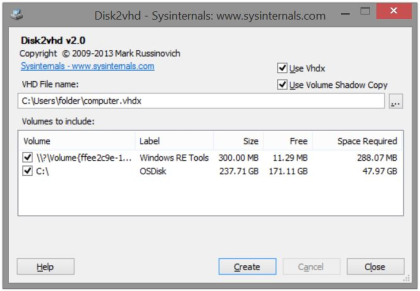
    https://learn.microsoft.com/en-us/sysinternals/downloads/disk2vhd

    By Mark Russinovich

    (Tick box: Use Volume Shadow Copy)

    https://learn.microsoft.com/en-us/sysinternals/downloads/media/disk2vhd/20131218_disk2vhd_v2.0.png

    That's a way of doing P2V.

    Paul
    --- Synchronet 3.21d-Linux NewsLink 1.2
  • From =?UTF-8?B?Li4ud8Khw7HCp8KxwqTDsSA=?=@winstonmvp@gmail.com to alt.comp.os.windows-10,alt.comp.os.windows-11 on Fri Mar 13 00:09:16 2026
    From Newsgroup: alt.comp.os.windows-11

    Paul wrote on 3/11/2026 1:11 PM:
    On Wed, 3/11/2026 2:08 PM, ...w¡ñ§±¤ñ wrote:
    Some of the articles are missing the point and spreading fear beyond what will/does happen.

    The fear is justified, given how stupid some of the motherboard
    engineering can be. One company lost the curation chain for their
    BIOS releases. In some cases, the only reason this stuff works,
    is because the BIOS in an Award, AMI, Phoenix, InSyde and those
    companies push out the code for that.

    They lost the curation chain b/c of Secure Boot requirements?


    It is the lack of industry expertise in UEFI and Secure Boot that
    strikes fear for the unlucky computer owners.

    There is some truth to that(though not related to Secure Boot)
    considering too many OEM's ignore standard GPT partition order(System,
    MSR, o/s, Recovery, OEM Recovery, and data partitions at the end or immediately prior to OEM Recovery.
    - in some cases, before OEM Recovery since it's much easier to
    extend(after wiping the OEM Recovery)the data partition.


    It would help greatly, if we had a tool to properly list the certs
    and revokes.

    I agree a better tool is warranted. Even a dedicated app in the MSFT
    store might be of value for Win10/11.


    Paul

    --
    ...w¡ñ§±¤ñ
    --- Synchronet 3.21d-Linux NewsLink 1.2
  • From =?UTF-8?B?Li4ud8Khw7HCp8KxwqTDsSA=?=@winstonmvp@gmail.com to alt.comp.os.windows-10,alt.comp.os.windows-11 on Fri Mar 13 00:18:24 2026
    From Newsgroup: alt.comp.os.windows-11

    Frank Slootweg wrote on 3/12/2026 8:26 AM:

    That's why I said Macrium Reflect probably doesn't even backup (the sectors containing) the hiberfil.sys file, because there's just no
    point. I/we could try to chase this down in the Macrium knowledge base
    etc. or/and check the contect of an image I/we made, but I won't try
    such an exercise in futility.


    cf.
    <https://knowledgebase.macrium.com/display/KNOWX/Backup+Defaults>

    Intelligent Sector Copy
    Only backup data blocks that are being used by files on the disk. This significantly reduces the time it takes for backups to complete and
    reduces the size of the backup files.

    ***The data blocks in Pagefile (pagefile.sys) and hibernation
    (hiberfil.sys) files will be excluded from images.***
    Data blocks in these files are temporary and not required when Windows
    starts. These files will be visible in the imaged file system, but will
    take up zero space in the image file.
    --
    ...w¡ñ§±¤ñ
    --- Synchronet 3.21d-Linux NewsLink 1.2
  • From Paul@nospam@needed.invalid to alt.comp.os.windows-10,alt.comp.os.windows-11 on Fri Mar 13 04:46:31 2026
    From Newsgroup: alt.comp.os.windows-11

    On Fri, 3/13/2026 3:18 AM, ...w¡ñ§±¤ñ wrote:
    Frank Slootweg wrote on 3/12/2026 8:26 AM:

       That's why I said Macrium Reflect probably doesn't even backup (the
    sectors containing) the hiberfil.sys file, because there's just no
    point. I/we could try to chase this down in the Macrium knowledge base
    etc. or/and check the contect of an image I/we made, but I won't try
    such an exercise in futility.


    cf.
    <https://knowledgebase.macrium.com/display/KNOWX/Backup+Defaults>

    Intelligent Sector Copy   
    Only backup data blocks that are being used by files on the disk. This significantly reduces the time it takes for backups to complete and reduces the size of the backup files.

    ***The data blocks in Pagefile (pagefile.sys) and hibernation (hiberfil.sys) files will be excluded from images.***
    Data blocks in these files are temporary and not required when Windows starts.  These files will be visible in the imaged file system, but will take up zero space in the image file.


    I just tested this. I had a lot of trouble with the test subject, just
    getting hiberfil.sys turned on. There really is a minimum size it is happy with!
    Who knew. I had to move partitions around on the test disk, it took a while
    to get set up for this.

    The Online backup was 46,716,473 KB and the Hiberfil.sys (after having just used it to hibernate the session then wake up again) was all zeros. While it reads out as zeros, the zeros don't seem to be recorded as such. The same is true of the pagefile.sys, it's zeros and they might or might not be stored.

    The Offline backup was 81,806,033 KB and the Hiberfil.sys is recorded.
    The first four characters are "WAKE". The pagefile.sys is similar recorded. #HSTR:Trojan:MSIL/AgentTesla <=== a piece of some virus definitions, incoming.

    Restoring an all-zeros pagefile.sys does not hurt anything. That is
    because there is a GPEdit security policy that does exactly that.
    It zeros the pagefile.sys at shutdown, so you "can't find those virus definitions" sitting there.

    https://www.ninjaone.com/blog/virtual-memory-pagefile-encryption/

    "To securely erase sensitive virtual memory data,
    enable ClearPageFileAtShutdown via Group Policy...

    This protects data remnants and enhances system security compliance."

    The hiberfile has one header pattern for a valid head. And something
    different when it is invalidating the hiberfile content to prevent
    accidental reuse (which might not align with file system state). so
    while I can see the word "WAKE", I don't know which byte is the invalidate byte.

    Paul
    --- Synchronet 3.21d-Linux NewsLink 1.2
  • From Paul@nospam@needed.invalid to alt.comp.os.windows-10,alt.comp.os.windows-11 on Fri Mar 13 04:59:34 2026
    From Newsgroup: alt.comp.os.windows-11

    On Fri, 3/13/2026 3:09 AM, ...w¡ñ§±¤ñ wrote:
    Paul wrote on 3/11/2026 1:11 PM:
    On Wed, 3/11/2026 2:08 PM, ...w¡ñ§±¤ñ wrote:
    Some of the articles are missing the point and spreading fear beyond what will/does happen.

    The fear is justified, given how stupid some of the motherboard
    engineering can be. One company lost the curation chain for their
    BIOS releases. In some cases, the only reason this stuff works,
    is because the BIOS in an Award, AMI, Phoenix, InSyde and those
    companies push out the code for that.

    They lost the curation chain b/c of Secure Boot requirements?

    When they now offer BIOS updates to users (like issuing
    a BlackLotus patch in a BIOS), the existing BIOS does not
    know whether the incoming BIOS about-to-be-flashed, is valid
    or not. It's possible some signing materials were lost.
    A bare minimum for a BIOS flash to happen, is for an eight
    character string near the end of the file, to match what is
    already on the motherboard. The version number may be involved
    too (some BIOS, there is a separate tool for taking versions
    backwards).

    This means, if they are asked for any more Security changes,
    they "aren't really secure". A Russian could have prepared the
    BIOS image and hacked into the web site and offered their file for usage.

    The custody chain for BIOS updates is broken, and that injures
    their ability to help customers have the best most secure
    motherboards possible.

    And the other companies are just stupid, and they don't
    care about anything. This is why Asus is on parole for
    some router firmware issues. Something about a lack of
    best practice. I don't remember all the details.

    https://www.zdnet.com/article/asus-hit-by-ftc-with-20-year-audit-for-bungled-router-security/

    There are some things the computer industry is good at,
    but there are also certain topics where they like
    to feint a certain incompetence. This could be based
    on the management considering "excess engineering work" to be
    a "reduction in profits". If Microsoft comes up with
    a scheme that costs more hours of engineering time
    per motherboard than before, then they have the option
    of showing their displeasure by doing a poor job
    on the maintenance of the scheme.

    Paul

    --- Synchronet 3.21d-Linux NewsLink 1.2
  • From Paul@nospam@needed.invalid to alt.comp.os.windows-10,alt.comp.os.windows-11 on Sat Mar 14 01:01:36 2026
    From Newsgroup: alt.comp.os.windows-11

    On Fri, 3/13/2026 4:46 AM, Paul wrote:
    On Fri, 3/13/2026 3:18 AM, ...w¡ñ§±¤ñ wrote:
    Frank Slootweg wrote on 3/12/2026 8:26 AM:

       That's why I said Macrium Reflect probably doesn't even backup (the >>> sectors containing) the hiberfil.sys file, because there's just no
    point. I/we could try to chase this down in the Macrium knowledge base
    etc. or/and check the contect of an image I/we made, but I won't try
    such an exercise in futility.


    cf.
    <https://knowledgebase.macrium.com/display/KNOWX/Backup+Defaults>

    Intelligent Sector Copy   
    Only backup data blocks that are being used by files on the disk. This significantly reduces the time it takes for backups to complete and reduces the size of the backup files.

    ***The data blocks in Pagefile (pagefile.sys) and hibernation (hiberfil.sys) files will be excluded from images.***
    Data blocks in these files are temporary and not required when Windows starts.  These files will be visible in the imaged file system, but will take up zero space in the image file.


    I just tested this. I had a lot of trouble with the test subject, just getting hiberfil.sys turned on. There really is a minimum size it is happy with!
    Who knew. I had to move partitions around on the test disk, it took a while to get set up for this.

    The Online backup was 46,716,473 KB and the Hiberfil.sys (after having just used it to hibernate the session then wake up again) was all zeros. While it reads out as zeros, the zeros don't seem to be recorded as such. The same is true of the pagefile.sys, it's zeros and they might or might not be stored.

    The Offline backup was 81,806,033 KB and the Hiberfil.sys is recorded.
    The first four characters are "WAKE". The pagefile.sys is similar recorded. #HSTR:Trojan:MSIL/AgentTesla <=== a piece of some virus definitions, incoming.

    Restoring an all-zeros pagefile.sys does not hurt anything. That is
    because there is a GPEdit security policy that does exactly that.
    It zeros the pagefile.sys at shutdown, so you "can't find those virus definitions" sitting there.

    https://www.ninjaone.com/blog/virtual-memory-pagefile-encryption/

    "To securely erase sensitive virtual memory data,
    enable ClearPageFileAtShutdown via Group Policy...

    This protects data remnants and enhances system security compliance."

    The hiberfile has one header pattern for a valid head. And something different when it is invalidating the hiberfile content to prevent
    accidental reuse (which might not align with file system state). so
    while I can see the word "WAKE", I don't know which byte is the invalidate byte.


    https://knowledgebase.macrium.com/display/KNOW/Macrium+Reflect+default+settings

    Option Description

    Intelligent Sector Copy

    Only backup the sectors that are being used by data on the disk.
    Pagefile (pagefile.sys) and hibernation (hiberfil.sys) will also be excluded.

    This reduces the time it takes for the backup to complete.

    Forensic Copy

    Backup every sector.

    *******
    I've completed a bit more testing.

    This time, I hibernated Windows, then shut down the power at the back.
    On power up, my Macrium Rescue stick was then inserted, and the plan was to
    do a backup of C: to "see what would happen".

    Well, the result was "more interesting than I would have expected".

    There is in fact, no safety flag raised about backing up a Hibernated OS.

    I examine the backup image, and the Hiberfil.sys has the word "HIBR"
    as the first four characters. So this is how the invalidation mechanism
    works. "HIBR" indicating the file is awaiting a chance to boot, and
    "WAKE" indicating it was just used (WAKE == now invalid).

    After the backup was finished, I rebooted the computer. No complaint yet.
    I ran a CHKDSK from Properties. It tells me C: needs to be repaired. I
    look in Eventvwr and see this. This is caused by Macrium, writing to
    the C: it just backed up (you can't write to the file systems while
    they are dirty). The directory 0x5,0x5 is filenum 5, having parent 5
    and is the root of the filesystem, otherwise known as C: in this case.
    It was then, attempting to write C:\rescuepe.log indicating that the
    backup had just started.

    Stage 2: Examining file name linkage ...
    Found an unneeded link (SFILE_NAME: "rescuepe.log") in index "SI30" of directory "\ <0x5,0x5>"
    was not able to send command for self-healing due to lack of memory.

    *******

    CoPilot tells me:

    Why Backup Tools Don’t Warn You

    Macrium Reflect (and similar tools):

    - operate at the **block level**, not the filesystem level
    - don’t interpret NTFS metadata <=== wrongo!
    - don’t inspect `hiberfil.sys`
    - don’t check the NTFS hibernation flag
    - assume the user knows what state the OS is in

    Why This *Should* Trigger a Warning (but doesn’t)

    You’re correct:
    **Restoring a hibernated OS image is dangerous unless you intend to resume immediately.**

    A practical backup tool *should* warn:

    “This volume appears to be hibernated. Restoring it later may cause resume corruption.
    Consider shutting down Windows before imaging.”

    I get a different answer this time, regarding "how to make it safe".

    How to Make This Safe

    Here’s the reliable rule:

    ### If you restore a hibernated image, **you must delete `hiberfil.sys` before booting**.

    You can do this by:

    - Booting into WinPE or rescue media
    - Deleting C:\hiberfil.sys
    - Clearing the hibernation flag by running: powercfg /h off

    To me then, this implies a normal boot will happen, and
    any uncommitted files (with fragments) would be cleared
    via USN Journal playback.

    Summary: This is NOT what I was expecting. Caveat emptor .

    Paul
    --- Synchronet 3.21d-Linux NewsLink 1.2
  • From =?UTF-8?B?Li4ud8Khw7HCp8KxwqTDsQ==?=@winstonmvp@gmail.com to alt.comp.os.windows-10,alt.comp.os.windows-11 on Sat Mar 14 14:12:27 2026
    From Newsgroup: alt.comp.os.windows-11

    On 3/13/2026 10:01 PM, Paul wrote:
    On Fri, 3/13/2026 4:46 AM, Paul wrote:
    On Fri, 3/13/2026 3:18 AM, ...w¡ñ§±¤ñ wrote:
    Frank Slootweg wrote on 3/12/2026 8:26 AM:

       That's why I said Macrium Reflect probably doesn't even backup (the >>>> sectors containing) the hiberfil.sys file, because there's just no
    point. I/we could try to chase this down in the Macrium knowledge base >>>> etc. or/and check the contect of an image I/we made, but I won't try
    such an exercise in futility.


    cf.
    <https://knowledgebase.macrium.com/display/KNOWX/Backup+Defaults>

    Intelligent Sector Copy
    Only backup data blocks that are being used by files on the disk. This significantly reduces the time it takes for backups to complete and reduces the size of the backup files.

    ***The data blocks in Pagefile (pagefile.sys) and hibernation (hiberfil.sys) files will be excluded from images.***
    Data blocks in these files are temporary and not required when Windows starts.  These files will be visible in the imaged file system, but will take up zero space in the image file.


    I just tested this. I had a lot of trouble with the test subject, just
    getting hiberfil.sys turned on. There really is a minimum size it is happy with!
    Who knew. I had to move partitions around on the test disk, it took a while >> to get set up for this.

    Paul

    I don't use hibernation, routinely disabled(or verified as disabled)
    shortly after a Windows install of any type(clean, on-top, repair,
    feature update[now only H2]...except for testing(like you are doing).

    I recall from an earlier on-MSFT-campus discussion that hiberfil.sys
    that was intended(oobe) to have a minimum size, but as expected that's
    just a starting point and growth can occur even with the same identical footprint of programs, apps, services, etc. running and without any
    changes to Windows.

    It's like a monster *It's alive* (Victor Frankenstein, after turning
    on/off the electricity or lightning strike - movie version; Shelley's
    version - no electricity or lightning) and for my use not needed.
    --
    ...w¡ñ§±¤ñ
    --- Synchronet 3.21d-Linux NewsLink 1.2
  • From =?UTF-8?B?Li4ud8Khw7HCp8KxwqTDsQ==?=@winstonmvp@gmail.com to alt.comp.os.windows-10,alt.comp.os.windows-11 on Sat Mar 14 14:16:26 2026
    From Newsgroup: alt.comp.os.windows-11

    On 3/13/2026 1:59 AM, Paul wrote:
    On Fri, 3/13/2026 3:09 AM, ...w¡ñ§±¤ñ wrote:
    Paul wrote on 3/11/2026 1:11 PM:
    On Wed, 3/11/2026 2:08 PM, ...w¡ñ§±¤ñ wrote:
    Some of the articles are missing the point and spreading fear beyond what will/does happen.

    The fear is justified, given how stupid some of the motherboard
    engineering can be. One company lost the curation chain for their
    BIOS releases. In some cases, the only reason this stuff works,
    is because the BIOS in an Award, AMI, Phoenix, InSyde and those
    companies push out the code for that.

    They lost the curation chain b/c of Secure Boot requirements?

    The custody chain for BIOS updates is broken, and that injures
    their ability to help customers have the best most secure
    motherboards possible.

    May very well be broken, but doubtful it's because of Secure Boot.
    - which seems to indicate your answer to my earlier question would be 'No'
    --
    ...w¡ñ§±¤ñ
    --- Synchronet 3.21d-Linux NewsLink 1.2
  • From Paul@nospam@needed.invalid to alt.comp.os.windows-10,alt.comp.os.windows-11 on Sat Mar 14 20:59:22 2026
    From Newsgroup: alt.comp.os.windows-11

    On Sat, 3/14/2026 5:12 PM, ...w¡ñ§±¤ñ wrote:


    I don't use hibernation, routinely disabled(or verified as disabled) shortly after a Windows install of any type(clean, on-top, repair, feature update[now only H2]...except for testing(like you are doing).

    I recall from an earlier on-MSFT-campus discussion that hiberfil.sys that was intended(oobe) to have a minimum size, but as expected that's just a starting point and growth can occur even with the same identical footprint of programs, apps, services, etc. running and without any changes to Windows.

    It's like a monster *It's alive* (Victor Frankenstein, after turning on/off the electricity or lightning strike - movie version; Shelley's version - no electricity or lightning) and for my use not needed.


    I saw another behavior in there I couldn't believe,
    but we'll save that for another time. Something
    changed the hiberfil.sys size, from one OS boot
    (not hibernated) to another OS boot (not hibernated).
    I've not heard of that being a capability the OS
    reserves for itself. There were no conditions that
    would even remotely stress the hibernation scheme
    (shouldn't have taken more than a gigabyte of storage
    space while hibernating, no excuse for finding my
    backup was backing up a 64GB hiberfil.sys). This increased
    the size of the offline backup I was making (impact would
    have been greatly reduced if I had switched on compression.

    Paul
    --- Synchronet 3.21d-Linux NewsLink 1.2
  • From Frank Slootweg@this@ddress.is.invalid to alt.comp.os.windows-10,alt.comp.os.windows-11 on Sun Mar 15 13:31:40 2026
    From Newsgroup: alt.comp.os.windows-11

    Paul <nospam@needed.invalid> wrote:
    [...]

    I saw another behavior in there I couldn't believe,
    but we'll save that for another time. Something
    changed the hiberfil.sys size, from one OS boot
    (not hibernated) to another OS boot (not hibernated).
    I've not heard of that being a capability the OS
    reserves for itself. There were no conditions that
    would even remotely stress the hibernation scheme
    (shouldn't have taken more than a gigabyte of storage
    space while hibernating, no excuse for finding my
    backup was backing up a 64GB hiberfil.sys). This increased
    the size of the offline backup I was making (impact would
    have been greatly reduced if I had switched on compression.

    Your findings seem to be an argument for NOT making offline (Macrium
    Reflect) image backups, because, as mentioned/documented before, an
    online image backup does NOT backup the hiberfil.sys file.
    --- Synchronet 3.21d-Linux NewsLink 1.2
  • From Paul@nospam@needed.invalid to alt.comp.os.windows-10,alt.comp.os.windows-11 on Sun Mar 15 13:37:19 2026
    From Newsgroup: alt.comp.os.windows-11

    On Sun, 3/15/2026 9:31 AM, Frank Slootweg wrote:
    Paul <nospam@needed.invalid> wrote:
    [...]

    I saw another behavior in there I couldn't believe,
    but we'll save that for another time. Something
    changed the hiberfil.sys size, from one OS boot
    (not hibernated) to another OS boot (not hibernated).
    I've not heard of that being a capability the OS
    reserves for itself. There were no conditions that
    would even remotely stress the hibernation scheme
    (shouldn't have taken more than a gigabyte of storage
    space while hibernating, no excuse for finding my
    backup was backing up a 64GB hiberfil.sys). This increased
    the size of the offline backup I was making (impact would
    have been greatly reduced if I had switched on compression.

    Your findings seem to be an argument for NOT making offline (Macrium Reflect) image backups, because, as mentioned/documented before, an
    online image backup does NOT backup the hiberfil.sys file.


    Good point.

    A better way to run a computer, is like a lot of us are
    already doing (on *desktops* at least).

    powercfg /h off

    Now your backups are in no danger whatsoever :-)

    You cannot do that on a laptop, due to battery management issues.
    (Laptop resorts to hibernation, when sleep operation depletes
    the battery sufficiently to cause alarm.)

    My test of Macrium, was done on 7.2 or so. While on a lot of
    softwares, it could be argued a newer version would "fix"
    the lack of detection of a potential issue, that's not a
    pattern I note in Macrium. If they're letting something slip
    like that, that is design intent and not a bug.

    That's why I would prefer to see a competing product flag this.
    Just so we know someone cares about the topic.

    *******

    A percentage of users, will be attracted to online backup, as
    the provided scheduler will manage their incremental or
    incremental-forever pattern. I'm not sure the offline tool
    is clever enough to find the backup pattern definition file,
    but it might...

    Paul

    --- Synchronet 3.21d-Linux NewsLink 1.2
  • From Frank Slootweg@this@ddress.is.invalid to alt.comp.os.windows-10,alt.comp.os.windows-11 on Sun Mar 15 18:48:26 2026
    From Newsgroup: alt.comp.os.windows-11

    Paul <nospam@needed.invalid> wrote:
    On Sun, 3/15/2026 9:31 AM, Frank Slootweg wrote:
    Paul <nospam@needed.invalid> wrote:
    [...]

    I saw another behavior in there I couldn't believe,
    but we'll save that for another time. Something
    changed the hiberfil.sys size, from one OS boot
    (not hibernated) to another OS boot (not hibernated).
    I've not heard of that being a capability the OS
    reserves for itself. There were no conditions that
    would even remotely stress the hibernation scheme
    (shouldn't have taken more than a gigabyte of storage
    space while hibernating, no excuse for finding my
    backup was backing up a 64GB hiberfil.sys). This increased
    the size of the offline backup I was making (impact would
    have been greatly reduced if I had switched on compression.

    Your findings seem to be an argument for NOT making offline (Macrium Reflect) image backups, because, as mentioned/documented before, an
    online image backup does NOT backup the hiberfil.sys file.


    Good point.

    A better way to run a computer, is like a lot of us are
    already doing (on *desktops* at least).

    powercfg /h off

    Now your backups are in no danger whatsoever :-)

    You cannot do that on a laptop, due to battery management issues.
    (Laptop resorts to hibernation, when sleep operation depletes
    the battery sufficiently to cause alarm.)

    Well, my laptop does indeed use hibernation, because that's the most natural/convenient, but one can set the 'Critical Battery Action' in the
    'Power Options' applet to 'Shut down' instead of 'Hibernate' and that
    would work with 'powercfg /h off'.

    But, as mentioned before, I just use online (Macrium Reflect) image
    backup. I might worry about a lot of things, but online image backup
    isn't one of them! :-)

    My test of Macrium, was done on 7.2 or so. While on a lot of
    softwares, it could be argued a newer version would "fix"
    the lack of detection of a potential issue, that's not a
    pattern I note in Macrium. If they're letting something slip
    like that, that is design intent and not a bug.

    That's why I would prefer to see a competing product flag this.
    Just so we know someone cares about the topic.

    *******

    A percentage of users, will be attracted to online backup, as
    the provided scheduler will manage their incremental or
    incremental-forever pattern. I'm not sure the offline tool
    is clever enough to find the backup pattern definition file,
    but it might...
    --- Synchronet 3.21d-Linux NewsLink 1.2